steel_for_humans

joined 1 month ago

It was my personal GOTY 2025. Fantastic game. I actually liked it more than Bloober's SH2R because of the setting, visual presentation, overall mood and music. I didn't hate the combat, either.

but these days im considering a different bank entirely that doesnt require an app in the first place

For me, it's not that some banks require a mobile app, because they don't. Why I like to use the mobile banking apps is because of PUSH notifications for transactions and for approval (like 3DS). I could use the mobile websites, but then I would need to drop down to SMS confirmation which is less convenient and less secure as well.

[–] steel_for_humans@piefed.social 2 points 5 days ago (1 children)

Ok. That seems important then. Having to type the WiFi password would be even more annoying. :) The other part seems important, too.

Now it makes me wonder how non technical people who have auto login enabled deal with it. I mean, I'd expect it to work like on Windows.

[–] steel_for_humans@piefed.social 4 points 6 days ago (3 children)

That's a bummer. I still don't know what it's useful for, except for not having to type SSH passphrases. I think it doubles as a password manager? I don't need that, I use Bitwarden.


I'm on a desktop PC that's in my home office. I have personal documents and clients' intellectual property on it (source code, databases, documents, etc.). Hence, I like to use full disk encryption on all disks. Nobody else uses this PC besides me and it's safe at home. The only threat vector is if somebody gained access to my room and stole the computer. It's very remote, but still technically possible (if you think I'm exaggerating, I'd like to learn your opinion). Maaaaybe if I was sending the nvme for RMA, that's also a threat, but I have never had an SSD break on me. Never. I know it's anecdotal and sometimes they break, but I had multiple and I think it's such a small chance...

LUKS is a bit of a pain with having to type the passphrase on each boot. So I had it on auto-unlock via TPM, which works great when it works, but a) is also a pain when it breaks (usually due to system upgrade that changes something and I forgot to re-enroll the keys or re-generate the PCRs), b) according to Arch wiki it's unsafe, if anybody has physical access to my PC -- so essentially the only threat vector I was trying to protect myself against is not protected against.

But I was thinking -- I am OK with typing one password on boot. I just don't want to type two different passwords one after the other. What if I set autologin in my Desktop Environment (GNOME or KDE), but left LUKS locked down with a passphrase? Wouldn't that be safe? It's a single user system, nobody will use it. If it gets stolen, it's been shutdown and then they can't gain access because of LUKS.

Am I thinking correctly?

[–] steel_for_humans@piefed.social 3 points 6 days ago (1 children)

My main issue with BotW is that there are no dungeons. Shrines are just small random puzzle games. Doing a dungeon in Zelda is part of the quest, doing shrines is doing puzzles for the sake of it to get points (Orbs) to advance your character with some numbers and bars. Only the Divine Beasts resemble traditional Zelda dungeons to some extent.

[–] steel_for_humans@piefed.social 7 points 1 week ago (7 children)

This was my first Zelda game. I didn't read any reviews, I just played it. Afterwards I learned that not everybody loves it, but I do. Being the first, I guess it will always be the best Zelda game to me. I... don't like BotW. I spent a few dozen hours in it over the past few years and have not finished it. I prefer the traditional structure of Zelda games.

[–] steel_for_humans@piefed.social 3 points 1 week ago* (last edited 1 week ago) (1 children)

Circa 20 years ago I was interested in running an UO shard, at the time I was testing RunUO, it seemed modern at the time because C# and .NET were only a few years old :)

I see they haven't updated the text on the website in 20 years ;)

The only drawback was the inability to port the software over to other operating systems. However projects like MONO are working extremely hard to provide a very capable .NET framework for the alternative operating systems.

Somebody should tell them about the new multiplatform .NET. Seriously though, I'm surprised that website is still online.

[–] steel_for_humans@piefed.social 10 points 2 weeks ago

I usually don't remember about having an account there, but every time someone reminds me (like right now) I wonder whether I should delete it. The problem (?) is that I'm an IT professional and LinkedIn was supposed to be a job search venue (I never used it in 20 or so years, I only got spammed by recruiters whom I either declined or ignored them (you know, the reverse Tinder meme)). But I still have "connections" there and a few recommendations, and there's that thought lingering in my head, that MAYBE SOMEDAY I may need one of those connections as a foothold or a bonus point when applying for a job. I don't know. There are several other IT job boards which all seem like a better solution than LinkedIn.

[–] steel_for_humans@piefed.social 5 points 2 weeks ago (1 children)

my printer just works! Out of the box, no issues

Ha, I'm going to test my dad's printer in Linux Mint this weekend, because I plan to migrate him from Windows 10. I remember printers on Linux used to be a PITA ~20 years ago, but I also read somewhere that (some?) printers now work driverless (no idea how that works), so we'll see.

[–] steel_for_humans@piefed.social 5 points 2 weeks ago (2 children)

I have a similar setup. My PC has disks formatted in Btrfs, so I get copy on write snapshots of my system disk, then have a local Restic backup on a secondary disk and then have an off-site Restic backup in the cloud on the Storage Box.

Thanks for pointing me to Paperless, never heard of it, it seems like it could be useful. I wonder how it deals with languages other than English, if at all.

[–] steel_for_humans@piefed.social 7 points 2 weeks ago (7 children)

I thought those materials were used because of wireless charging and because they make the phone body double as an antenna.


The rumors were true. Spiders have confirmed that they are being liquidated.


I'm looking to move my dad, who is not versed in technology, from Windows 10 to Linux. Windows 11 is not supported on his old laptops and given his computer usage I think it's not worth to buy a new laptop just to be on Windows 11 with Slopilot. He uses Excel a lot, but only basic functionality, which any office suite can do. The problem is he is accustomed to the Ribbon UI and although he has LibreOffice on his other computer, he seems not to like it, I think he's lost in its UI/UX. I would like to find an office suite for Linux that looks like MS Office. It doesn't need any bells & whistles, basic spreadsheet and document functionality is enough. I'd like to move all his Excel spreadsheets to that new program.

I looked at OnlyOffice -- I think it's the closest match. But it's Russian (I believe their HQ in Latvia is a smokescreen). WPS Office looks kinda Ribbon-like, but I see they focus heavily on AI and cloud. Collabora is based on LibreOffice. LibreOffice is not like Excel. I think it may not be possible to find what I'm looking for, but perhaps somebody can help.


First week: https://piefed.social/c/linux4noobs/p/1977063/i-m-nearing-my-first-full-time-week-on-linux

I thought I was going to write that my second week on Linux was rather boring because I had everything set up and was just working doing everyday tasks.

That was until Friday where I decided it was time to do a distro upgrade (I use openSUSE Tumbleweed, which is a rolling distro). That did not go well. It made me question my distro choice and I even considered hopping to Debian, because it's stable AF (or so I heard), boring (old packages), widely supported (basically all software has a an official .deb package) and has a large community and multiple resources online. At first I thought I wouldn't like packages that are a couple years old, but it seems that my whole stack is there, so I wouldn't notice. Meanwhile, on Tumbleweed I have issues here and there because it's not as mainstream and is bleeding edge. For the time being, I will migrate to Slowroll soon.

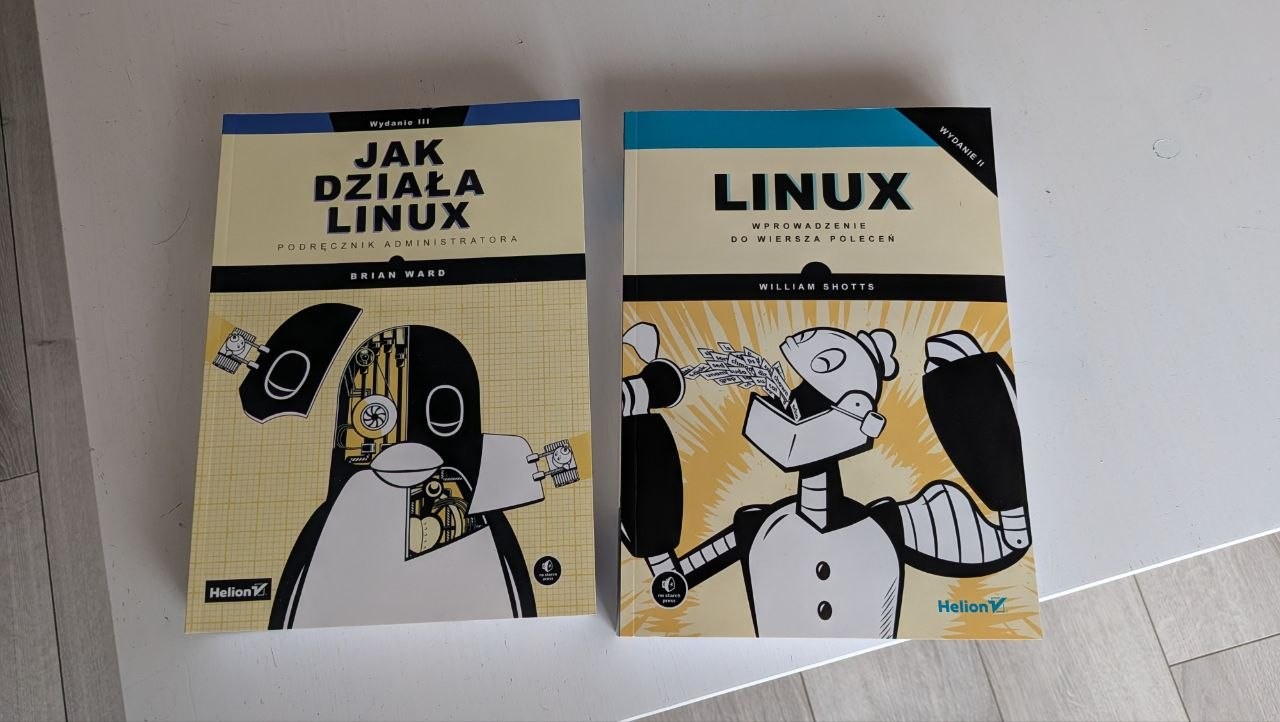
I bought a couple books about Linux, started reading the first one.

I have a project to move my Google Drive, OneDrive and Google Photos somewhere else. Nextcloud seems like the best solution, but I also like Immich as a replacement for Google Photos. That made me think about self-hosting. The Hetzner Storage Share looks nice because it's a cheap, managed Nextcloud, but not having access to the database feels like vendor lock-in and a possible friction point in the future, so I am thinking of renting a VPS. I also have a pretty beefy old PC at home, but it's currently damaged (I think either the motherboard or the PSU is dead, I didn't diagnose yet).


I currently have the following services which I'd like to migrate elsewhere:
OneDrive
Google Drive
Google Photos (some photos doubled in OneDrive, too, but I will just delete those)
Bitwarden (potenitally)
Google Calendar (but may use the calendar at Mailbox.org)

I keep searching for solutions and I keep coming back to Nextcloud. On the one hand, it seems like it's too big and too complex (even Nextcloud's website defaults to business version and talks about collaboration), but on the other hand it seems modular and has all I need (Files + Virtual Files, Photos / Memories, Calendar and more).

I may one day want to self-host at home, but this is not the day yet, especially with the ridiculous storage prices. I think I'd rather go the cloud route first, but would like to have an option of switching to another provider or taking everything home.

I understand that with a VPS that's a no-brainer because it's essentially a rented virtualized server. But what about the Storage Share? What is easy to take out and what is difficult to take out? I guess files and photos would be as easy as downloading them to my machine (for example via SFTP, rsync, etc. -- I'm on Linux). What about Calendar, if I used that? CalDAV, I guess, and sync to another calendar?

On one hand, using the VPS is a good learning experience, but also more prone to errors on my part. But I am not limited to only Nextcloud, I can spin up other services (for example Immich or even Vaultwarden), especially if I use Docker containers. But VPS will be more expensive, especially if I keep adding services.

Managed Nextcloud is easy to set up and there's virtually no maintenance apart from installing some apps and managing my data. But I am limited to only what Hetzner offers and it may be troublesome to move away.

What am I missing?


I want to migrate from Tumbleweed to Slowroll. I have a rather fresh install of Tumblweed with systemd-boot, so I want to retain that. Just waiting for them to get in sync on that.

14
submitted 1 month ago* (last edited 1 month ago) by steel_for_humans@piefed.social to c/opensuse@lemmy.world
 

Updating from Tumbleweed 20260331 to 20260415, zypper dup fails at accountsservice :(

error: lsetfilecon: (11 /usr/share/accountsservice, system_u:object_r:accountsd_share_t:s0) Invalid argument  
error: Plugin selinux: hook fsm_file_prepare failed  
error: unpacking of archive failed on file /usr/share/accountsservice: cpio: (error 0x2)  
error: accountsservice-23.13.9-11.3.x86_64: install failed  
error: accountsservice-23.13.9-11.2.x86_64: erase skipped  
(557/916) Installing: accountsservice-23.13.9-11.3.x86_64 ..................................................................................................[error]  
Installation of accountsservice-23.13.9-11.3.x86_64 failed:  
Error: Subprocess failed. Error: RPM failed: Command exited with status 1.  
Abort, retry, ignore? [a/r/i] (a): a  
Warning: %posttrans and %transfiletrigger scripts are not executed when aborting!  

What should I do?

7
submitted 1 month ago* (last edited 1 month ago) by steel_for_humans@piefed.social to c/opensuse@lemmy.world
 

I'm on Tumbleweed. I just launched the system and the first thing I tried was to refresh the Zypper repos. I got this error:

~> sudo zypper refresh  
[sudo] password for root: 
PackageKit is blocking zypper. This happens if you have an updater applet or other software  
management application using PackageKit running.  
We can ask PackageKit to interrupt the current action as soon as possible, but it depends on  
PackageKit how fast it will respond to this request.  
Ask PackageKit to quit? [yes/no] (no): no  
System management is locked by the application with pid 2648 (/usr/libexec/packagekitd).  
Close this application before trying again.  

I guess that's an intermittent issue. I'm new to Linux and new to openSUSE and until today I have not heard about PackageKit.

But something bothers me in the documentation:

In general, it is recommended to allow packagekit to handle system maintenance and software package updates since it contains background operations to ensure stable delivery with minimal interruptions. For this reason, newcomers to Tumbleweed should continue to use their respective software managers (Discover for Plasma, Gnome Software for Gnome) until there is an absolute need for manual intervention and/or greater understanding.

Elsewhere, when I was still researching which distro to choose and before installing Tumbleweed, I read that I should always use only zypper dup, never to use GNOME's Software updates or anything else (unless it's Flatpak). GNOME does display pending updates at times, but I ignore them. So how is it actually?


I'm looking for an Android app that strips EXIF from photos before I upload them somewhere. I really care mostly about removing geolocation. I searched on F-Droid, I didn't find much. Has anybody used Scrambled Exif ?


For example Slack or Telegram or something else. The program has a single window, I click the "x" and it is closed. GNOME doesn't have a tray with program icons by default, I didn't install any extensions besides Vitals to monitor the CPU temperature. I don't even have a visible Dash. Just vanilla GNOME. In Windows, some programs will go to the background and will still be running when you close the window, usually there's a setting for that in each program. I wonder whether in GNOME I can do the same or if I should change my mindset and leave everything open at all times. This is more of a habit than necessity.


I wanted to switch for several months but needed to sort out some things first. I'm a .NET dev (on Linux, crazy, I know). We migrated to .NET 8 (I want to upgrade to .NET 10 which is nowhere near the complexity level of moving everything from .NET Framework) last year and because .NET is now cross-platform, I could finally switch to Linux full time because my full tech stack is available here. It's not a 1:1 workflow, some things are done differently (for example I don't use IIS with self-signed certificates, I use Caddy; I don't use MSBuild, I run dotnet commands manually; SQL Server is running in a Podman container).

I chose openSUSE Tumbleweed because I live in the EU, there's the whole Buy European movement caused by Trump which I support. I tested Fedora Workstation first, I really really like it, it gave me less issues than openSUSE, but it's "American", sponsored by Red Hat who does business with Palantir, so sorry :( I should have considered Debian, too, I think it would have been easier, but openSUSE has newer packages and has that super cool Snapper integration which is a godsend to newbies such as myself who can break their system by doing something stupid. So far so good, I can't use OpenVPN 3 here, though, because the community package doesn't work properly (it expects DBUS to be named dbus, but for some reason openSUSE devs decided that non-standard dbus-1 is better). GSConnect doesn't work, either, the extension hasn't been updated enough and references some old parts which are not available in the cutting edge GNOME 49 on Tumbleweed ;) I believe both OpenVPN 3 and GSConnect would have worked on Debian out of the box. I could have also gone for LMDE, but I wasn't aware what it was and I only knew I didn't want Ubuntu, so Linux Mint was not something I wanted, either (I know it's not the same, but it's based on Ubuntu).

I read many times that your choice of DE is more important than your choice of distro. And to stick to your choice for at least three months before you hop to another one. I can't help but get a sort of buyer's remorse . That's when you make a choice, but other options are still available after. Makes you (me) think that maybe it was not the best choice, you know. But hopping too soon just teaches you to install Linux :D

I set up a 3-2-1 backup scheme for which I'm very happy now. I have Btrfs + Snapper on my system disk, then I have Restic (with resticprofile) to back up my user files (plus some configuration files from /etc) on a secondary disk and another backup in the cloud. Initially I wanted an image based backup of the system disk, because I've been using Macrium Reflect on Windows for many years. After some research it seems that Linux users have a different mindset and because programs keep their config in /etc (or sometimes ~/.config) you can just backup those files and in case your rootfs is so damaged you cringe when thinking of fixing it, you just quickly re-install the system, pull all packages (which list you can export into a .txt file) and then restore the configs.

I learned that everything in Linux is a file. Even CPU frequencies (/sys/devices/system/cpu/cpu*/cpufreq/scaling_cur_freq). And that everything in Bash is a stream. And that I love fish (I actually don't like fish, but I love the shell of that name).

I learned that systemd services are plain text files with super easy syntax. That BLEW MY MIND because in my .NET project I have a tool to create Windows Scheduler tasks and it's like some stone age tech in comparison. I have to re-compile to create a new service. In systemd I can type a new service in a text editor and make it run on a schedule with a CLI command.

I learned that many people hate systemd. I listened to a short history of how systemd came to be and apparently somebody was collecting Bitcoin in 2014 to hire a hitman to kill one of the creators of systemd. 🤯 I don't have a baggage, a month ago I thought you still use cron in Linux, so I don't have any feelings about that, I understand the concerns about centralization and complexity, but currently I'd say I like systemd. I barely know anything, though.

After first few days I actually reinstalled Tumbleweed to get systemd-boot instead of GRUB because I use LUKS encryption on all disks and I read that systemd + Secure Boot is better.

I use GNOME. KDE seems to too Windows-like in its UX and too complex (too many options and switches), but I would still like to give it a fair chance. I wish it was possible to switch between GNOME and KDE on the same machine without making the system garbage (mixed window types, settings, etc.). I know it's technically possible, but as far as I know it leaves "trash" and the OS sometimes gets confused and tries to display KDE (Qt?) windows in GNOME or something. I think it's better to reinstall, but let me know if I'm wrong.

I did not encounter any serious issues, the system is very stable, no crashes. I am able to work on it and do personal stuff.
view more: next ›