cross-posted from: https://lemmus.org/post/21124885
Welcome to Programmer Humor!
This is a place where you can post jokes, memes, humor, etc. related to programming!
For sharing awful code theres also Programming Horror.
cross-posted from: https://lemmus.org/post/21124885
KDE: 500000% size increase and then....

Loooove for KDE
You would never have guessed it, but this is my favourite feature :-)
KDE shaky shaky
That's why I no longer code in C#.
Fooled us all. That's a tanning booth.
Ow my neck
I struggle with my neck and 3 screens. I've gotten really good at doing a bunch of shit at once on one screen so my neck doesn't hurt as much lol
Windows are too big. The whole point is to have small windows and multiple screens so you don't have to move your eyes around in their sockets in the window you're working which causes eyestrain.
They might have well just have fewer screens and click through windows.
This is a job for a tiling WM. Imagine doing this on Window$.
surely just using the terminal?
Wiggle thing on MacOS and you'll see it. ✨ Got you covered there.
It would be funny af if there was a way to make the computer think the screen size was infinite (just for the mouse) so you could send your cursor 20 miles away and never find it again.
That's only funny if it's not YOUR computer 😁
Where the fuck is the image? Not loading for me
Check monitor number 8, it may have opened there.
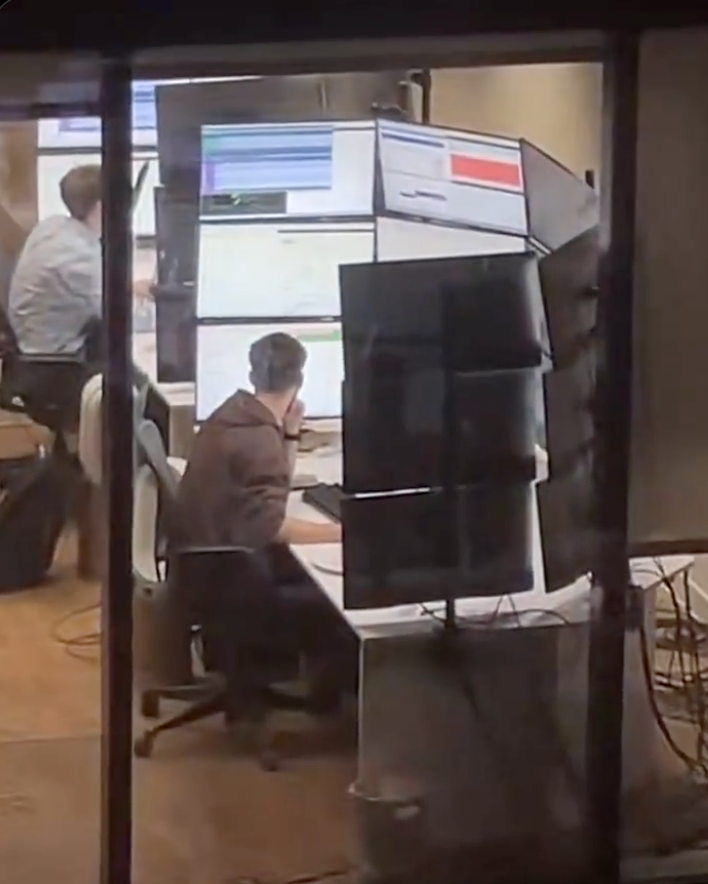
Loads fine for me. It's someone sitting in front of a desk with 15 large monitors surrounding them in a semicircle, 3 monitors stacked on top of one another in 5 columns.
Go to mouse l settings, make your cursor larger and change the contrast. So when the curse is black and it goes over something white and then white when it goes over black
for real though, the CTRL tap accessibility feature to find the cursor is a lifesaver
On KDE and on MacOS, if you shake the cursor it becomes larger
And larger...and larger...
No lying, wiggling my mouse until it becomes HUGE is my go to activity during boring video calls.
I guess this confirms that I am a man, because I refuse to do anything except jiggle the mouse until I see it.
KDE: just wiggle it
wiggle it until it's the size of a monitor, and if you're brave, it'll take over EVERYTHING.
I love it that KDE didn't limit the growing of it :)
Oh, it's limited. But you will only discover it if you look at the bug-tracker.
I had a similar matrix of screens at my old job: Seismic survey observer desk. Three rows tall, four columns wide.
They weren't all connected to the same PC, though; If I remember correctly:
They were all connected to a Raritan KVM switch, so I used that to select which row to control. The exception was on bottom left and bottom right which had a dedicated keyboard and mouse.
I have a picture of it somewhere, but I can't seem to find it.


The cursor is on Monitor 3 (there is no monitor 3 but Windows thinks there is)
right-click and see where a menu opens.
pastes into putty
am I doing it right?