tko

joined 3 years ago
[–] tko@tkohhh.social 10 points 1 month ago

I find myself commenting three questions on any post about a new application somebody developed.

  1. What is your experience in [subject matter of app]?
  2. What is your experience in software development?
  3. What percentage of the code for this app was written by AI? What percent was written by you?

Personally, I wouldn't mind if all new app posts were required to answer these questions for their post. It doesn't discriminate, it just asks them to lay their cards on the table for everyone to see. The community can judge from there.

[–] tko@tkohhh.social 2 points 2 months ago (1 children)

I'm still on 7.2 myself, and I don't intend to switch to internal boot. However, I keep an eye on the Unraid subreddit, and from what I've seen there internal boot is working well for most people that have switched. I would maybe review any posts on the Unraid forum before proceeding.

[–] tko@tkohhh.social 2 points 2 months ago

I've got no moral qualms about the way I'm handling things, nor am I judging anybody for the way they handle things. My comment was simply meant to show that not everybody is using Plex for stolen media.

[–] tko@tkohhh.social 3 points 2 months ago (6 children)

I guess that depends on your definition of "piracy"... is it "breaking the law" or is it "stealing"?

In any case, the point I was making is that some people use Plex with non-stolen media. I mostly see assumptions that it's only used for stolen media, so I wanted to offer a counter-example.

[–] tko@tkohhh.social 3 points 2 months ago (2 children)

Not sure if you're implying that I torrent my media... but just to be clear I don't torrent.

[–] tko@tkohhh.social 9 points 2 months ago (15 children)

I won't make any claims about other users, but I am using Plex for 100% legally obtained media, mostly by means of ripping physical media that I still have on my shelf. So, not everybody is using it for pirated content.

[–] tko@tkohhh.social 6 points 2 months ago

This is not an apples to apples comparison because Nextcloud has security built in... it was designed to be published securely on the internet.

That's not to say Nextcloud is perfect and without security concerns, but it's miles ahead of Jellyfin which is Not designed to be published to the web.

[–] tko@tkohhh.social 1 points 2 months ago (1 children)

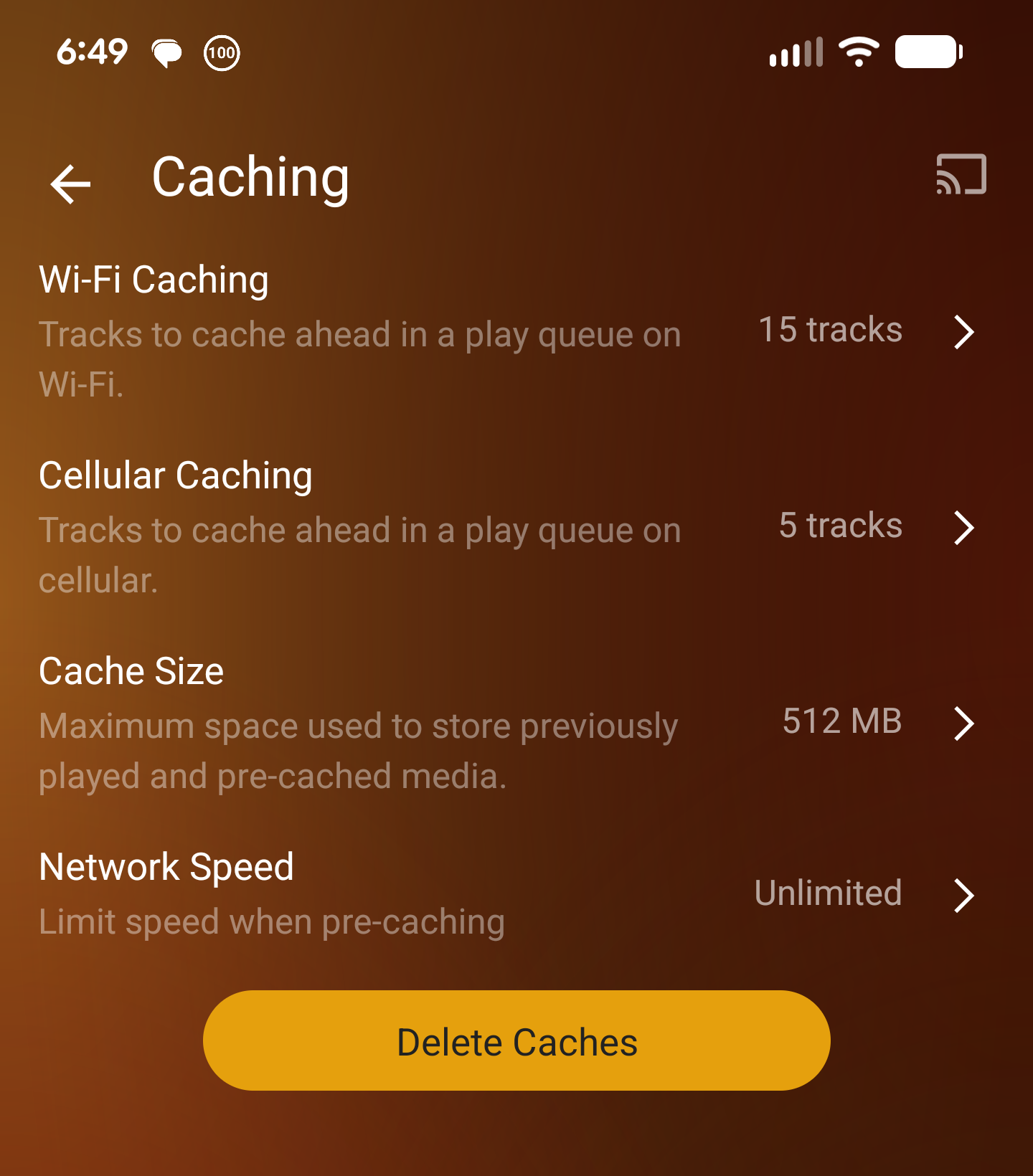
Gotcha... Yes, Plexamp does this as well:
[–] tko@tkohhh.social 1 points 2 months ago (3 children)

Can you explain rolling cache? I'm pretty sure plexamp does this, but maybe I'm misunderstanding what you're referring to.

[–] tko@tkohhh.social 2 points 2 months ago* (last edited 2 months ago) (1 children)

I appreciate you putting it this way. There IS a battle happening to be sure.

Unfortunately, it feels like the battle that's being fought is between former Plex users and current (continuing) Plex users. It's frustrating as a continuing Plex user to feel like we are making all of the Jellyfin users angry just by existing. Some of us feel like explaining why our choice is rational, but that is often met with more hostility.

My hope is that we all (as self-hosters) can recognize that we all have different priorities and those priorities will lead to different choices. It's not wrong to leave Plex for something else. It's also not wrong to keep using Plex if it suits your needs.

(to be clear, I'm not at all implying that you were being hostile. This is just a general impression I get from several self-hosting communities when it comes to Plex versus other options)

[–] tko@tkohhh.social 1 points 3 months ago (1 children)

As I dug into this, I found that it is in fact trivial to change the Unraid UI ports. There's a setting for it. I can only assume that since Unraid attracts a LOT of novices, bad advice gets passed around and taken as gospel. So, I changed Unraid's ports, set my reverse proxy to listen on 80/443, updated the NAT on my router, and added the relevant host overrides to the DNS Resolver. Hairpin eliminated. Thanks again!

[–] tko@tkohhh.social 1 points 3 months ago (1 children)

Totally fair... I appreciate you engaging with me, your perspective is appreciated! I won't defend Unraid's choice when it comes to the UI ports, but I will simply say that there are things that are really nice about Unraid from a usability standpoint.

Thanks again for your thoughts!


The release notes for 0.19.4 mention that this version requires an upgrade to both pictrs and postgres, but there isn't any information about what versions of those are supported. Is there someplace else I should be looking for this information? Or should I just YOLO with the latest version of each?


cross-posted from: https://tkohhh.social/post/4829

Unfortunately, the official documentation on theming lemmy is severely lacking. I made some progress on getting it figured out today, so I wanted to share that with you all.

This is by no means meant to be an exhaustive guide, but my hope is that it will at least get you going. I'm sure that I will say things that are incorrect, so please correct me if you know better!

Background

Lemmy uses Bootstrap-compatible theming. As far as I can tell, this means that it uses a pre-defined set of CSS classes. This is important because if you provide a CSS file that doesn't have all of the correct classes defined, it will break the layout of your lemmy.

Your custom CSS needs to be saved in the bind mount for your lemmy-ui container. If you followed the install instructions on join-lemmy.org, the location will be /lemmy/volumes/lemmy-ui/extra_themes/.

Prerequisites

In order to generate the correct CSS, you need a couple of things:

  • your customized Bootstrap variables, saved in an scss file
  • the Bootstrap scss files
  • the SASS compiler

Let's go through each of these (last to first):

The SASS compiler

The SASS compiler needs to be installed on the machine you will use to generate your CSS files (it doesn't NEED to be the computer that lemmy is installed on, but it can be). Follow the install instructions relevant to you. I used the "Install Anywhere (Standalone)" instructions and installed SASS on the Ubuntu machine that is running my lemmy instance.

The Bootstrap scss files

These files need to be saved on the same machine as the SASS compiler. The Bootstrap download page has a button to download the source files ("Download source"). This will give you a zip folder, so unzip it. Within the unzipped files, the only directory you need to keep is /bootstrap-5.3.0/scss. Save that folder in a place that makes sense for you. I put it in my home directory, so the path looks like ~/bootstrap-5.3.0/scss. You'll need to reference this directory when you're creating your custom scss file.

Your customized Bootstrap variables, saved in an scss file

This is the fun part... you define your Bootstrap variables. I'm still a little unclear on which version of Bootstrap lemmy is using (and therefore which variables are valid), so I chose to start with one of lemmy's default themes as a starting point. I grabbed _variables.litely.scss and litely.scss from the lemmy-ui github repo as a starting point.

You'll notice that litely.scss is just importing variables.litely as well as the Bootstrap scss files. You'll need to change the path of the Bootstrap scss files to the path where you saved your copy of the files. However, leave bootstrap at the end of the file path, as this is actually referring to the bootstrap.scss file within the Bootstrap scss directory.

It wasn't obvious to me initially, but you can also add your own CSS styles at the bottom of your scss file. These will be merged with the styles defined in the Bootstrap files. For instance, I wanted my navbar to have a different font from the body, so I added this:

#navbar {
  font-family: sans-serif;
}

Generating the CSS file

Once you have all of the prerequisites satisfied, you can generate your CSS files using the SASS compiler. Go to the directory where your customized scss file(s) are saved, and run this command (you added the SASS install directory to your PATH, right??):

sass [inputfile.scss] [outputfile.css]

This will generate a CSS file. However, pay attention, as there might be errors. If so, fix the errors until you can run SASS without any errors.

Finally, drop the generated CSS file into your "extra_themes" directory. You'll now see your theme show up in the list of themes on your profile (it'll be the filename of your CSS file).


And that's it! I hope somebody finds this helpful. Please let me know if there's anything I can clarify!

view more: next ›