ock88

joined 2 years ago
[–] ock88@lemmy.world 2 points 6 months ago

It's a bit more complicated as it involves managing screens of different resolution and sizes. Currently I'm focusing on core features that everyone will be able to use, such as dock folder and more gestures. Coming back to foldables improvements after that

[–] ock88@lemmy.world 1 points 6 months ago

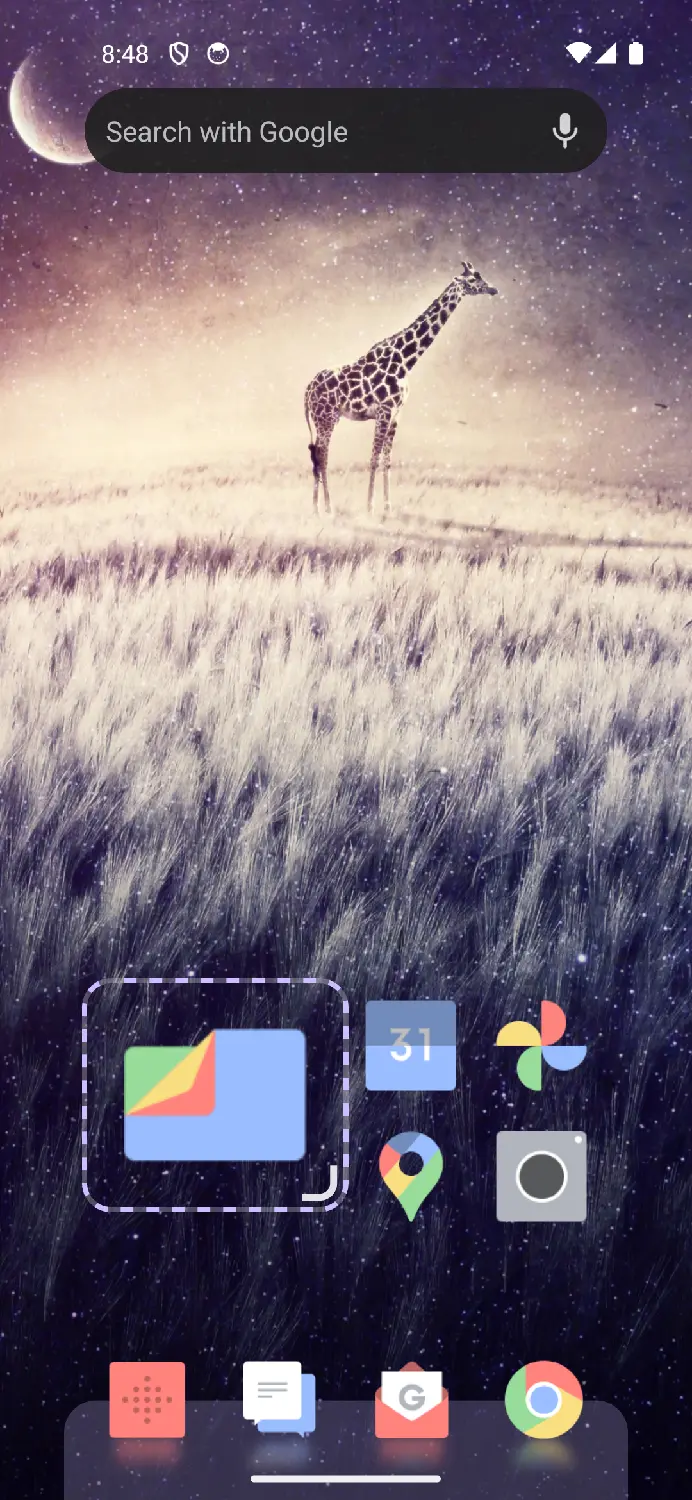
You can actually float/ pin a widget to make it behave like a dock.

As for the actual dock, that can be achieved too by creating a folder, changing it to grid mode, and resizing it to the size you want. You can then float/pin it too.

Google Now slide left won't be planned soon as it requires Google not to change and break things in future, which is something I can't control. As a work-around, you can assign the Google app to the gesture when you swipe right

[–] ock88@lemmy.world 1 points 8 months ago

For drawer folders, it's currently under drawer settings

[–] ock88@lemmy.world 2 points 8 months ago

Not for current version. With the stuff I have learnt from building this, a rewrite could be possible, but I do not have a timeline on that yet

[–] ock88@lemmy.world 1 points 8 months ago (3 children)

Thanks for the ☕

There are a few available styles, including a more classical grid mode for folders


Hi folks,

After numerous feedback and hundreds of changes, I'm happy to share that my project, Octopi Launcher, is ready for open testing.

Below are some key features, with more to come:

  • Foldables support - have totally different layouts on each screen
  • (Auto scrolling) widget stacks
  • Float/ pin a widget on top of home screens
  • Display drawer icons as tiles
  • App drawer folders and favorite apps
  • Assign a nickname to an app (e.g. searching "ff" can instantly launch Firefox)
  • Launch different apps using swipes on an icon
  • Icon pack and shortcut support
  • Resize individual home screen icons
  • Index bar and reachability mode for drawer
  • Option to hide status and navigation bars
  • Notification badges
  • Private space support
  • Lock home screen layout
  • Haptic effects

Shane has also done a video review on a slightly older version, which gives an idea what this launcher can do.

Have a great day!


Hi folks,

After numerous feedback and hundreds of changes, I'm happy to share that my project, Octopi Launcher, is ready for open testing.

Below are some key features, with more to come:

  • Foldables support - have totally different layouts on each screen
  • (Auto scrolling) widget stacks
  • Float/ pin a widget on top of home screens
  • Display drawer icons as tiles
  • App drawer folders and favorite apps
  • Assign a nickname to an app (e.g. searching "ff" can instantly launch Firefox)
  • Launch different apps using swipes on an icon
  • Icon pack and shortcut support
  • Resize individual home screen icons
  • Index bar and reachability mode for drawer
  • Option to hide status and navigation bars
  • Notification badges
  • Private space support
  • Lock home screen layout
  • Haptic effects

Shane has also done a video review on a slightly older version, which gives an idea what this launcher can do.

Have a great day!

[–] ock88@lemmy.world 1 points 1 year ago (1 children)

Thank you so much! A video speaks a million words and yours helped me to instantly identify what's causing this.

What happens is that when you remove apps from a folder until one is left, that app remains as a folder, and currently this launcher doesn't allow you to drag one folder over another.

A workaround is to tap that "folder" and drag that last app out from its "folder", into the other folder you want it to be in.

A fix for this is planned, thanks for highlighting this confusing behaviour ;)

[–] ock88@lemmy.world 1 points 1 year ago (3 children)

It's not a known bug, could you provide more details? I just tried creating a home screen folder with 4 apps, and am able to.

[–] ock88@lemmy.world 1 points 1 year ago

Do you mean the A-Z bar on the right of the drawer in Microsoft Launcher?

[–] ock88@lemmy.world 22 points 1 year ago (3 children)

I've been working on a launcher for a while now, do help me test it out!

Features include:

  • Widget stacks (with auto scroll)
  • Swipe up and swipe down to launch different apps
  • Display app drawer icons as tiles or a list
  • Individually resize home screen icons, for mixed-size icon layouts
  • Freely position and resize a widget or icon
  • Frosted glass background for widgets (experimental)
  • App drawer folders
  • Fade a widget
  • Separate layouts for different screens for foldables
  • Tap a folder to launch its first app (swipe to open folder)
  • Assign a nickname to an app for instant app search and launch (e.g. searching "ff" launches Firefox instantly)
  • Lots of custom animations and haptics

Planned features include:

  • Profile switching with Tasker support
  • Square tiles for app drawer
  • Swipe to open a widget pop up

https://lemmy.world/post/14530643

[–] ock88@lemmy.world 1 points 1 year ago (6 children)

Do give my work on progress launcher a try

https://lemmy.world/post/14530643

[–] ock88@lemmy.world 1 points 2 years ago

it's still under lots of development, but here's a few:

  • Better support for foldables (separate layouts for each screen)
  • (Auto-scrolling) widget stacks
  • Fine/ free positioning of home screen apps and widgets
  • Resizable home screen icons
  • Display drawer items as tiles (or single list)
[–] ock88@lemmy.world -1 points 2 years ago (1 children)

Just did, thank you

2
submitted 2 years ago* (last edited 2 years ago) by ock88@lemmy.world to c/android@lemmy.world
 

Hi everyone!

I'm happy to share my app, Octopi Launcher, which I've worked on for quite a while now.

Octopi Launcher is a launcher for Android, built with the latest trends in mind, which includes visual and haptic effects, and support for foldables.

Features:

  • App drawer, dock and homescreen
  • Different homescreen for different screen layout/ orientation/ size/ foldable position
  • Widgets and (autoscrolling) widget stacks
  • Home screen folders
  • Fine/ free positioning of home screen apps and widgets
  • Big home screen icons
  • Swipe actions for icons
  • Display drawer items as icons or tiles (or single list); sort by installed date or updated date
  • App search + instant launch
  • Icon pack support
  • Wallpaper blur when opening app drawer (on supported devices)
  • Work profile support
  • Fun animations, reflections and haptic effects

Screenshot album: https://photos.app.goo.gl/8xiXqSABV7Rhad139

Firstly, join the Google Group to gain access: https://groups.google.com/g/octopi-launcher-alpha-testers

Then, use this link to download the closed beta: https://play.google.com/apps/testing/com.otp.octopilauncher

I'd love to hear your feedback below, and have a nice day!
view more: next ›