I mount extra storage under /mnt/ and store stuff like media in there.
this post was submitted on 07 Jan 2025
32 points (92.1% liked)
Selfhosted
61333 readers
394 users here now
A place to share alternatives to popular online services that can be self-hosted without giving up privacy or locking you into a service you don't control.
Rules:
-
Be civil.
-
No spam.
-
Posts are to be related to self-hosting.
-
Don't duplicate the full text of your blog or readme if you're providing a link.
-
Submission headline should match the article title.
-
No trolling.
-
Promotion posts require active participation, with an account that is at least 30 days old. F/LOSS without a paywall has exceptions, with requirements. See the rules link for details. Tags [CBH] or [AIP] are required, see the links in Rule 8 for details.
-
AI-related discussions and AI-involved promotional posts have additional requirements for tagging, as noted in Rule 7 and the AI & Promotional Post Expanded Rules post, and find example disclosures here.
Resources:
- selfh.st Newsletter and index of selfhosted software and apps
- awesome-selfhosted software
- awesome-sysadmin resources
- Self-Hosted Podcast from Jupiter Broadcasting
Any issues on the community? Report it using the report flag.
Questions? DM the mods!
founded 3 years ago
MODERATORS
And make symlinks for large collections, like ~/photos -> /mnt/nas/photos
Interesting, are you accessing files directly on the NAS or something like that where the symlink makes sense?
You want the big files to live on the NAS, but be navigable from your home dir for convenience and to discourage saving to the local disk.
Oh I see, you mean you mount the NAS storage into /home?
Not quite - He's saying to mount the NAS under /mnt/ and to create a symlink under /home/ to go directly to /mnt/nas/photos
If you're on KDE Plasma / Dolphin, this can be done here:
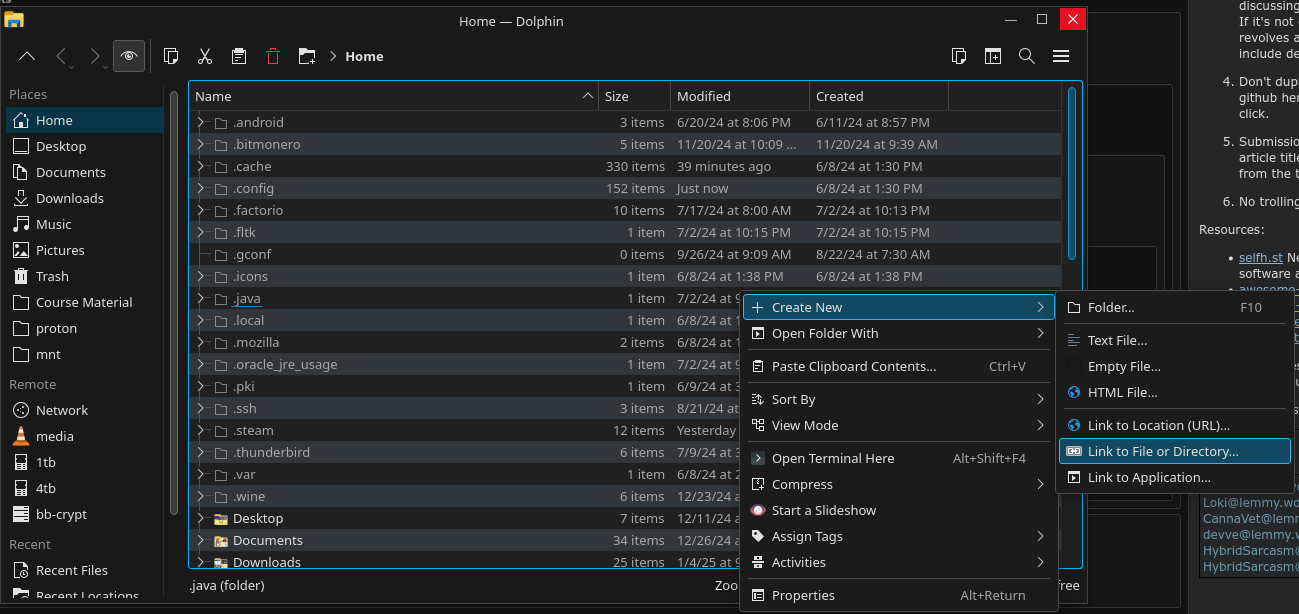
and put something like this in there
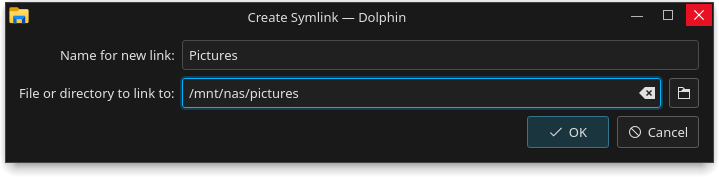
This will create a folder that goes directly to /mnt/nas/pictures, but you can put it anywhere.
Gosh FINALLY this is starting to make sense. Thanks for your effort!
A bit offtopic: What theme is that? I was woundering why you would put windows screenshots under a comment about dolphin for a second.
Haha, it's PlasmaXDark - https://store.kde.org/p/1367172
I genuinely like the look and feel of Windows.
/mnt/ is where I would put this. Only exception would be if I had a service I was providing, like a media player server, and then I might mount it at /srv/
Mainly, I’m wondering if I should migrate /home/ to my RAID array, or leave /home/ where it is and create a new directory on the RAID array.
Leave home where it is. Symlink to important directories on RAID.
Makes it easier to mess with the RAID if it doesn't make logging in hard.
Personally I wouldn't worry too much about where you mount the volume, I use /storage on my boxes because I is easy to remember and sounds good to me. I also typically make a storage group that I give access to manage the files in the volume vs having my user own everything.
I wouldn't put it in home just because you are considering sharing with others.
I think convention is for files served by the server to go in /srv or even /usr/lib.
Yup, I use /srv, works well.
/srv for me.
systemd seems to like mounting stuff on /media. However, I would consult the Linux filesystem hierarchy documents around (eg. Wikipedia and then follow the references) for the most compatible place.
/srv /mnt tend to suggest themselves. /home is for your personal stuff not shared user wide stuff.
Don't put stuff in local directories, leave it in a NAS location and mount it where you need it using fstab or auto/mount units and the appropriate filesystem. Maybe I've misunderstood something you wrote to think of this last bit.
/storage for me.
I checked my local backup server and I have two directories:
/home/share for backup files
/home/app data for backup appdata
My main server which unfortunately runs unraid is structured like
/mnt/user/array/media
/mnt/user/array/Nextcloud
/mnt/cache_ssd/appdata