this post was submitted on 24 Aug 2024
197 points (95.8% liked)

Unixporn

16532 readers
6 users here now

Unixporn

Submit screenshots of all your *NIX desktops, themes, and nifty configurations, or submit anything else that will make themers happy. Maybe a server running on an Amiga, or a Thinkpad signed by Bjarne Stroustrup? Show the world how pretty your computer can be!

Rules

  1. Post On-Topic
  2. No Defaults
  3. Busy Screenshots
  4. Use High-Quality Images
  5. Include a Details Comment
  6. No NSFW
  7. No Racism or use of racist terms

founded 6 years ago
MODERATORS
 
top 36 comments
sorted by: hot top controversial new old
[–] Matriks404@lemmy.world 9 points 2 years ago* (last edited 2 years ago) (4 children)

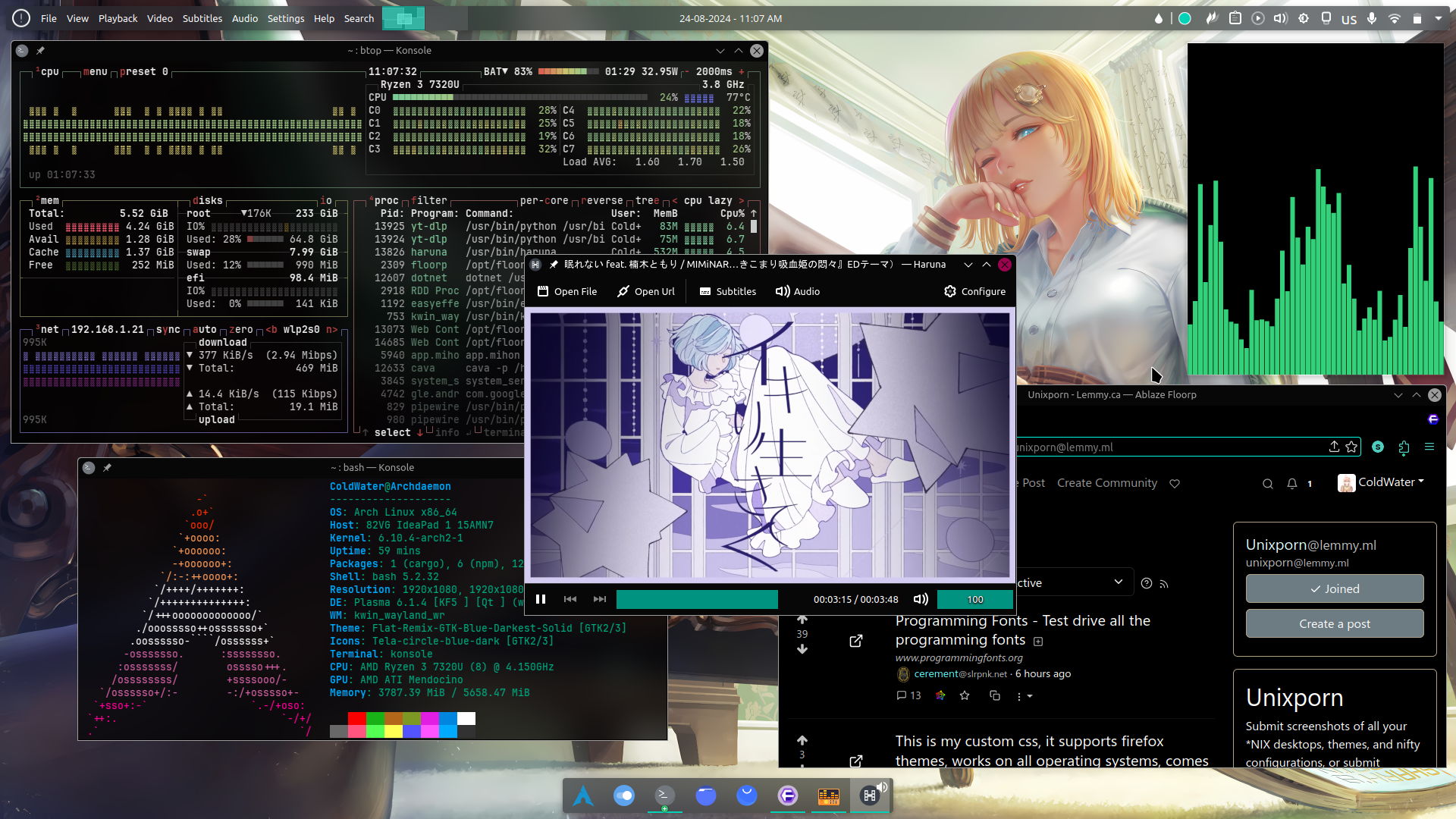
Very Interesting and pretty setup, although I never understood why people like to waste precious vertical space by having bars on the bottom and top of the screen πŸ€”

Also I didn't know KDE has global menu applet, makes me wonder if I can setup it to look like Ubuntu looked back in the old days (does it still have global menus anyway, or just use GNOME control thingies?)

[–] 299792458ms@lemmy.zip 3 points 2 years ago* (last edited 2 years ago)

Vertical bars are great but they are terrible for displaying text, either the bar has to be huge or the bar's width readjusts or text and icons get easily misaligned when displaying dynamic stuff. Personally my horizontal bar is now 70% occupied and I have a keybind that toggles its hidden state.

[–] ColdWater@lemmy.ca 3 points 2 years ago

App panel automatically hide itself when a window on top of it, I think kde global menu only work with qt apps (atleast on Wayland for now I think it also work with GTK on X11)

[–] prole@sh.itjust.works 3 points 2 years ago* (last edited 2 years ago)

I got a Framework, and the 16:10 aspect ratio allows for the two bars without messing up most applications as they're mostly geared toward 16:9. Full screen games go over both bars. It's nice.

[–] fmstrat@lemmy.nowsci.com 2 points 2 years ago (1 children)
[–] Matriks404@lemmy.world 1 points 2 years ago

Yeah, I also prefer having a single side bar on the screen, but I recently found out that on small screens (like on a laptop) the side bar doesn't allow a lot of applications to be visible, so in this scenario I'd rather have it on the bottom.

[–] mrvictory1@lemmy.world 8 points 2 years ago (1 children)

What is kwin_wayland_wr? Also do you really have 6 GiB RAM installed? If not you may be able to reclaim some of it via UEFI if the RAM is assigned to iGPU.

[–] ColdWater@lemmy.ca 8 points 2 years ago (1 children)

I have 8gb and I assigned 2gb to igpu because I already have 8gb of zram, I'm not sure what difference it would make tho

[–] jrgd@lemm.ee 8 points 2 years ago (1 children)

As I found out recently myself, you should almost always set the minimum amount of reserved memory for the iGPU on modern hardware. The reserved memory is just thatβ€” reserved. The kernel still dynamically allocates memory for GPU usage as needed on iGPUs.

[–] ColdWater@lemmy.ca 4 points 2 years ago (1 children)

Really?, so I should set vram to 256mb and everything should still work fine?

[–] mrvictory1@lemmy.world 1 points 2 years ago

Yes, iGPU can use system RAM

[–] victorz@lemmy.world 2 points 2 years ago (1 children)

Neat. What's your bar setup?

[–] ColdWater@lemmy.ca 3 points 2 years ago (1 children)

Menu bar? It's just normal KDE applications menu bar

[–] victorz@lemmy.world 1 points 2 years ago (1 children)

The top bar I mean. That's KDE's built-in bar? Just styled?

[–] ColdWater@lemmy.ca 1 points 2 years ago (1 children)

Yes it's just KDE's built-in bar, no style or mod I think it's called "Application menu panel"

[–] victorz@lemmy.world 1 points 2 years ago

Wow, okay. Looks pretty sleek out of the box in that case. Thanks!

[–] fmstrat@lemmy.nowsci.com 2 points 2 years ago (1 children)

less, git, etc should default to color mode on.

[–] ColdWater@lemmy.ca 1 points 2 years ago (1 children)

I'm new to Linux and I don't know any of these, can you explain a bit more?

[–] fmstrat@lemmy.nowsci.com 1 points 2 years ago

Sure. git is a command used for programming, much more likely in the future you will use less, which allows you to view/scroll through/paginate text files.

To be honest, the intro of manual pages are really good at explaining commands: man less

[–] Cris_Color@lemmy.world 2 points 2 years ago (1 children)

An apt post title, lovely use of color!

[–] ColdWater@lemmy.ca 2 points 2 years ago (1 children)
[–] Cris_Color@lemmy.world 1 points 2 years ago

You're very welcome! ☺️

[–] yokonzo@lemmy.world 2 points 2 years ago (1 children)

Linux is pretty green at least

[–] GolfNovemberUniform@lemmy.ml 1 points 2 years ago* (last edited 2 years ago) (3 children)

Well I can argue with that because Linux systems usually consume more energy than identical systems with other operating systems though they are probably less green due to having a lot of cloud and ad related tech built in.

[–] prole@sh.itjust.works 2 points 2 years ago (1 children)

Linux systems usually consume more energy than identical systems with other operating systems

Is this true?

[–] GolfNovemberUniform@lemmy.ml 1 points 2 years ago* (last edited 2 years ago) (1 children)

Yes, at least on battery powered PCs. Other kinds of machines may be more efficient on Linux but I guess these are mostly cases when there are no big and well developed proprietary solutions for them.

[–] prole@sh.itjust.works 2 points 2 years ago (1 children)

I imagine it varies wildly by distro, hardware, use-case, etc.

[–] GolfNovemberUniform@lemmy.ml 1 points 2 years ago (1 children)

I don't have any information that proves it. I think in this list only hardware matters.

[–] prole@sh.itjust.works 2 points 2 years ago (1 children)

Surely use-case is important? Someone running a server that's on 24/7 vs. someone running it on a laptop or desktop that they shut down every day.

[–] GolfNovemberUniform@lemmy.ml 1 points 2 years ago

I was talking about comparing the efficiency between operating systems. That requires the use case to be the same. Comparing different use cases is unfair.

[–] ColdWater@lemmy.ca 2 points 2 years ago (1 children)

That's not ture atleast on my system, I played modded Minecraft for 4 hours on performance mode and I still have 15% to spare, I also watch BCS for an season and it's only drain 60% on power saving mode

[–] GolfNovemberUniform@lemmy.ml 2 points 2 years ago (1 children)

Did you check the consumption on other operating systems?

[–] ColdWater@lemmy.ca 1 points 2 years ago

I used win10 1 years and I don't remember exactly what the power consumption is like but I think it probably worse because of win10 use more on CPU and RAM for anti-malware and telemetry

[–] featured@lemmygrad.ml 2 points 2 years ago

Extremely dependent on a number of factors, mostly hardware and configuration. I had a Thinkpad T480 and on a stock fedora install it definitely died faster than W10, but after setting up TLP and Powertop I squeezed ~2 more hours of use out of it than Windows could manage. Ditto for my framework 13, I get all day battery life on NixOS but when I’ve tested windows on it I lose a few hours immediately

[–] NichtElias@sh.itjust.works 0 points 2 years ago (1 children)
[–] ColdWater@lemmy.ca 2 points 2 years ago

Haha thanks, took me awhile to come up with that name