thayer

joined 2 years ago
[–] thayer@lemmy.ca 4 points 1 year ago (1 children)

Not mutually exclusive, but it's highly probable that if you're running a mainstream distro, the default kernel is in lockdown mode, preventing hibernation while secure boot is enabled.

[–] thayer@lemmy.ca 6 points 1 year ago* (last edited 1 year ago) (1 children)

Thanks for clarifying, and I can appreciate your overall concerns as I face the same dilemma with my aging relatives.

Just to confirm, have you opened these files in Word yourself (or witnessed them being opened), to verify they are in fact valid documents? if valid, are they meant to be in English?

It wouldn't be the first time I've seen "other" files renamed with an incorrect file extension.

[–] thayer@lemmy.ca 12 points 1 year ago* (last edited 1 year ago) (6 children)

Assuming you meant ".docx files", those should open without issue in LibreOffice. As others have said, OnlyOffice is another popular option if format preservation is a goal.

What do you mean when you say the files are "not supported" by the tools you've tried? What, exactly, is happening and what are you trying to accomplish? The end goal wasn't clear to me from your post.

Getting Word to run under wine will require much more effort than copying the Word binary.

[–] thayer@lemmy.ca 2 points 1 year ago

I think I've tried nearly every monospace typeface over the years and I've finally settled on JetBrains Mono for more than 2 years now, though IBM Plex Mono is a close second.

[–] thayer@lemmy.ca 5 points 1 year ago (1 children)

Looks great! I'll definitely give this a try!

[–] thayer@lemmy.ca 3 points 1 year ago (2 children)

You can go with something like this if you want a clean solution.

I use a drive dock station for my backup drives, and I have a few of these for one-offs too.

[–] thayer@lemmy.ca 3 points 1 year ago

Crucial is fine. It's commonly found in corporate and government workstations.

[–] thayer@lemmy.ca 5 points 1 year ago

I don't use RCS myself, but there are recent posts on the GOS forums and it appears to be working fine once all of the prerequisites are installed.

[–] thayer@lemmy.ca 5 points 1 year ago (1 children)

Sure, like I said above, GOS doesn't at all prevent you from rooting the device. They only discourage it from a security point of view. Regarding MicroG, I've never had need for it myself but I've read many other posts over the years from users who have installed it on GOS in lieu of Graphene's own implementation.

I would argue that overall GrapheneOS provides more control over the OS than some other Android-based operating systems.

[–] thayer@lemmy.ca 3 points 1 year ago (3 children)
[–] thayer@lemmy.ca 5 points 1 year ago (1 children)

You can root GOS like any other Android-based OS. It's just highly discouraged, completely unsupported and, in the opinion of the GOS devs, you will no longer be considered to be running GOS since you are compromising the core OS by doing so.

[–] thayer@lemmy.ca 1 points 1 year ago* (last edited 1 year ago)

You've clearly done your homework, and you've gotten a lot of good feedback already, so I'll just add a few points...

  • Storage options: Personally, I'd replace the existing drive with the highest capacity I could afford. In an ideal situation, I'd keep the host on another drive (NVMe or flash) and dedicate the large drive to a single partition of data storage.

    In my own mini-PC (8th gen NUC), I've got a smaller NVMe for Proxmox and a single 8TB internal SSD for data.

  • Encryption: If you're going to bother with encryption, I wouldn't half-ass it. Why bother at all if you're fine using auto-decryption or a weak password that will be guessed with any sizeable effort? Just lock it down with a strong password and decrypt/mount the data drive after any reboot; making a shell alias or script for this is trivial. You're likely not rebooting the server more than once a week anyway.

  • Budget/Specs: I get the sense you don't have much budget right now, but knowing your hardware would help in suggesting solutions. Do you have an NVMe slot? What is the make/model of the motherboard and case?

  • Filesystem: For simple storage, this really doesn't matter and Ext4 will probably be fine. It's a mature, robust, no-frills filesystem which is perfect for bulk file storage (docs, music, videos, etc.), but Btrfs would be fine too if you want more options.

  • USB Docking Stations: I've had really good experiences with USB docking stations like this one, and I currently use it for attaching my backup HDDs each month. I wouldn't want to rely on them for realtime data access, but they do work wonderfully for backups and one-off drive access.


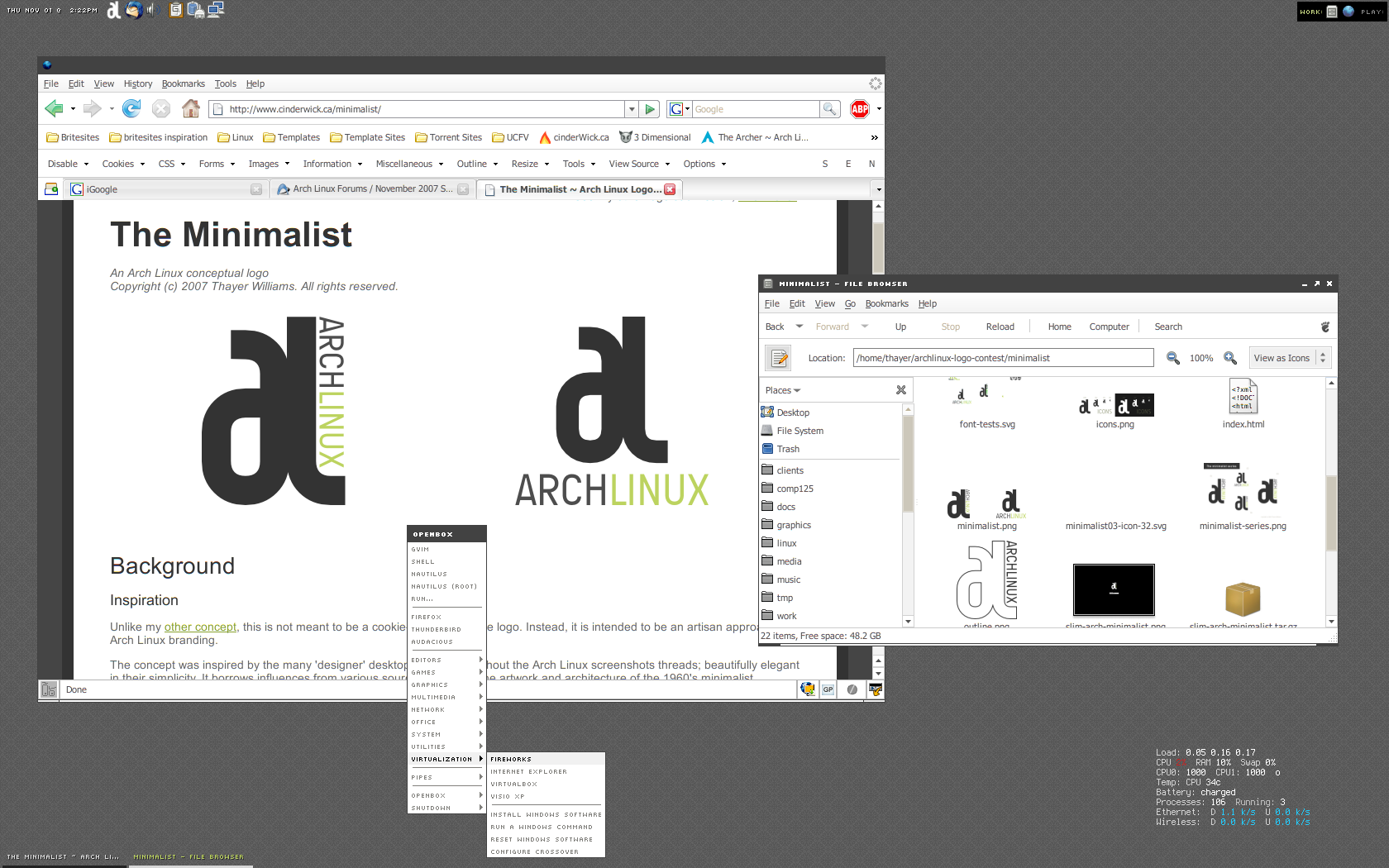
I've been going through my old screenshots and thought I'd share some for nostalgia. This shot is from 2007, when I was working on several logo concepts for Arch Linux (it remains one of my favourites).

As I recall, the specs were as follows:

  • WM: Openbox
  • GTK: Murrina-Tangoesque
  • Icons: Tango
  • Panel: Tint2
  • Systray: Stalonetray (I think)
  • Stats: Conky
 

I just want to share my notes for installing a Brother HL-L5210DW(T) printer via USB under Fedora Atomic 40 (Kinoite), in case it helps anyone else. This may work for other similar models too. I've included some background info at bottom if you're interested.

The following method doesn't require any proprietary drivers, and utilizes IPP-over-USB and IPP Everywhere, both of which are preinstalled on Fedora 40 Atomic distributions (and likely their traditional variants as well).

  1. Connect the printer via USB and ensure it is powered on
  2. Open the CUPS admin web interface at http://localhost:631/
  3. Select Administration and enter your credentials
  4. Select Add Printer
  5. Select Internet Printing Protocol (ipp), then Continue
  6. Enter ipp://localhost:60000/ipp/print in the path field, then Continue
  7. Enter a name for the printer (ex: HL-L5210DW), then Continue
  8. Select Brother as the Make, then Continue
  9. Select IPP Everywhere as the Model, then Add Printer
  10. Set the default printer options as desired (set Duplex to DuplexNoTumble for standard 2-sided printing)
  11. Select Set Default Options
  12. From the Maintenance drop-menu, select Set as Server Default

More info

I haven't needed to configure a USB printer at home in well over 15 years, so I was more than a little rusty, and things were further complicated by my use of Fedora Atomic. I'll eventually connect this device via Ethernet so it can be used by everyone on the LAN, but until I sort out exactly where I want to put it I'm stuck with USB.

Brother's driver install tool expects dnf, apt, or yum, and so it's incompatible with ostree-based systems like Kinoite or Silverblue. You can of course download the driver manually and install the necessary packages:

rpm-ostree install --apply-live hll5210dwpdrv-4.0.3-1.i386.rpm glibc.i686 libstdc++.i686

However, I still ran into some problems (likely related to SELinux), and I wasn't keen on overlaying additional packages, particularly proprietary software written for i386 arch.

I then opted to try the generic brlaser driver, but it failed to work correctly when long-edge (NoTumble) duplex printing was enabled. The backside of pages were corrupted and illegible.

After spending far too much of my Saturday reading support forums, I eventually discovered that IPP-over-USB was a thing, and the rest went smoothly. Hopefully this post helps anyone else with an HL-L5210DWT or other L5000 series Brother printer.

Bonus Tip: Disable deep sleep

If you have a Brother printer that goes into deep sleep and doesn't wake up for print jobs, you can disable the Deep Sleep feature via the printer's built-in menu:

  1. Press the OK button to bring up the printer's menu
  2. Navigate to General Setup > Ecology > Sleep Time
  3. Press OK to enter into the Sleep Time settings
  4. Press the Minus and Cancel buttons simultaneously to display the hidden Deep Sleep menu
  5. Press OK to enter into the Deep Sleep settings
  6. Navigate up/down to change the setting to Off
  7. Press OK
  8. Turn off the printer, unplug it and plug it back in, then verify the setting is retained
 

I recently scored a free 1974 Deelite Apollo 10 speed. As far as I can tell, it has all original parts, but most of the stickers have faded out and there are a few places where the paint has failed completely on the tubes.

As a project bike, would you consider stripping and painting the frame, or simply replace what needs done (tires, bar tape) and ride it as is?


Probably a longshot, but hoping anyone here might have working instructions on getting OpenRazer running under Fedora Silverblue. I recently picked up some Huntsman V2s and while OpenRGB works for basic control, I'd like to see what other options are available.

Apparently there is a known incompatibility between Silverblue and how OpenRazer implements kernel modules (link). I've seen elsewhere that some users have tweaked the build files to work around this, but I couldn't find any detailed info. Any help would be appreciated.

EDIT:

I got it working, but it wasn't worth the trouble compared to simply running OpenRGB in a flatpak. For Razer keyboard users, you'll gain one or two RGB presets over OpenRGB, such as Reactive, and the ability to adjust the polling rate (the merits of which are highly debatable). You'll lose secure boot and kernel verification unless you also add the ublue repo and signing key rpm (ublue-os-akmods-addons).

If anyone wants to do it anyway, I had success by downloading and installing the following ublue-os akmod rpms from here:

  • akmod-openrazer-100.0.0.git.530.886f986d-1.fc39.x86_64.rpm
  • kmod-openrazer-100.0.0.git.530.886f986d-1.fc39.x86_64.rpm
  • openrazer-kmod-common-100.0.0.git.530.886f986d-1.fc39.x86_64.rpm

(Note: you might need to layer the kernel-devel package first; I had it layered already so I can't confirm.)

Add the openrazer repo, then install the daemon and frontend app:

curl -o - https://download.opensuse.org/repositories/hardware:/razer/Fedora_$(rpm -E %fedora)/hardware:razer.repo | sudo tee /etc/yum.repos.d/razer.repo
rpm-ostree install openrazer-meta razergenie

Add the plugdev group to /etc/group, then add your user to it:

sudo bash -c 'grep "plugdev" /lib/group >> /etc/group'
sudo gpasswd -a $USER plugdev

Finally, launch RazerGenie...

view more: next ›