promitheas

joined 2 years ago
[–] promitheas@programming.dev 2 points 2 months ago* (last edited 2 months ago)

That does make sense, but Im more referring to the people in the company. For example when I was working as IT, there were people who were still using Office 2016 at a time when Office 365 was already out for a while (dont... just dont... I agree with whatever you are thinking of commenting about this - it was insane). When we finally upgraded them all to 365 we as IT had to show them how to do their basic workflow stuff again because the interface was so different. Even microsoft, which is a software vendor (arguably one of the biggest one if not THE biggest) wouldn't deal with training your employees for something like that. In that regard, I guess its the same situation as an OSS developer who just puts their product out, provides the most basic support maybe in terms of github issues, and calls it a day.

My comment was more on the internal relationship between the IT guys who will create the training resources and then for a period of time guide the regular employee through using the software, and the regular employee just using the software, rather than the organisation and the person/group/company providing the software

[–] promitheas@programming.dev 8 points 2 months ago (2 children)

In my experience its irrelevant for the computer illiterate whether its OSS or M$S... They'll always need handholding until they learn their workflow. At least my experience working as IT.

Of course as soon as an update changes the UI slightly they need to go through the whole process again xD

[–] promitheas@programming.dev 1 points 3 months ago* (last edited 3 months ago) (1 children)

These 2 boards are part of my circuit, which I want to move from my breadboard to a PCB, so I need a way to attach these boards to the PCB. Due to the fact that I want the ability to re-use these boards in other projects, and also not have them stick up from the PCB vertically, I decided to go with right-angled headers so that I have both of these features (easy plugging in/unplugging of the boards from the final PCB, and a more compact final design).

However since they will need to hang over some degree you need to look at the 2d drawing and make sure the right angle header pins are long enough to mate to the matching component on the board.

By this do you mean I need to make sure the pins on the boards will fit in the hole of the headers? I was under the impression that pin length is quite standard, much like pin separation. I believe mine are 2.54 mm because they fit nicely in my arduino headers, as well as the breadboard. I'd assume the length is also standardised. Please correct me if Im wrong.

If you are sending the board out to be made at a shop you will need to define these features and tolerances in the manufacturing layer that will export as part of the gerber file and possibly provide a 2d drawing.

By this I assume you mean that I need to make sure the boards will clear any other components on the PCB? I've been getting through this playlist: https://www.youtube.com/watch?v=ZHH4G_EWhm0&list=PL3bNyZYHcRSUhUXUt51W6nKvxx2ORvUQB&index=4&t=2s

as I go through each step of the process. When he gets to the point about designing the PCB I'll see if he mentions how to make sure I have enough clearance for all my components, otherwise I guess I'll look for other videos explaining how to do this.

[–] promitheas@programming.dev 1 points 3 months ago (1 children)

Pretty much yea thats what I want to do, but I havent started designing the PCB yet, as I wasnt sure how to create the footprints for these components.

If I'm understanding you correctly, in this case I need to kind of "work backwards" and instead of creating the footprint for the board and add pins to it, I need to create the footprint for the headers I will use, and simply mark out a region which the board will sit on so that that area is free from other components?

[–] promitheas@programming.dev 2 points 3 months ago

I also play a lot of eve online, and the ships engine looks a lot like the capacitor meter in the game 😁

[–] promitheas@programming.dev 46 points 3 months ago (5 children)

I was so sad when i watched the last episode (it had been over for a while but i had only recently found the show and binged it). Its so good

[–] promitheas@programming.dev 6 points 3 months ago (3 children)

I need a shirt like like this or with a similar idea xD

Anyone know where i can find it?

[–] promitheas@programming.dev 4 points 3 months ago (1 children)

This is great, reads sort of like an onion article before the onion ran out of satire and got an overstock of reality

[–] promitheas@programming.dev 1 points 3 months ago

No lol, Voyager is just acting up xD

[–] promitheas@programming.dev 3 points 3 months ago

Im glad theres one less of them. Those who believe peaceful protesting works will disagree.

Also: https://www.youtube.com/watch?v=om7O0MFkmpw

😁

1
Creating (adding) POIs (programming.dev)
submitted 1 year ago* (last edited 1 year ago) by promitheas@programming.dev to c/osmand@lemmy.ml
 

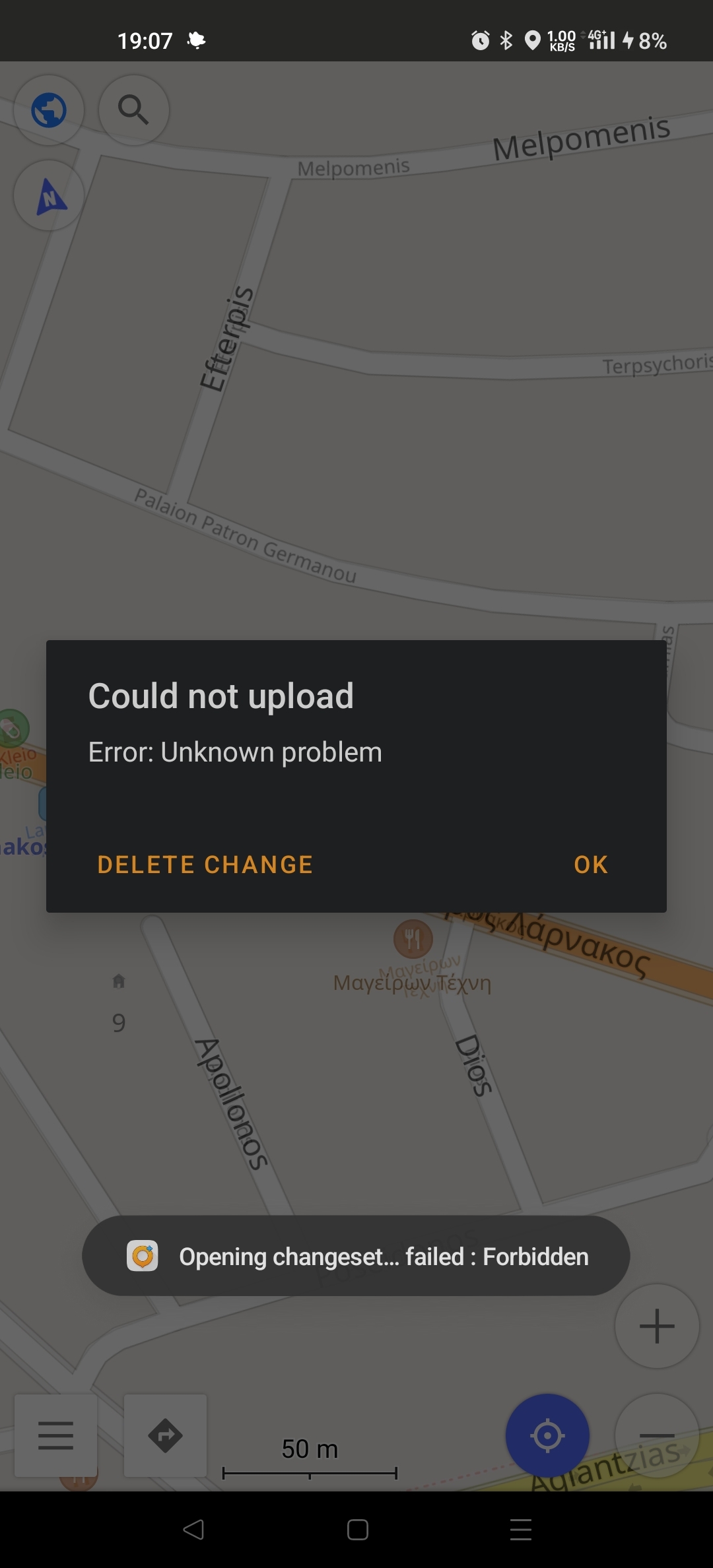
I would like to contribute to the maps for my area by creating and uploading various POIs as I come across them in my daily use. To get familiar with the system I decided to add a known to me florist. I found the exact location using google maps, opened it in OsmAnd+, and went through the process to add all its details (address, phone, website, type, etc). However when I decide to upload it, signing in with username and password, I get the error in the image attached. Anyone know what the problem is and how I can solve it?

Edit: App Info OsmAnd+ 4.6.12, Released: 2024-01-16


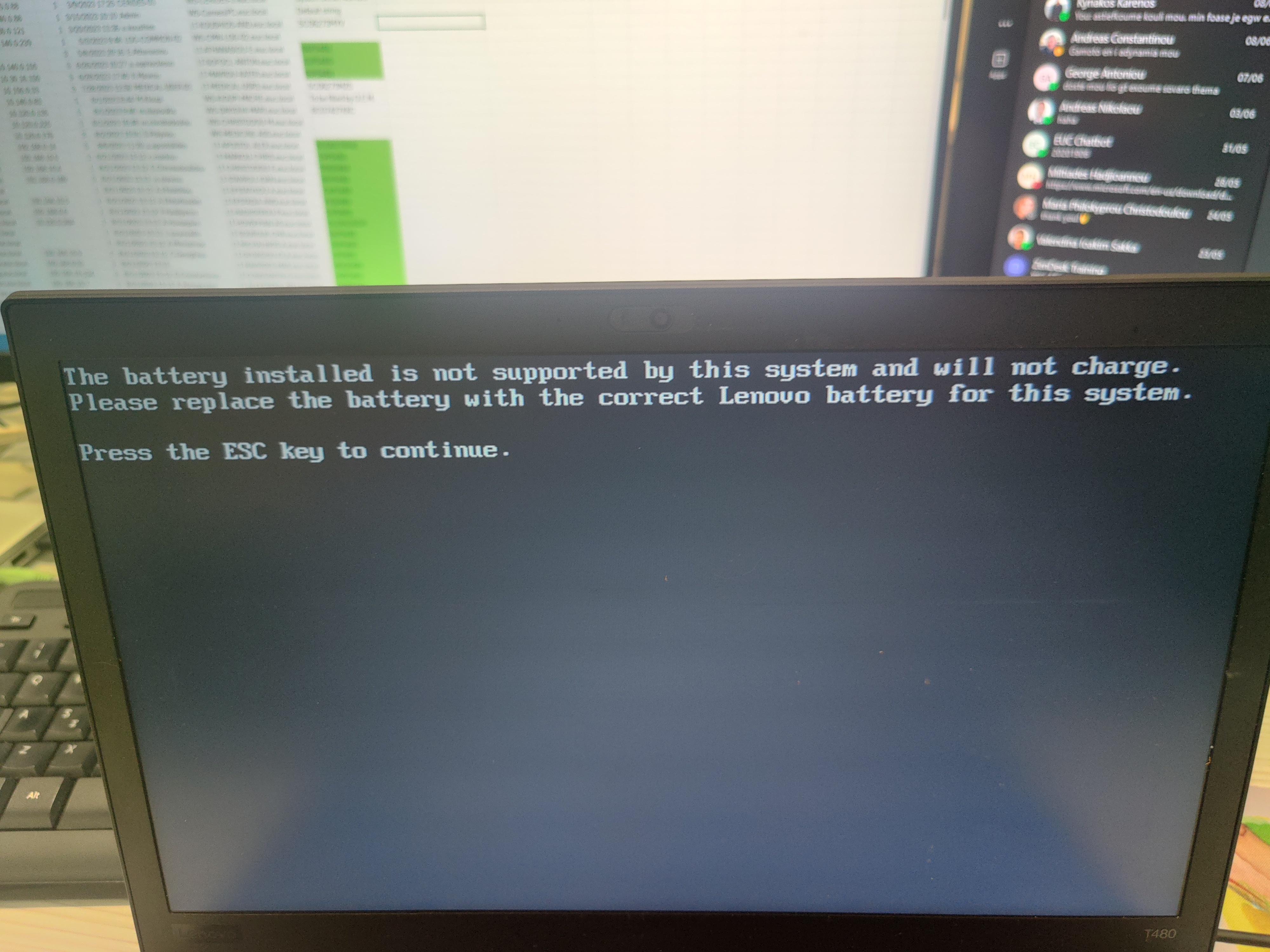
Hello everyone. I just got a new battery for my T480 from my work supplier. It is a Greencell LGC 11 Model: 01AV424 and I get a BIOS message before my bootloader:

The battery installed is not supported by this system and will not charge. Please replace the battery with the correct Lenovo battery for this system. Press the ESC key to continue.

Once I plugged it in and booted up the battery had 74% charge, and I let it discharge until 6% without the AC adaptor plugged in as per the instructions, so that I could then fully charge it (and repeat the process 3-5 times). However, once it reached 6% and I plugged it in it wasn't charging and ended up dropping to 1% where it remains even now. Below I'll include outputs from some commands.

Everything I read online mentions flashing the EC chip to whitelist the battery, or changing the BIOS to something like coreboot. I'd like to avoid flashing any chips unless absolutely the only option, in case something goes wrong and I brick my motherboard. I've tried also resetting the EC chip by pushing the button in the pinhole at the bottom of the laptop with a paper clip, but with no effect.

$ upower -e          
/org/freedesktop/UPower/devices/line_power_AC
/org/freedesktop/UPower/devices/battery_BAT1
/org/freedesktop/UPower/devices/line_power_ucsi_source_psy_USBC000o001
/org/freedesktop/UPower/devices/line_power_ucsi_source_psy_USBC000o002
/org/freedesktop/UPower/devices/DisplayDevice

$ upower -i /org/freedesktop/UPower/devices/battery_BAT1            
  native-path:          BAT1
  vendor:               LGC 11
  model:                01AV424
  serial:               14050
  power supply:         yes
  updated:              Tue 11 Jun 2024 12:46:25 EEST (19 seconds ago)
  has history:          yes
  has statistics:       yes
  battery
    present:             yes
    rechargeable:        yes
    state:               pending-charge
    warning-level:       none
    energy:              0.41 Wh
    energy-empty:        0 Wh
    energy-full:         22.23 Wh
    energy-full-design:  22.23 Wh
    energy-rate:         0 W
    voltage:             10.296 V
    charge-cycles:       1
    percentage:          1%
    capacity:            100%
    technology:          lithium-ion
    icon-name:          'battery-caution-charging-symbolic'

As you can see the state it is stuck in is "pending-charge"

Any help would be appreciated. Also, if you need any additional info please let me know and I will provide it.

EDIT: Supplier will pick it up from my work in a couple days and try to solve the issue. Hopefully that works, otherwise I'll have to see about flashing the EC chip with the patched firmware to remove the whitelist.

1
submitted 2 years ago* (last edited 2 years ago) by promitheas@programming.dev to c/archlinux@lemmy.ml
 

Solution at the end of the post

Hello guys. I've recently started experiencing an odd issue with my bspwm setup where on a reboot or upon restarting bspwm in-place I either don't get the top polybar (fixed this by explicitly killing all polybar processes from my bspwm script if they exist and then on a separate line running my launch script), or the gap between the bottom of the windows on my top (secondary) monitor and the bottom edge of the monitor is far too wide. Here is a screenshot of what I mean:
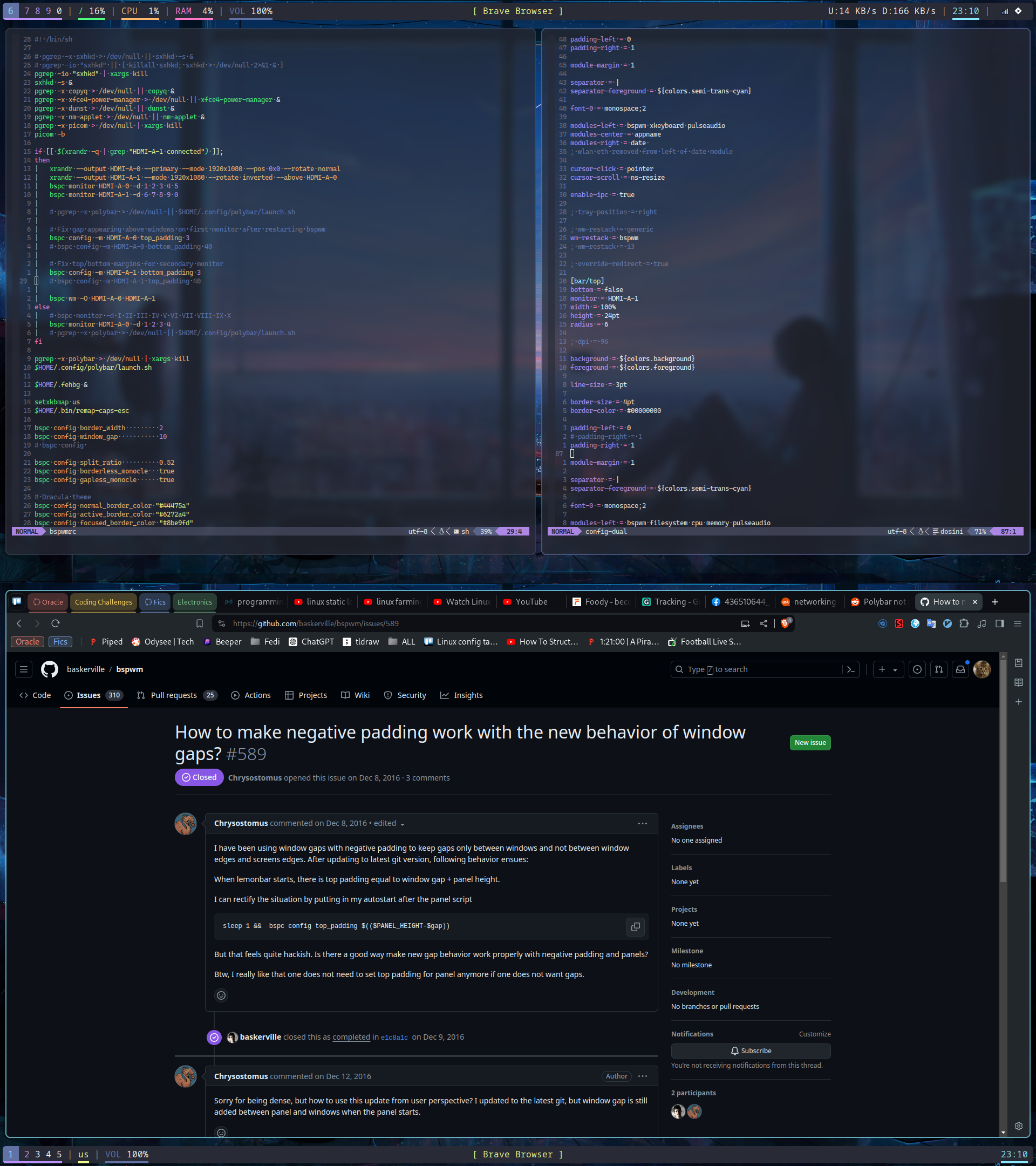
Out of the 20 times give or take that I will restart bspwm either from the terminal or through the sxhkd keybind I set, only once will it actually size itself correctly with the proper gap. The next time I restart it will revert back to this large gap. Here is also my bspwmrc file

#! /bin/sh
# pgrep -x sxhkd > /dev/null || sxhkd -s &
# pgrep -io "sxhkd" || { killall sxhkd; sxhkd > /dev/null 2>&1 & }
pgrep -io "sxhkd" | xargs kill
sxhkd -s &
pgrep -x copyq > /dev/null || copyq &
pgrep -x xfce4-power-manager > /dev/null || xfce4-power-manager &
pgrep -x dunst > /dev/null || dunst &
pgrep -x nm-applet > /dev/null || nm-applet &
pgrep -x picom > /dev/null || picom -b
pgrep -x polybar > /dev/null || $HOME/.config/polybar/launch.sh
if [[ $(xrandr -q | grep "HDMI-A-1 connected") ]];
then
	xrandr --output HDMI-A-0 --primary --mode 1920x1080 --pos 0x0 --rotate normal
	xrandr --output HDMI-A-1 --mode 1920x1080 --rotate inverted --above HDMI-A-0
	bspc monitor HDMI-A-0 -d 1 2 3 4 5
	bspc monitor HDMI-A-1 -d 6 7 8 9 0
	
	# Fix gap appearing above windows on first monitor after restarting bspwm
	bspc config -m HDMI-A-0 top_padding 3
	bspc config -m HDMI-A-0 bottom_padding 40
	
	# Fix top/bottom margins for secondary monitor
	bspc config -m HDMI-A-1 bottom_padding 3
	bspc config -m HDMI-A-1 top_padding 40
	bspc wm -O HDMI-A-0 HDMI-A-1
else
	# bspc monitor -d I II III IV V VI VII VIII IX X
	bspc monitor HDMI-A-0 -d 1 2 3 4
fi
$HOME/.fehbg &
setxkbmap us
$HOME/.bin/remap-caps-esc
bspc config border_width         2
bspc config window_gap           10
# bspc config 
bspc config split_ratio          0.52
bspc config borderless_monocle   true
bspc config gapless_monocle      true
# Dracula theme
bspc config normal_border_color "#44475a"
bspc config active_border_color "#6272a4"
bspc config focused_border_color "#8be9fd"
bspc config presel_feedback_color "#6272a4"
# Make sure theme cursor is shown when mouse is not over a window, instead of the standard default one
xsetroot -cursor_name left_ptr
bspc rule -a Gimp desktop='^8' state=floating follow=on
bspc rule -a Chromium desktop='^2'
bspc rule -a mplayer2 state=floating
bspc rule -a Kupfer.py focus=on
bspc rule -a Screenkey manage=off
bspc rule -a Zathura state=tiled
bspc rule -a Passy state=tiled

bspc rule -a scpad sticky=on state=floating rectangle=1896x400+10+50

betterlockscreen -u $HOME/Pictures/wallpapers/ --fx dim --dim 50

The lines where I set bottom_padding for the secondary monitor and top padding for the primary monitor I just commented out but they did not have any effect.

I would really appreciate any help for this. Thanks in advance!

Solution for polybar not launching both bars is to change the single polybar line that checks for any existing instances and runs the launch script if none are found, to 2 lines that will explicitly kill all polybar processes and then run the launch script. I also moved this a bit further down in the file.

pgrep -x polybar > /dev/null | xargs kill
$HOME/.config/polybar/launch.sh

The solution for the gap on the bottom of the second monitor was to move the if check further down in the file, hopefully giving bspwm enough time to set its defaults and then have my values set. It now looks like this:

#! /bin/sh

# pgrep -x sxhkd > /dev/null || sxhkd -s &
# pgrep -io "sxhkd" || { killall sxhkd; sxhkd > /dev/null 2>&1 & }
pgrep -io "sxhkd" | xargs kill
sxhkd -s &

pgrep -x copyq > /dev/null || copyq &
pgrep -x xfce4-power-manager > /dev/null || xfce4-power-manager &
pgrep -x dunst > /dev/null || dunst &
pgrep -x nm-applet > /dev/null || nm-applet &

pgrep -x picom > /dev/null | xargs kill
picom -b

# THESE ARE THE 2 POLYBAR LINES WHERE THE FIRST KILLS ANY EXISTING PROCESSES AND THE SECOND RUNS THE LAUNCH SCRIPT
pgrep -x polybar > /dev/null | xargs kill
$HOME/.config/polybar/launch.sh

$HOME/.fehbg &

setxkbmap us
$HOME/.bin/remap-caps-esc

bspc config border_width         2
bspc config window_gap           10
# bspc config 

bspc config split_ratio          0.52
bspc config borderless_monocle   true
bspc config gapless_monocle      true

# Dracula theme
bspc config normal_border_color "#44475a"
bspc config active_border_color "#6272a4"
bspc config focused_border_color "#8be9fd"
bspc config presel_feedback_color "#6272a4"


# THIS IS THE CHECK FOR WHETHER THERE ARE 2 MONITORS CONNECTED WHICH I MOVED DOWN IN THE FILE
if [[ $(xrandr -q | grep "HDMI-A-1 connected") ]];
then
	xrandr --output HDMI-A-0 --primary --mode 1920x1080 --pos 0x0 --rotate normal
	xrandr --output HDMI-A-1 --mode 1920x1080 --rotate inverted --above HDMI-A-0
	bspc monitor HDMI-A-0 -d 1 2 3 4 5
	bspc monitor HDMI-A-1 -d 6 7 8 9 0
	
	# pgrep -x polybar > /dev/null || $HOME/.config/polybar/launch.sh

	# Fix gap appearing above windows on first monitor after restarting bspwm
	bspc config -m HDMI-A-0 top_padding 3
	bspc config -m HDMI-A-0 bottom_padding 40
	
	# Fix top/bottom margins for secondary monitor
	bspc config -m HDMI-A-1 bottom_padding 3
	bspc config -m HDMI-A-1 top_padding 40

	bspc wm -O HDMI-A-0 HDMI-A-1
else
	# bspc monitor -d I II III IV V VI VII VIII IX X
	bspc monitor HDMI-A-0 -d 1 2 3 4
	# pgrep -x polybar > /dev/null || $HOME/.config/polybar/launch.sh
fi

# Make sure theme cursor is shown when mouse is not over a window, instead of the standard default one
xsetroot -cursor_name left_ptr

bspc rule -a Gimp desktop='^8' state=floating follow=on
bspc rule -a Chromium desktop='^2'
bspc rule -a mplayer2 state=floating
bspc rule -a Kupfer.py focus=on
bspc rule -a Screenkey manage=off
bspc rule -a Zathura state=tiled
bspc rule -a Passy state=tiled

bspc rule -a scpad sticky=on state=floating rectangle=1896x400+10+50

betterlockscreen -u $HOME/Pictures/wallpapers/ --fx dim --dim 50

Note: On booting into the WM the secondary monitor polybar doesn't launch, but it appears after restarting bspwm.

Im not entirely sure if my way of thinking is correct with regards to how bspwm handles the timing of setting default values and then reading its configuration file, but it seems to at least half work now.
 

Hello guys! While I am a relatively experienced programmer, I have practically zero experience on the hardware/electronics side of things. I really want and need (I'd like to work in embedded systems) to get this stuff in my "tool belt" of skills, but I am really worried that I will do something wrong or order the wrong parts because it is quite an old project I will be trying to build.

I would like to make this project (EDTracker github) so that i can play all my sim games that benefit from head tracking again. I had one which was pre-built but the connector broke. I would prefer a version with the magnetometer (9150 or 9250). The problem is that due to my inexperience I have no idea where to search for cheap(ish) components, or even if the components listed in the docs are still available or if there are better ones that do the same thing.

I realise this is not much (almost nothing) to go on, but I would really appreciate any help at all that can push me in the right direction. Also, please be understanding of my possibly ignorant questions. When you have no knowledge in a field it is often hard to know what the right questions are :)

Many thanks in advance!

Edit: Spelling

view more: ‹ prev next ›