ericbandrews

joined 3 years ago
MODERATOR OF
 

Features

  • Added settings to control when account ages are shown (Settings → General → Show Account Age)

Bug Fixes

  • Fixed scrubbing from the playback bar behaving inconsistently
  • Fixed inbox pull-to-refresh spinning for longer than intended
  • Fixed some performance issues when panning the image viewer on devices with ProMotion displays
  • Fixed mark read on scroll sometimes not persisting read status
  • Fixed image saving sometimes failing on lemmy.ml
 

Hi Mlem Community,

Mlem 2.1 is now available on the App Store. This version adds support for video scrubbing and customizing swipe actions, plus a host of smaller quality of life features and bug fixes.

Cheers,

The Mlem Group

Mlem is a free and open source project. 100% of our funding, which pays for things like server time, comes from our generous donors; we do not, and will never, run ads or sell data. If you'd like to help support Mlem, you can donate here.


Features

  • Media Improvements
    • Added a progress bar to the media viewer
    • The media viewer now supports scrubbing. Swipe left or right in the image viewer to scrub; drag your finger up or down while scrubbing to increase or decrease the scrubbing speed. Swipe on the progress bar to directly move the playback head.
    • Added support for animated avatars. Avatar animation can be disabled in Settings -> General -> Animated Avatars.
  • Swipe actions can now be customized (Settings -> Posts/Comments/Inbox -> Swipe Actions)
  • Refined the post editor to make attaching media and links easier
  • Links can now be shared from your local instance, the original instance, or lemmyverse.link; the default is now to share from your instance. This behavior can be toggled in Settings -> Links -> Share Links.
  • Added a setting to toggle post tap-to-collapse behavior (Settings -> Posts -> Tap to Collapse)
  • Added a "Blur NSFW" toggle to the ellipsis menu in the feed
  • Added a "jump to last position" button to the post view, which scrolls to the last position you viewed on that post.
  • Tweaked jump button design
  • Added a slight fade effect to scrollable edges of the Markdown toolbar
  • Updated the design of comments in mixed feeds
  • Improved scroll behavior when collapsing and expanding comments
  • Vote and saved readouts in the interaction bar are now colored if there is no widget in the bar displaying the same information

Bug Fixes

  • Fixed some images not loading correctly from lemmy.ml
  • Fixed rendering issues with transparent gifs
  • Community links formatted as Markdown links now open correctly when tapped
  • Fixed custom emoji sometimes rendering as full size images
  • Fixed comments sometimes not appearing immediately when posted
  • Disabled autocorrect when searching communities, users, and instances
  • Fixed slight visual stutter when scrolling to the top of some views
  • Fixed incorrect background color being visible when opening keyboard
  • Fixed certain animated media shaking when zooming out
  • Fixed NSFW images not being blurred in the expanded post view
  • Fixed multi-word keyword filters not applying correctly
  • Improved error handling in post and comment pages
  • Fixed interaction bar configurations and keyword filters not being included in import/export settings
[–] ericbandrews@lemmy.ml 10 points 1 year ago (1 children)

Thank you!

@sjmarf@lemmy.ml deserves equal credit :)


This is our 2.1 RC build; we are targeting an App Store release next week.

Features

  • Improved scroll behavior when collapsing and expanding comments
  • The swipe action editor now supports drag-and-drop rearranging
  • Vote and saved readouts in the interaction bar are now colored if there is no widget in the bar displaying the same information

Bug Fixes

  • Fixed inbox swipe action configuration not persisting
  • Fixed interaction bar configurations, swipe actions, and keyword filters not being included in import/export settings
[–] ericbandrews@lemmy.ml 5 points 1 year ago (3 children)

I've created an issue to track this. I haven't looked deeply into the technical feasibility--SwiftUI has some powerful tools for reversing layouts to accommodate languages that scan right-to-left, but I can't promise this is a feature we can deliver without doing a bit more research.


Features

  • Swipe actions can now be customized (Settings -> Posts -> Swipe Actions, Settings -> Comments -> Swipe Actions, Settings -> Inbox -> Swipe Actions)
  • Added a TestFlight update notification banner with a link to the update post. This only appears on TestFlight builds.
  • Added a slight fade effect to scrollable edges of the Markdown toolbar
  • Updated the design of comments in mixed feeds

Bug Fixes

  • Fixed slight visual stutter when scrolling to the top of some views
  • Fixed incorrect background color being visible when opening keyboard
  • Fixed certain animated media shaking when zooming out
  • Fixed NSFW images not being blurred in the expanded post view
  • Fixed multi-word keyword filters not applying correctly
  • Improved error handling in post and comment pages
  • Fixed "jump back to position" button appearing when when it shouldn't
[–] ericbandrews@lemmy.ml 4 points 1 year ago

We haven't changed anything, but it's possible your instance admins have made some configuration changes--there are some configuration settings that can mess with image proxying. The Voyager dev brought attention to this last week, plus put up a nice page about it--it's possible that the sopuli admins fixed their config in response to that.

[–] ericbandrews@lemmy.ml 6 points 1 year ago

We're also on the App Store, but every App Store release goes through TestFlight first.


Features

  • Added a "jump to last position" button to the post view, which scrolls to the last position you viewed on that post.
  • Tweaked jump button design
[–] ericbandrews@lemmy.ml 8 points 1 year ago

This is correct. The GitHub releases feature doesn’t make a lot of sense for Mlem, since we primarily deliver through the App Store rather than via source downloads.


Features

  • Media Improvements
    • Added a progress bar to the media viewer
    • The media viewer now supports scrubbing. Swipe left or right in the image viewer to scrub; drag your finger up or down while scrubbing to increase or decrease the scrubbing speed. Swipe on the progress bar to directly move the playback head.
    • Added support for animated avatars. Avatar animation can be disabled in Settings -> General -> Animated Avatars.
  • Added a setting to toggle post tap-to-collapse behavior (Settings -> Posts -> Tap to Collapse)
  • Updated the design of comments in mixed feeds
  • Refined the post editor to make attaching media and links easier
  • Added a lemmyverse.link option to the share menu
  • Added a "Blur NSFW" toggle to the ellipsis menu in the feed

Bug Fixes

  • Community links formatted as Markdown links now open correctly when tapped
  • Fixed custom emoji sometimes rendering as full size images
  • Fixed comments sometimes not appearing immediately when posted
  • Disabled autocorrect when searching communities, users, and instances
 
[–] ericbandrews@lemmy.ml 2 points 1 year ago

That’s a great idea! We have an issue open to track it.

[–] ericbandrews@lemmy.ml 3 points 1 year ago* (last edited 1 year ago) (2 children)

Today’s build is a bit delayed due to a deployment pipeline issue—it should be up soon. I’ve updated the post with a notice.

Update: The build is now live.


Features

  • Links can now be shared from your local instance or the original instance; the default is now to share from your instance. This behavior can be toggled in Settings -> Links -> Share Links.

Bug Fixes

  • Fixed some images not loading correctly from lemmy.ml
  • Fixed rendering issues with transparent gifs
[–] ericbandrews@lemmy.ml 2 points 1 year ago* (last edited 1 year ago) (1 children)

I assume you’re using compact or tiled posts in feed. We color the little arrow in those layouts but not the headline or large post layout (used in the post page) because the upvote button in the interaction bar is already colored, and coloring both looked pretty bad.

We didn’t consider that the upvote button might not be present when we made that choice, though—we’ll revise the design for the next build so it’s always easy to tell at a glance.

In the meantime, if you add the upvote button to your interaction bar (settings -> posts -> interaction bar), that should provide that readability.


Hi Mlem Community,

Patch 2.0.1 is now available on the App Store and TestFlight.

Bug Fixes

  • Fixes connections to lemmy.ml failing
  • Fixes Instance Trust & Safety not showing endorsement details

Cheers,

The Mlem Group

Mlem is a free and open source project. 100% of our funding, which pays for things like server time, comes from our generous donors; we do not, and will never, run ads or sell data. If you'd like to help support Mlem, you can donate here.

[–] ericbandrews@lemmy.ml 10 points 1 year ago* (last edited 1 year ago) (1 children)

I'm currently working with the admins to resolve this issue.

Update: We've identified the root cause and a fix is in development. A patch will be out as soon as possible.

Update 2: The fix is ready and just waiting on App Review to release.

Update 3: The fix is live. Thank you for your patience!


Hi Mlem Community,

Now that 2.0 is live, we’re simplifying the structure of our TestFlight.

For the initial development of 2.0, we created the Stable Pre-Release group to serve as our release environment. Going forward, we plan to ship smaller, more frequent updates. Under that new system, it no longer makes sense to maintain the separate pre-release group. We will therefore be shutting down the Stable Pre-Release group on Sunday, March 16. If you are in that group and wish to remain in the beta, we still have plenty of spots in the Weekly group.

We’re also changing the TestFlight timing: new builds to the Weekly TestFlight will go out every Saturday at 11am EDT (UTC -4).

Cheers,

The Mlem Group

[–] ericbandrews@lemmy.ml 3 points 1 year ago* (last edited 1 year ago) (1 children)

We updated the filtering logic in 2.0 to make it more reliably filter keywords around punctuation, but it looks like that broke multi-word filters. Sorry about that, we'll have it fixed in the next build!

[–] ericbandrews@lemmy.ml 8 points 1 year ago

The leaf indicates a new account (<30 days old). We also have an issue open for a setting to always display the age indicator, for which we'd probably need some new symbols :)


cross-posted from: https://lemmy.ml/post/26903523

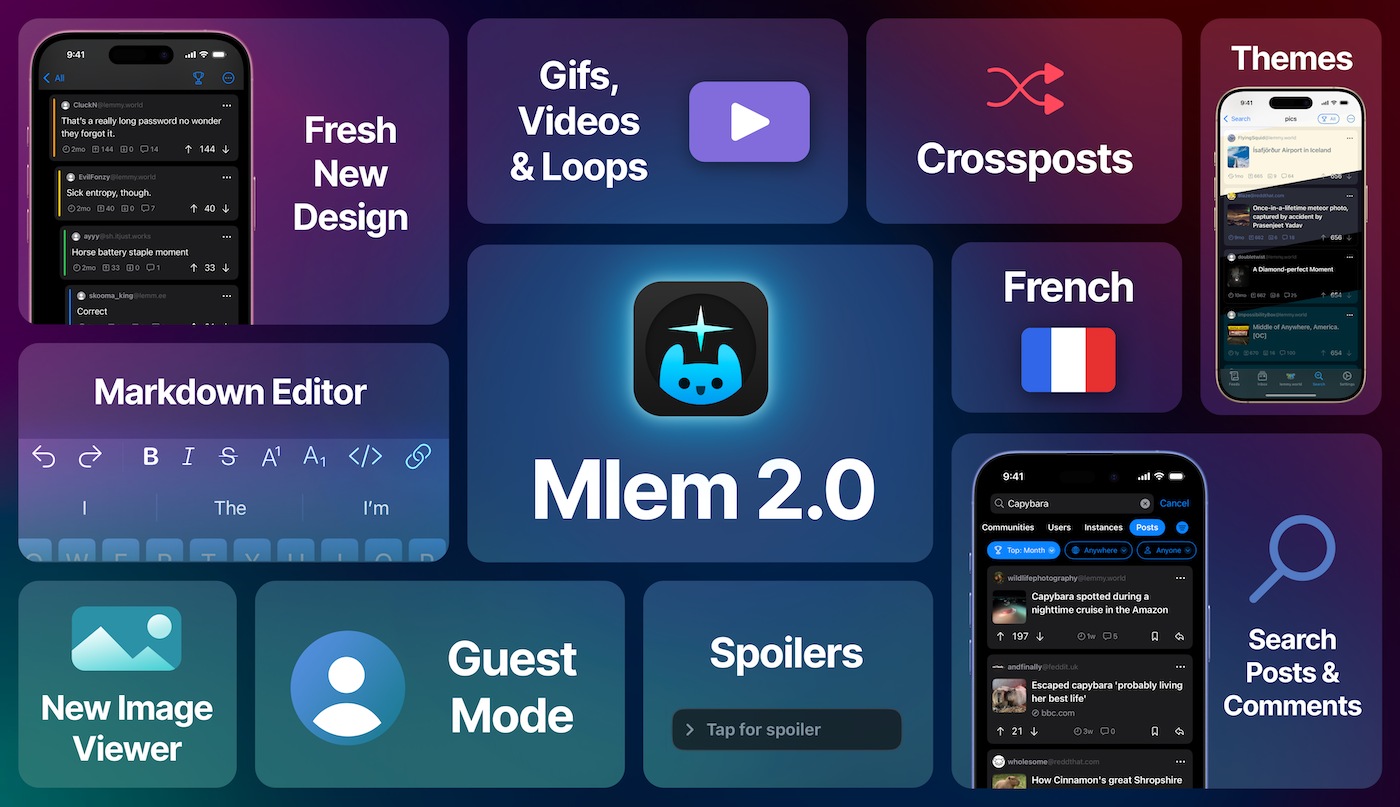
After a year in development and six months in beta, we are thrilled to announce that Mlem for Lemmy 2.0 is available on the App Store!

We've rewritten the app from the ground up--it's still the same Mlem our users know and love, but with significant performance improvements, a set of new features that were infeasible in our v1 app, and a fresh new design that feels right at home with the latest versions of iOS. There are more changes than we could list here, so the best way to see what's new is to just download the app, but some of the highlights include:

Media Enhancements

2.0 ships with a brand new image viewer and full support for gifs, videos, and animated webps. We've even added loops.video embedding--link posts to loops.video will display the linked video directly in Mlem.

Color Themes

In addition to the standard light and dark, Mlem 2.0 offers OLED, Solarized, and Dracula color themes, with more on the way. If you'd like us to support your favorite theme, let us know!

Markdown Handling

Powered by our custom cmark fork, Mlem 2.0 supports the full range of Lemmydown syntax.

Enhanced Post Composer

You can now create crossposts directly in the post editor (+ -> Crosspost), and can even post to multiple communities from multiple accounts at once. The keyboard now also sports a comprehensive set of Markdown editing tools.

French Localization

Mlem is now available in French, thanks to pylapp.

And More...

  • Guest mode: you can now browse instances without an account
  • Added a new Tiled post layout
  • Keep place on switch: you can now switch accounts without reloading the app. This behavior can be toggled in Settings -> Accounts or accessed by long pressing an account in the account switcher.
  • You can now search for posts and comments

Compatibility Notice: Mlem 2.0 supports iOS 17 and later. If you are on an older iOS, you won't be able to download this update but will be able to continue using the previous version of Mlem.

Thank you to all of our beta testers, whose feedback and support has been invaluable.

Cheers,

The Mlem Group

Mlem is a free and open source project. 100% of our funding, which pays for things like server time, comes from our generous donors; we do not, and will never, run ads or sell data. If you'd like to help support Mlem, you can donate here.

view more: next ›