FearMeAndDecay

joined 1 year ago

She has a volunteer tab on her website!

Thank you for sharing! It’s hard to find content of her online outside of her insta so this is really helpful!


I’m gonna start by saying 1. Sorry if this kind of thing isn’t allowed, I checked the rules and didn’t see anything against this and 2. I’m not in any way affiliated with her (pic was just lifted from her website), I just want to let other people know about a candidate I’m keeping my eye on. With that out of the way:

With all of these progressive races and wins happening across the country, I wanted to see if there was anything similar happening here in MN for the governor’s race. Unfortunately most of the news/press about it assumes that Amy Klobuchar is the leading candidate and treating her as the default dem candidate even though we still have the primary in August to get to. So I checked Amy Klobuchar’s campaign website and it’s literally just a donation grab. You can check for yourself, but theres literally no policy, no key issues, not even an about page. It’s just a request for donations despite the fact that she announced her candidacy in January. Personally, I have no interest in a candidate that takes my vote for granted

So I looked at the other candidates and found Kobey Layne. She’s a progressive candidate that is anti-ICE and anti-genocide, and she’s a supporter of single payer healthcare/universal healthcare and worker’s rights. She supports divestment from Israel. She also supports trans rights and action against climate change. This is the first time she’s running for office but she does have some experience working in politics. I found a short speech she did, but tbh the audio is a little scuffed bc theres people talking right by the camera. And theres also an interview she did with a YouTuber where she talks about herself and her politics. She also has an insta set up

I’ll be honest, her campaign so far seems pretty small, but that’s why I’m making this post. I want our candidates to really earn our votes, and I feel like Klobuchar isn’t even trying. So even if Layne doesn’t win the primary, I think it’s important to use the primaries to tell the dems that we demand more. There’s still a lot of time before August 11 (mark the primaries on your calendars!) so I want to use this time to support a candidate that seems to actually have my best interests in mind

If you don’t care for any of this or it’s too long to read then just please remember the primaries are on August 11th! Do your civic duty and vote!

Sorry again if this isn’t allowed <3

[–] FearMeAndDecay@midwest.social 4 points 11 months ago

Thanks for the encouragement! After I got it working I was showing my family all the cool customization options like making windows have an explode effect when you close them. It’s fun so I’m really glad I didn’t give up!

[–] FearMeAndDecay@midwest.social 7 points 11 months ago

Thank you so much! I did this and everything seems to be working properly! Thanks so much for your help!!

[–] FearMeAndDecay@midwest.social 1 points 11 months ago (1 children)

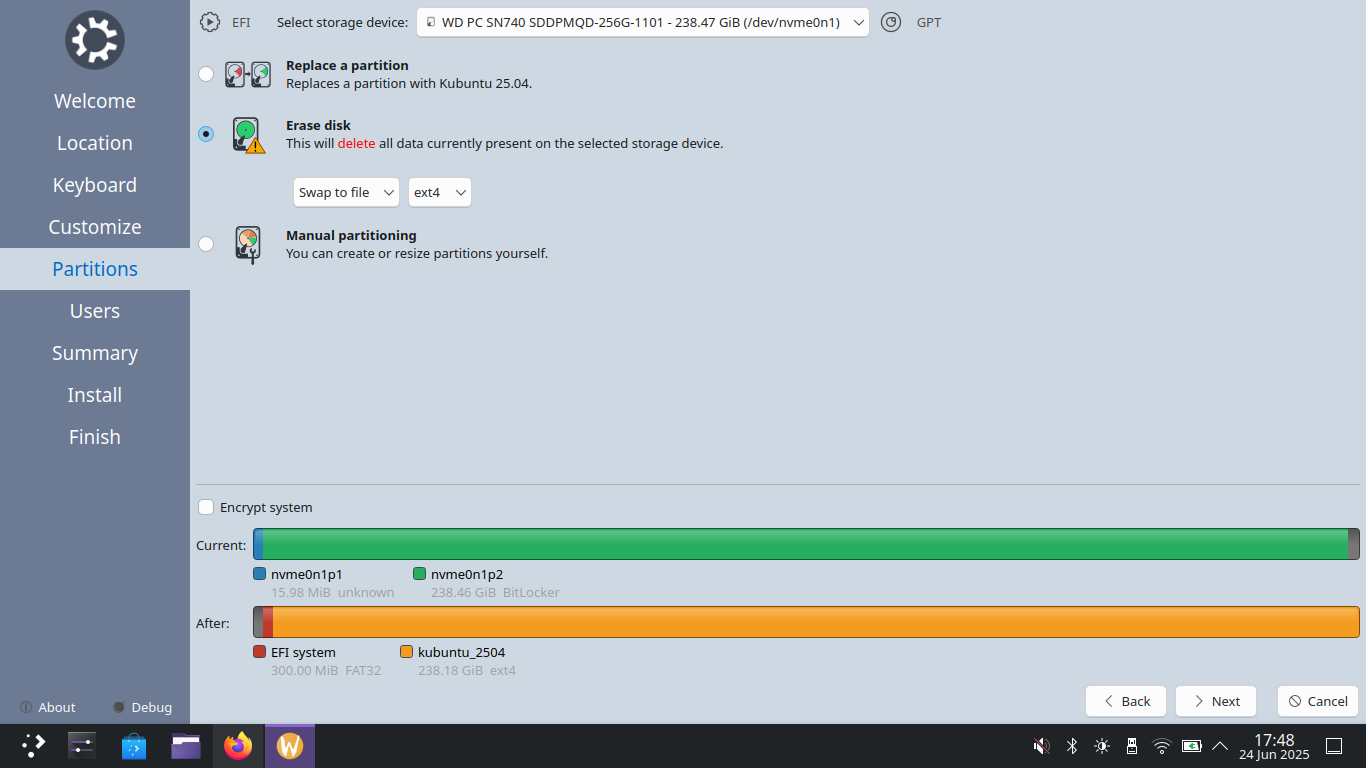
That would be the second one right? The WD PC... 238.47GiB one right? Would that mean that windows is still on the other one?

18
Help Installing Kubuntu (midwest.social)
submitted 11 months ago* (last edited 11 months ago) by FearMeAndDecay@midwest.social to c/linux@lemmy.world
 

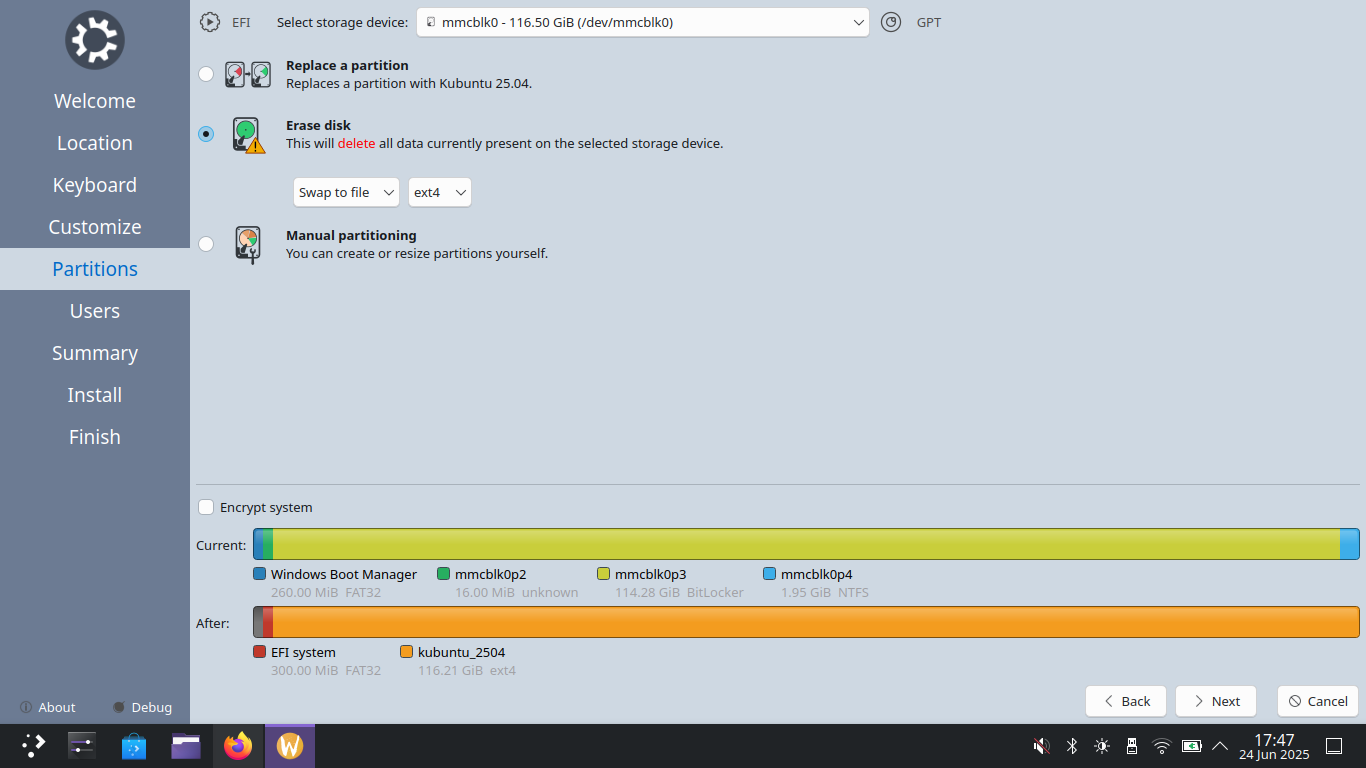
Hello! I posted yesterday asking questions about which distro to pick, so first of all, thank you to everyone who responded. I wanted to thank you all there but lit cafe is down, so I'm on my other lemmy acc and can't edit that post. As you can tell from the title, I ended up picking Kubuntu, mostly because the touchpad didn't work on Mint (thank goodness I have a mouse handy) and Kubuntu has a nice little welcome walkthrough that made exploring it really easy and comfortable. So I went to install it, but I'm confused about this part of the installation. For reference I'm doing this on a Lenovo Ideapad and it has "128GB eMMC and 256GB PCIe." (honestly I don't exactly know what the PCIe means). There's two options for storage devices at the top.

The prior picture is with the first storage device selected. The following picture is with the second storage device selected.

Are there two options because there's technically two different hard drives in the laptop? Does it matter which one I choose? And I have no idea if I should erase disk (there's literally nothing on this laptop, so no worries about deleting documents or pictures) or do a manual partition? And if so, how do I do a manual partition because even if I click that I don't seem to be able to do anything (also what does manual partition mean)? And would Kubuntu take up all the storage space on the drive like it looks like it will? Because that would be a problem?

I had a lot of fun checking out the distros and trying out all of the customization options in Kubuntu and taking a look at everything in the software center, but I'm starting to feel like this might be too advanced for me. I'm sick of windows, but maybe I should just not risk messing with operating systems I don't understand? (Also I really hope those screenshots don't doxx me or something)