this post was submitted on 14 Feb 2025
32 points (97.1% liked)

Steam Hardware

20065 readers
236 users here now

A place to discuss and support all Steam Hardware, including Steam Deck, Steam Machine, Steam Frame, and SteamOS in general.

As Lemmy doesn't have flairs yet, you can use these prefixes to indicate what type of post you have made, eg:
[Flair] My post title

The following is a list of suggested flairs:
[Deck] - Steam Deck related.
[Machine] - Steam Machine related.
[Frame] - Steam Frame related.
[Discussion] - General discussion.
[Help] - A request for help or support.
[News] - News about the deck.
[PSA] - Sharing important information.
[Game] - News / info about a game on the deck.
[Update] - An update to a previous post.
[Meta] - Discussion about this community.

If your post is only relevant to one hardware device (Deck/Machine/Frame/etc) please specify which one as part of the title or by using a device flair.

These are not enforced, but they are encouraged.

Rules:

Link to our Matrix Space

founded 4 years ago
MODERATORS
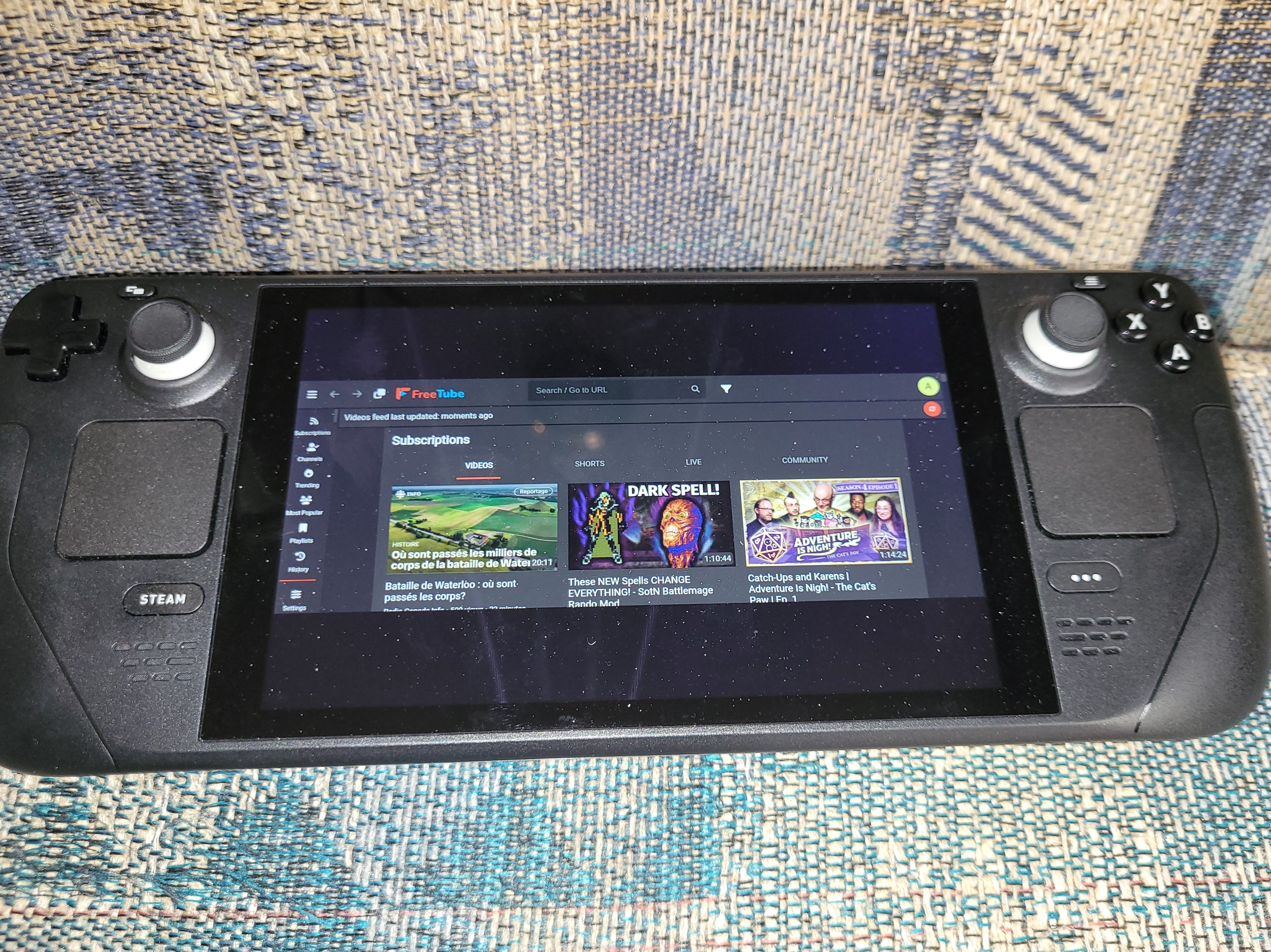
 

Has anyone had success getting FreeTube to run full screen when in game mode? I've messed with settings to no success, and can't find anything online about it either. It always has black bars top and bottom that take up a good portion of the screen.

Edit: I've added a picture to show what I mean

all 18 comments
sorted by: hot top controversial new old
[–] kipo@lemm.ee 7 points 10 months ago* (last edited 10 months ago) (1 children)

I have a Steam Deck OLED and my Freetube uses the whole screen. Freetube v0.23.1 beta and SteamOS version 3.6.20

It might be the way you have Freetube installed. From Steam game mode, go to Freetube, then Properties, then Shortcut. This is what I have:

Target:

“/usr/bin/flatpak”

Start In:

/usr/bin

Launch Options:

run --branch=stable --arch=x86_64 --command=/app/bin/run.sh --file-forwarding io.freetubeapp.FreeTube @@u %u @@

I am not using any specific compatibility mode.

There is a problem though where the mouse pointer cannot select anything more than about halfway down the screen. To get around this, I have the controller config set as follows:

  • Right touchpad: mouse
  • L2 & R2: right and left mouse buttons
  • D-pad: arrow keys
  • Left joystick - left: shift+tab
  • Left joystick - right: tab
  • Y: on-screen keyboard
  • A: Enter

This will let you scroll with the d-pad, tab around, use keyboard, and select things with Enter.

I hope this helps.

[–] usualsuspect191@lemmy.ca 1 points 10 months ago (1 children)

3.6.21 for my Steam OS version, but this problem existed for awhile so I doubt that's it.

Everything else for me is identical, except the %u at the end of the shortcut (each section is in "quotations" too). Adding it in manually doesn't change anything.

[–] kipo@lemm.ee 1 points 10 months ago

That's really odd. I don't know what else to check.

I hope you are able to figure it out!

[–] rando@sh.itjust.works 3 points 10 months ago

There is also a magnify feature you can try to have it zoom in, you can find this under Controller settings> bind some button > System > toggle magnifier

I did this for a diff app. And did a back paddle that I have to hold for 3 seconds

You can change how far you zoom in or out under the regular steamdeck settings > display > Advanced > magnifier scale

[–] rando@sh.itjust.works 3 points 10 months ago

I admit I have not tried this at all, but maybe check if there is a key combination to go full screen for FreeTube and map that key combination to a button! That's what I would do

[–] rotopenguin@infosec.pub 3 points 10 months ago* (last edited 10 months ago)

Try messing with ~/.var/app/io.treetubeapp.FreeTube/config/FreeTube/settings.db , in the "bounds" line.

It doesn't look like Freetube had a --fullscreen option, so you can't tell steam to just do that.

[–] bjoern_tantau@swg-empire.de 1 points 10 months ago (1 children)

Have you tried making it fullscreen in desktop mode and then quitting? That often works.

[–] usualsuspect191@lemmy.ca 4 points 10 months ago

Just tried it, didn't work :(

[–] Hiro8811@lemmy.world 1 points 10 months ago* (last edited 10 months ago) (1 children)

Steam + L1 for screenshot

If enabled

[–] usualsuspect191@lemmy.ca 1 points 10 months ago (1 children)

Lol, I did take one, but it ended up being too annoying to send it to my phone so I did the less technical option

[–] Hiro8811@lemmy.world 1 points 10 months ago* (last edited 10 months ago)

KDE connect from desktop? USB?

[–] Ulrich@feddit.org -1 points 10 months ago (1 children)

The Steam Deck has a 16:10 display. The videos you're watching are most likely 16:9 or 18:9 so it will always have black bars.

[–] usualsuspect191@lemmy.ca 3 points 10 months ago (1 children)

The program itself doesn't use the whole screen, not just when videos are playing. It's like only half the screen is used (one quarter left blank top and bottom). I can't even move the mouse cursor into the blank space.

[–] Ulrich@feddit.org 2 points 10 months ago (1 children)

Oh I see. Check the display settings? The little settings wheel on the right before you launch the app?

[–] usualsuspect191@lemmy.ca 1 points 10 months ago (1 children)

Under the "Shortcut" section there is an option to change the resolution, but this has no effect on the total area FreeTube uses on the screen.

[–] Ulrich@feddit.org 2 points 10 months ago (1 children)

No I mean the settings in Steam.

[–] usualsuspect191@lemmy.ca 1 points 10 months ago

That's in the properties of FreeTube in Steam.