this post was submitted on 13 Jan 2025
14 points (85.0% liked)

Selfhosted

59850 readers
281 users here now

A place to share alternatives to popular online services that can be self-hosted without giving up privacy or locking you into a service you don't control.

Rules:

  1. Be civil: we're here to support and learn from one another. Insults won't be tolerated. Flame wars are frowned upon.

  2. No spam.

  3. Posts here are to be centered around self-hosting. Please ensure it is clear in your post how it relates to self-hosting.

  4. Don't duplicate the full text of your blog or git here. Just post the link for folks to click.

  5. Submission headline should match the article title.

  6. No trolling.

Resources:

Any issues on the community? Report it using the report flag.

Questions? DM the mods!

founded 3 years ago
MODERATORS
 

cross-posted from: https://lemmy.ml/post/24722787

I am running ubuntu with casa os. I was previously running an intel apu (the name has slipped me I will update the post when I can with this info). Recently I got a 1650 that I installed for nvenc transcoding. It seems all the proper drivers are installed but my jellyfin container still fails playback anytime with it turned on.

I have reinstalled the container with the nvidia device variable and no dice. I have also tried installing the nvidia cintainer toolkit but that didn't work either. I am at a loss for trying to get nvenc to work.

Any help is appreciated!

EDIT: here is the ffmpeg log file

https://gofile.io/d/9nsBFq

top 11 comments
sorted by: hot top controversial new old
[–] ludicolo@lemmy.ml 6 points 1 year ago* (last edited 1 year ago)

THANK YOU ALL!

It was a problem with my docker compose file! I didn't list the needed devices from the jellyfin documentation. I thought the Container was detecting the gpu but it wasn't. Docker exec nvidia-smi is your friend!

Edit: so now it doesnt kick me out saying the playback failed but its just a black screen with 4k media

Edit 2: my bad forgot to enable some transcoding settings in jellyfin lol
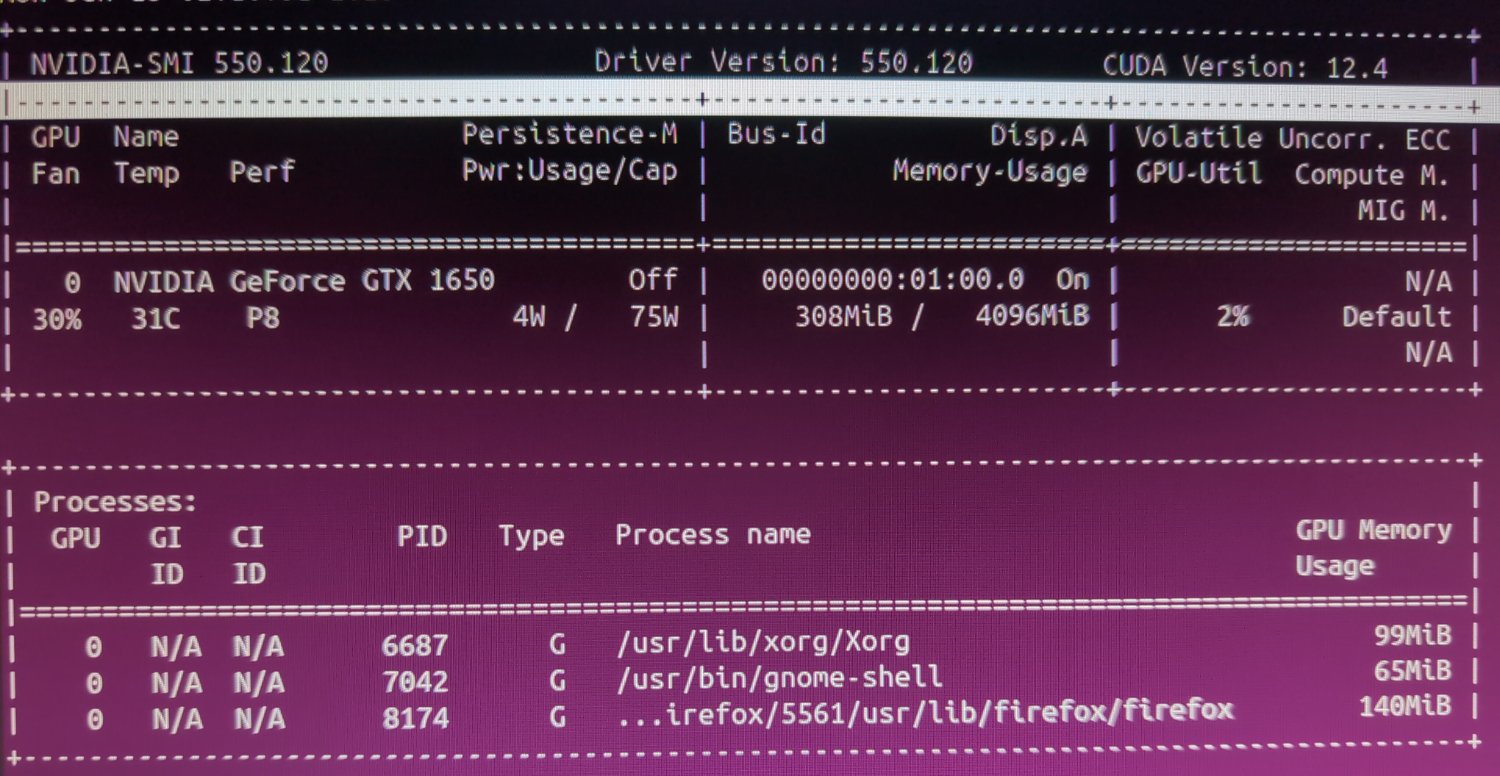
[–] ludicolo@lemmy.ml 1 points 1 year ago

Here is a pic of my nvidia-smi output:

[–] just_another_person@lemmy.world 1 points 1 year ago (1 children)

You need to be running the Nvidia container toolkit and specify the container be launched with that runtime if you want direct hardware access to enc/dec hardware.

[–] ludicolo@lemmy.ml 1 points 1 year ago (3 children)

I followed this guide and seemed to get it working.

https://docs.nvidia.com/datacenter/cloud-native/container-toolkit/latest/install-guide.html

However jellyfin transcoding sttill doesn't work. I have tried adding the "nvidia devices= all" environment variable, it still didn't work.

I tried using the docker conpose from here

https://jellyfin.org/docs/general/administration/hardware-acceleration/nvidia/#configure-with-linux-virtualization

But when I try and run this command: "docker exec -it jellyfin ldconfig sudo systemctl restart docker"

It says the container is restarting and to try again when the container has started.

[–] plantsmakemehappy@lemmy.world 2 points 1 year ago (1 children)

I have no guidance on your issue but just to make sure, this is two commands and not one:

docker exec -it jellyfin ldconfig
sudo systemctl restart docker

Do you get the restarting message with just the first command?

[–] ludicolo@lemmy.ml 1 points 1 year ago

I ran it as two commands instead of one before and still got that error message.

However, I tried again with a different jellyfin image and the command seems to have ran fine.

[–] tacostrange@lemmy.ml 2 points 1 year ago (1 children)

I had the same issue a few weeks ago. Try this in your docker compose

deploy:
      resources:
        reservations:
          devices:
            - driver: cdi
              device_ids:
                - nvidia.com/gpu=all
[–] ludicolo@lemmy.ml 1 points 1 year ago* (last edited 1 year ago)

This is what thay compose looks like now:

 services:
  jellyfin:
    image: jellyfin/jellyfin
    user: 1000:1000
    network_mode: 'host'
    volumes:
      - /DATA/AppData/jellyfin/config:/config
      - /DATA/AppData/jellyfin/cache:/cache
      - /DATA/AppData/jellyfin/media:/media
      - /mnt/drive1/media:/mnt/drive1/media
      - /mnt/drive2/Jellyfin:/mnt/drive2/Jellyfin
      - /mnt/drive3:/mnt/drive3
      - /mnt/drive4/media:/mnt/drive4/media
      - /mnt/drive5/jellyfin:/mnt/drive5/jellyfin
      - /mnt/drive6/jellyfin:/mnt/drive6/jellyfin
    runtime: nvidia
    deploy:
      resources:
        reservations:
          devices:
            - driver: cdi
              device_ids:
               - nvidia.com/gpu=all
            - /dev/nvidia-caps:/dev/nvidia-caps
            - /dev/nvidia0:/dev/nvidia0
            - /dev/nvidiactl:/dev/nvidiactl
            - /dev/nvidia-modeset:/dev/nvidia-modeset
            - /dev/nvidia-uvm:/dev/nvidia-uvm
            - /dev/nvidia-uvm-tools:/dev/nvidia-uvm-tools
              count: all
              capabilities: [gpu]

Edit: when I try and compose up it says "yaml: lin 30 mapping values are not allowed in this context" when I remove line 30 and 31 the output is "validating /DATA/AppData/jellyfin/docker-compose.yml: services.jellyfin.deploy.resources.reservations.devices.1 must be a mapping"

[–] just_another_person@lemmy.world 0 points 1 year ago (1 children)

'docker exec -it jellyfin nvidia-smi'

[–] ludicolo@lemmy.ml 1 points 1 year ago* (last edited 1 year ago) (1 children)

I tried this and it says:

OCI runtime exec failed: unable to start container process: exec: "nvidia-smi": executable file not found im $PATH: unknown

Sure seems like you're either sourcing these images wrong, or they're missing something. The docs themselves even reference this command as it's a good way to test the container is linked to the host hardware properly.

Maybe try starting a shell and finding if that executable exists in the image.