
Game. Map for the game. Background video/music/audio book. btop. Fastfetch x 8
General rules:
Exceptions may be made at the discretion of the mods.
Game. Map for the game. Background video/music/audio book. btop. Fastfetch x 8
I was idly wiggling my mouse while wating for a download and the cursor got HUGE. I didn't know KDE even had such a feature.
I have the banana cursor and I amuse myself daily by making my banana big banana
Link for the magnificent banana cursor: https://store.kde.org/p/1931412/
Nobody thinks of the banana for scale? How do we do now?
Someone should make a penis cursor. That would be double amusing.
I doubt it doesn't exist already
I love this feature in kde, if only just to amuse
My use case (other than amusement) is to point out something on the screen to my girlfriend who is on the other side of the room. Wiggle the mouse for a bit until it's big and then circle the thing needing focus lol
This has been a thing in MacOS for years, and it always felt so simple and... obvious? Well, it seems, finally someone else has implemented it
Yeah i disabled it cuz I always wiggle and it was distracting me too much lmao
It also got huge while hovering over Kwrite. Only once and that was a bug.
KDE has this feature that if you keep wiggling the cursor fast enough it gets as big as the screen, which would be useful in this situation
that's a neat way, as it is very intuitive. one always wiggles the mouse to search for the cursor :) at some point i had a shortcut for that, but would always forget about its existence

You can double-click Ctrl on Windows 11
"Lost your cursor? That's okay, just use your mouse to double-click the Ctrl key on your keyboard and you'll find it!"
(Not what you meant of course but accidentally sounded too much like an AI slop answer, fitting for Windows 11)
Lmao. What verb do you use when pressing a key twice then? "Double-press" sounds weird, doesn't it?
Double-caress, clearly??
Double tap.
So that's why my cursor randomly gets huge...
#twss
Windows: install power tools then double tap ctrl.
Linux: search "locate pointer" a lot of desktop environments support this natively, or you can extend it power tools style. On GNOME ctrl should also highlight the cursor.
On KDE you just shake it
Hell, Windows has had the locate cursor option natively since like XP I think.
I've had to turn it off forever since I'm a bit spastic on the keyboard, haha
Nah. I'm just going to ⬆️🔄🔃↪️↖️↘️↩️➡️↘️🖱️↙️⤴️⬇️↩️⬆️⬇️⬅️↗️🔃🔄
Accidently pressed prtscn and roasted their RAM.
Furiously pressing ctrl
https://learn.microsoft.com/en-us/windows/powertoys/mouse-utilities#find-my-mouse
Find My Mouse. Double tap cntrl and it shows you where it is.
Can anyone tell what kind of work he's actually using those for? The image is a little too potato for me to make much out.
We have rooms like this where i work. Theyre for live monitoring jet engine tests so we can monitor 1000+ pieces of instrumention to make sure the engines running safe.
That said, that floor looks too nice to be in our kind of facility. But i imagine hes got to be monitoring something in live time. Each screen is probably dedicated to a sub-system so he knows if something turns yellow or red, he immediately knows what system it is, whats going on, and can call the test back to a "safe operation"
Many control rooms require you to keep an eye on a lot of things at the same time and have similar setups
What kind of hardware do you need to run 15 screens?
Four GPU's with four outputs each would do it.
You'd only need a main board with for x16 physical slots as PCIe x4 would be sufficient bandwidth for desktops.
You're also not pushing the GPU's power envelope, so one beefy or two smaller PSU's would suffice. The AMD WX7000 series workstation cards don't even have the extra PCIe power connectors (last time I looked).
I suspect these are more likely to be two or more machines though.
Matrox makes some crazy multi-monitor GPUs that could do this without needing as many cards.
Here's their 8-display version:
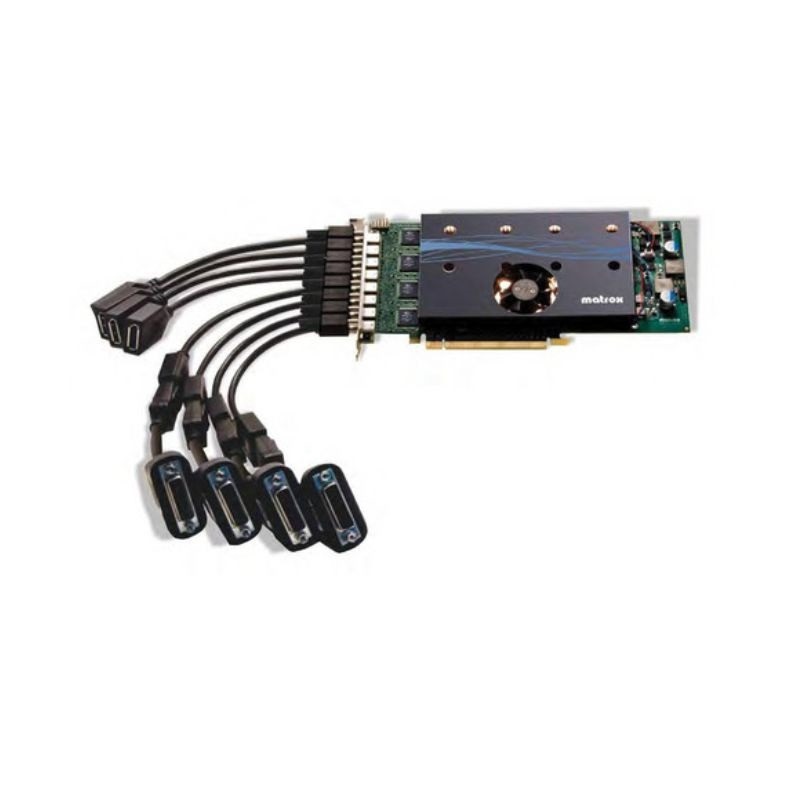
AMD GPUs used to be really good at this. Not sure how well it works nowadays, with generally higher resolutions and thus higher bandwidth requirements. I'd imagine it involves a lot of trial and error with displayport chaining.
Matrox cats are even better. 8 displays per card.
TIL Matrox still exists. I think I used to have one of their cards in the 90s, but I don't remember which.
A modern computer can easily fit 4 low-end GPUs plus the onboard one. Most things that used the slots are onboard the motherboard or USB now.
That's not what it looks like in my PC, but I guess you might be right. Although it seems that most motherboards, people can actually afford come with far fewer full PCIe slots.
If you can afford 15 huge monitors, you can splurge on the motherboard with extra PCI-E slots.
The main limitation here is number of monitor ports.
Applications that use this many screens aren't running a high level of graphics. Even a bunch of camera feeds aren't going to strain the GPU.
The cursor problem seems like it wouldn't be there with a tiling wm.
Just eliminate a few of them monitors, then it's much easier.
