this post was submitted on 17 Jul 2024
0 points (50.0% liked)

Linux Mint

2325 readers
1 users here now

Linux Mint is a free Linux-based operating system designed for use on desktop and laptop computers.

Want to see the latest news from the blog? Set the Firefox homepage to:

linuxmint.com/start/

where is a current or past release. Here's an example using release 21.1 'Vera':

https://linuxmint.com/start/vera/

founded 4 years ago
MODERATORS
 

I can't change directory and file permissions which is in /mnt/ through elevated Nemo. But can change in /. Why?

Apparently, this happens due to Automount. Because when I mount manually, this problem doesn't occur.

I also changed /mnt/Storage to /media/user/Storage/ on auto mount, still the same problem occurs.

uploaded on reddit because lemmy doen't allow videos .sorry for the quality reddit squashed it. Also my user name is blurred.

Also this an automounted NTFS partition, if it has to do anything with this,
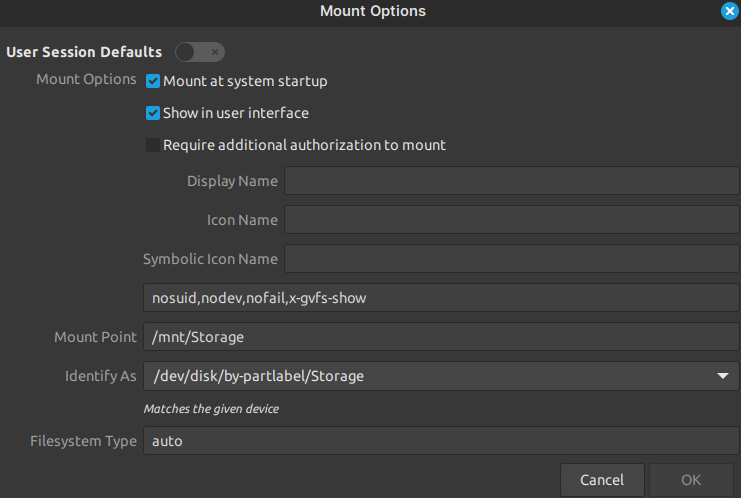
I tried restarting. Doesn't work.

I know about chown and chmod. But I wanna do it in GUI.

==============================================================

SOLVED

Include uid= and gid= as part of your mount options.
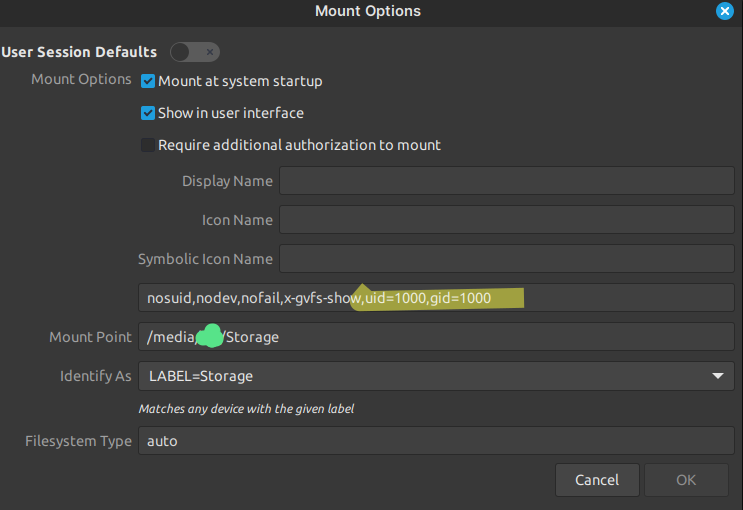
For More info look at this.

Thanks to this Chad @neidu@feddit.nl

top 3 comments
sorted by: hot top controversial new old
[–] neidu2@feddit.nl 0 points 1 year ago* (last edited 1 year ago) (1 children)

/mnt is owned by root (by default, anyway), and I suspect /mnt/Storage is too. Did your GUI ask for a sudo password at any point?

[–] gpstarman@lemmy.today 0 points 1 year ago (1 children)

I suspect /mnt/Storage is too

It is

It asked when open nemo as root. And didn't asked when I change the permissions.( Because nemo is already root, I suppose)

[–] neidu2@feddit.nl 0 points 1 year ago

You might want to include uid= and guid= as part of your mount options. Not sure how that'll work with NTFS, but it's worth a try