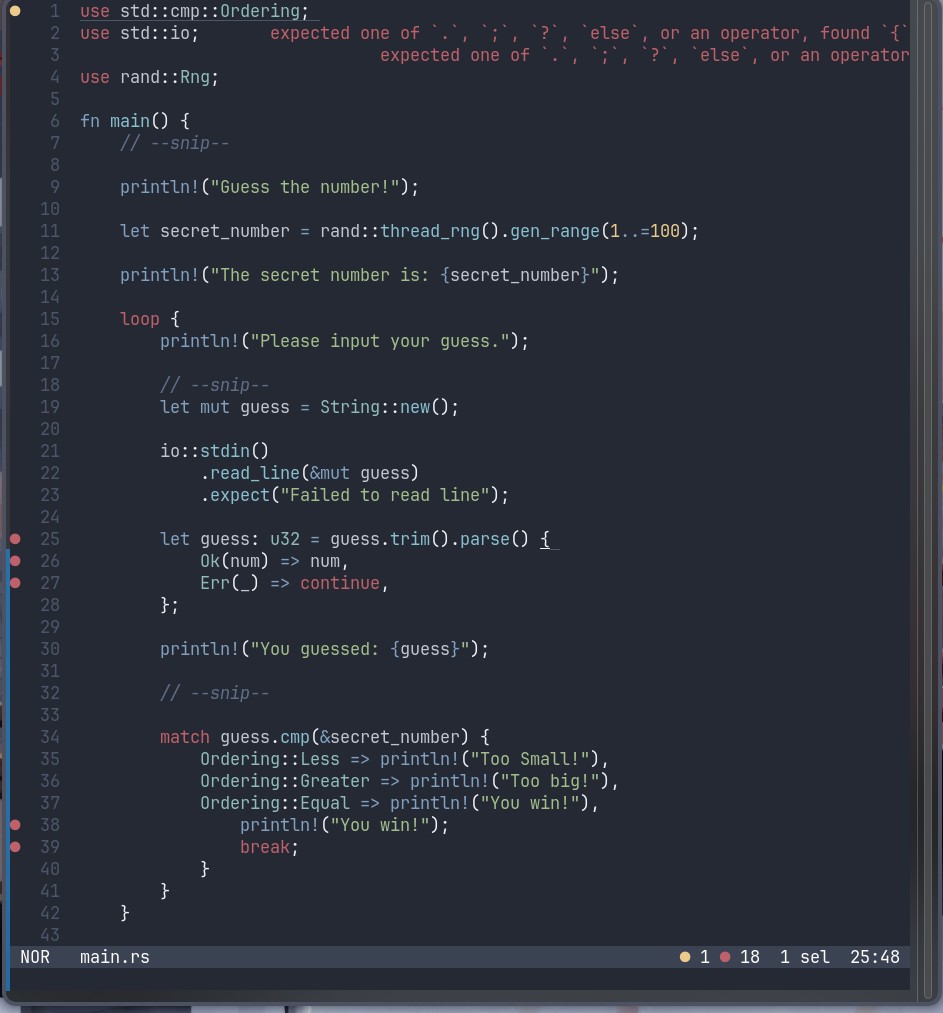
Why can't I open the thing it nags me about an operator but how is that relevant I'm just trying to open the thing
Welcome to the Rust community! This is a place to discuss about the Rust programming language.
Credits
Why can't I open the thing it nags me about an operator but how is that relevant I'm just trying to open the thing
You're missing a
matchafter the=and beforeguess…on line 25.The multiple statements on 37, 38, 39 after
=>also need to be enclosed in a{}.Also, why is your error message all the way up on the top, far away from the error? Something seems misconfigured.
Thank you're a lifesaver, IDK about the error message on the top didn't configure much except nord-night theme must be a bad design choice on helix's part
fwiw if you do a
cargo buildyou should be able to see the error messages in the correct context. If I replicate line 25 in a little test project and runcargo buildI getIf I try this with a blank helix config I don't get any of the text output from
rust-analyzerat all, just the three dots indicating there's a problem there, so it's unlikely it's a bad design choice on helix's part.Inline diagnostics was implemented earlier this year, and is still not enabled by default (likely to prevent breaking existing configs). The changelog is from January of this year:
https://helix-editor.com/news/release-25-01-highlights/
You can set it up here, and is straightforward:
https://docs.helix-editor.com/editor.html#editorinline-diagnostics-section
As an avid Helix user, thank you for linking this! I had no idea this was available, nor that I wanted it in the first place, but now I do.
By default, the message on the top-right refers to the location of the cursor in Helix. Though, I don't see a selected line or the cursor itself, so, I'm a bit confused, too.
From the bottom right, we know there is one selection and it's on 25:48, but lack of visual indication tripped me, too.