this post was submitted on 03 Mar 2025
48 points (91.4% liked)

Selfhosted

60281 readers
588 users here now

A place to share alternatives to popular online services that can be self-hosted without giving up privacy or locking you into a service you don't control.

Rules:

Detailed Rules Post

  1. Be civil.

  2. No spam.

  3. Posts are to be related to self-hosting.

  4. Don't duplicate the full text of your blog or readme if you're providing a link.

  5. Submission headline should match the article title.

  6. No trolling.

  7. Promotion posts require active participation, with an account that is at least 30 days old. F/LOSS without a paywall has exceptions, with requirements. See the rules link for details.

Resources:

Any issues on the community? Report it using the report flag.

Questions? DM the mods!

founded 3 years ago
MODERATORS
 

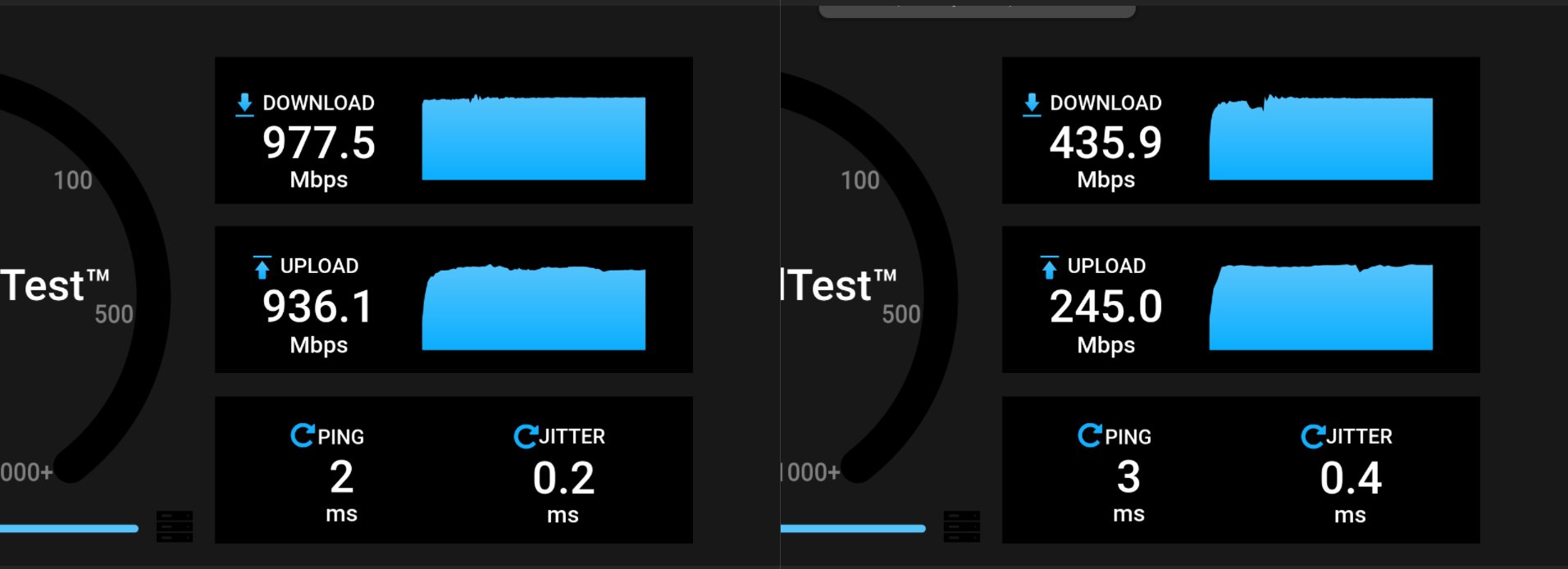
I ran OpenSpeedTest from my PC to my Raspberry Pi 4B, both connected via LAN to my WiFi router. The left screenshot shows the speedtest via local_ip:3000, and I'm getting the expected 1 Gbps up/down.

The right screenshot shows the speedtest via https://speed.mydomain.com/. I'm confident that the connection from my PC to my home server is routed internally and not through the internet because my lowest ping to the nearest Speedtest server (my own ISP) on speedtest.net is 6ms, and my internet speed is 100 Mbps up/down. So the traffic must be routing internally.

Is there typically such a massive difference between using http://local_ip:3000 and https://speed.mydomain.com/?

Additional context: The speedtest server is running via Docker Compose. I'm using Nginx (native, not Docker) to access these services from outside my network.
you are viewing a single comment's thread
view the rest of the comments
[–] taaz@biglemmowski.win 5 points 1 year ago

Also, proxy_buffering