this post was submitted on 08 Feb 2025
142 points (98.0% liked)

Selfhosted

60320 readers
592 users here now

A place to share alternatives to popular online services that can be self-hosted without giving up privacy or locking you into a service you don't control.

Rules:

Detailed Rules Post

  1. Be civil.

  2. No spam.

  3. Posts are to be related to self-hosting.

  4. Don't duplicate the full text of your blog or readme if you're providing a link.

  5. Submission headline should match the article title.

  6. No trolling.

  7. Promotion posts require active participation, with an account that is at least 30 days old. F/LOSS without a paywall has exceptions, with requirements. See the rules link for details.

Resources:

Any issues on the community? Report it using the report flag.

Questions? DM the mods!

founded 3 years ago
MODERATORS
 

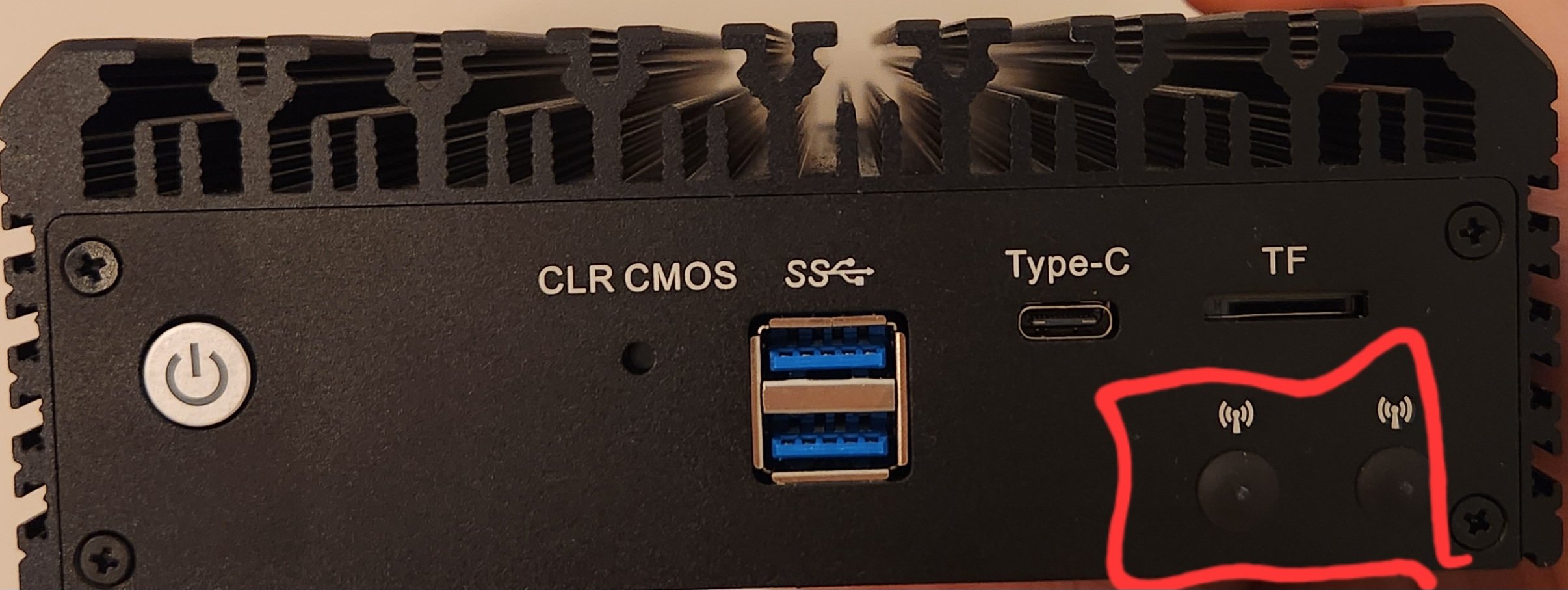
After a hardware upgrade I ended up with a spare mini pc. Noticed these two icons and thought I might be able to use it as a WiFi access point with VLANs using OPNsense.

Is that possible? If so, what do I even need to buy to plug into there?

I don't need it to do any fancy dhcp, dns or firewall stuff, I just need a WiFi access point with support for VLANs.
you are viewing a single comment's thread
view the rest of the comments
[โ€“] elyviere@lemmy.world 3 points 1 year ago (1 children)

That's a good point, I'll see if I can figure out the power draw of this system somehow. Any tips?

[โ€“] stoy@lemmy.zip 3 points 1 year ago

Since you have the equipment at home you can just get a power meter and measure the computer and a router to see which uses most power over two hours.

Make sure to install the baseline for the computer before the test so it is fairly representative