this post was submitted on 07 Nov 2024
49 points (96.2% liked)

Selfhosted

61808 readers
715 users here now

A place to share alternatives to popular online services that can be self-hosted without giving up privacy or locking you into a service you don't control.

Rules:

Detailed Rules Post

  1. Be civil.

  2. No spam.

  3. Posts are to be related to self-hosting.

  4. Don't duplicate the full text of your blog or readme if you're providing a link.

  5. Submission headline should match the article title.

  6. No trolling.

  7. Promotion posts require active participation, with an account that is at least 30 days old. F/LOSS without a paywall has exceptions, with requirements. See the rules link for details. Tags [CBH] or [AIP] are required, see the links in Rule 8 for details.

  8. AI-related discussions and AI-involved promotional posts have additional requirements for tagging, as noted in Rule 7 and the AI & Promotional Post Expanded Rules post, and find example disclosures here.

Resources:

Any issues on the community? Report it using the report flag.

Questions? DM the mods!

founded 3 years ago
MODERATORS
 

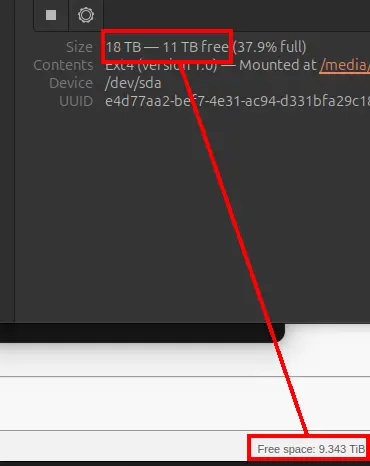
qBit does delete the file from my physical drive (direct attached storage, raid5). But won't update the free space in the WebUI. The discrepency is over 1TB, so I'd like to address this if someone can help me.

Some info:

  • qBit v.5.0.1, docker, from linuxserver.io
  • Ubuntu 24.04
  • Automatic Management Mode is checked
  • Torrent content removing mode: Delete files permanently
you are viewing a single comment's thread
view the rest of the comments
[–] Barzaria@lemmy.dbzer0.com -1 points 2 years ago

Yo, empty your computer recycle bin / yeah can. That's where the files are.