Swift

494 readers
1 users here now

This group focus on the content related to the development of Apple Eco-system software. So feel free to share and talk about, for example;

founded 2 years ago
MODERATORS
26


Qualcomm Acquires Arduino: The Wheel of History Turns

  • 🚀 How to Integrate OpenSwiftUI
  • 🗓️ Foundation Model Code-Along Q&A
  • 🌍 The macOS DNA of Apple Platforms
  • 📖 Swift Profile Recorder
  • 📁 RichText

and more...

27
 
 
  • ✨ Async Result in a Synchronous Function
  • 🗓️ Adopting Liquid Glass
  • 📖 Swift Configuration
  • 📁 AsyncItemProvider

and more...

28


Fatbobman’s Swift Weekly #0104 is out! Apple is Preparing for System-Level MCP Support

  • 💡 Adopting the New Window Controls in iPadOS 26
  • 🧐 Benjamin Button Reviews macOS
  • 🔍 How I QA iOS Apps
  • 🌐 App Store Optimization

and more...

29
30


Fatbobman’s Swift Weekly #0103 is out!

Swift 6.2 Is Here

  • 🌟 SwiftUI TextField Memory Leak
  • 🔍 Processing Swift Actor Usage Advice in Depth
  • 📅 Feature Flags in Swift -📖 edge-agent

and more...

31
32


Have You Completed Your Liquid Glass Adaptation?

  • 🌟 Talk About Observation
  • 🔧 The Swift Android Setup
  • 🌍 SwiftUI Redraw System In Depth -📖 Swift-Build GitHub Action

and more...

33


From Open Platform to Controlled Ecosystem: Google Announces Android Developer Verification Policy

  • 🚀 MainActor.assumeIsolated
  • 🧩 Default Value in String Interpolations
  • 📚 OpenAttributeGraph Documentation
  • 🔧 macOS Accessibility

and more...

34


So I have a view that is focusable and has onKeyPress on it. I want to show a modal dialog when the user presses the delete key. However, it seems that the pressedKey.key for the delete key does not equal KeyEquivalent.delete value.

Example:

import SwiftUI

struct MyView: View {
    var body: some View {
        Rectangle()
            .frame(width: 100, height: 100)
            .focusable()
            .focusEffectDisabled()
            .onKeyPress { pressedKey in
                // Output: KeyEquivalent(character: "\u{7F}") == KeyEquivalent(character: "\u{08}")            
                print("\(pressedKey.key) == \(KeyEquivalent.delete)")
                return .handled
            }
    }
}

Am I missing something that is otherwise obvious?

35


While Swift has offered strict concurrency checking for some time, many of Apple’s official APIs have yet to be fully adapted, and this situation may persist for quite a while. As Swift 6 gradually gains adoption, this problem becomes increasingly prominent: developers want to benefit from the concurrency safety guarantees provided by the Swift compiler, while struggling with how to make their code meet compilation requirements. This article will demonstrate the clever use of MainActor.assumeIsolated in specific scenarios through an implementation case with NSTextAttachmentViewProvider.

36


For This Journey, and for My Future Self | Fatbobman’s Swift Weekly #0100 is out!

  • 🌟 An Analysis of Xcode’s New AI Assistant
  • 🎨 Discussion on SwiftData’s ModelActor
  • 🔎 Creating Amazing Loading Animations with SF Symbols
  • 👁️ SBSObservation

and more...

37


The Future is Coming: Humanoid Robot Games

  • ✨ Corner concentricity on iOS 26
  • 🖌️ Vapor on Raspberry Pi
  • 🔍 Liquid Glass. Why?
  • 📲 Open Intent

and more...

38


Fatbobman’s Swift Weekly #098 is out! I Almost Lost Patton (My Dog)

  • 🌟 TextKit 2
  • 🔍 Why LLMs Can’t Really Build Software
  • ⏰ Main Menu in SwiftUI
  • 📱 NavigationStack + Deep Linking in Large SwiftUI Apps

and more...

39


I've just noticed that the official Swift language guide has been updated. It now includes a number of additional topics on concurrency. There's still a long way to go here, but this is good progress!

I think the migration guide is still useful, and goes into a lot more depth in many areas. But, I'm very glad to see this is being filled in.

(However, I'm not glad to see "split isolation" used in an example: a type with different isolation than its members. The language supports this, sure, and it does have uses, but is a mistake 99% of the time.)

40


I am trying to build a macOS (14.6) app that uses a combination of List(_:selection:rowContent:) and Section(isExpanded:content:header:), and while it "works", it looks like garbage. When using .plain, there are list row/section seperators, and even when using .listRowSeparator(.hidden) or .listSectionSeparator(.hidden), there is always one separator that is still visible between the first item and the remaining items.

When I try to use .listStyle(.sidebar), it adds its own disclosure indicator, but on the right side of the list row. It's tolerable, though I'd prefer the indicator on the left and not to auto-hide when not being hovered.
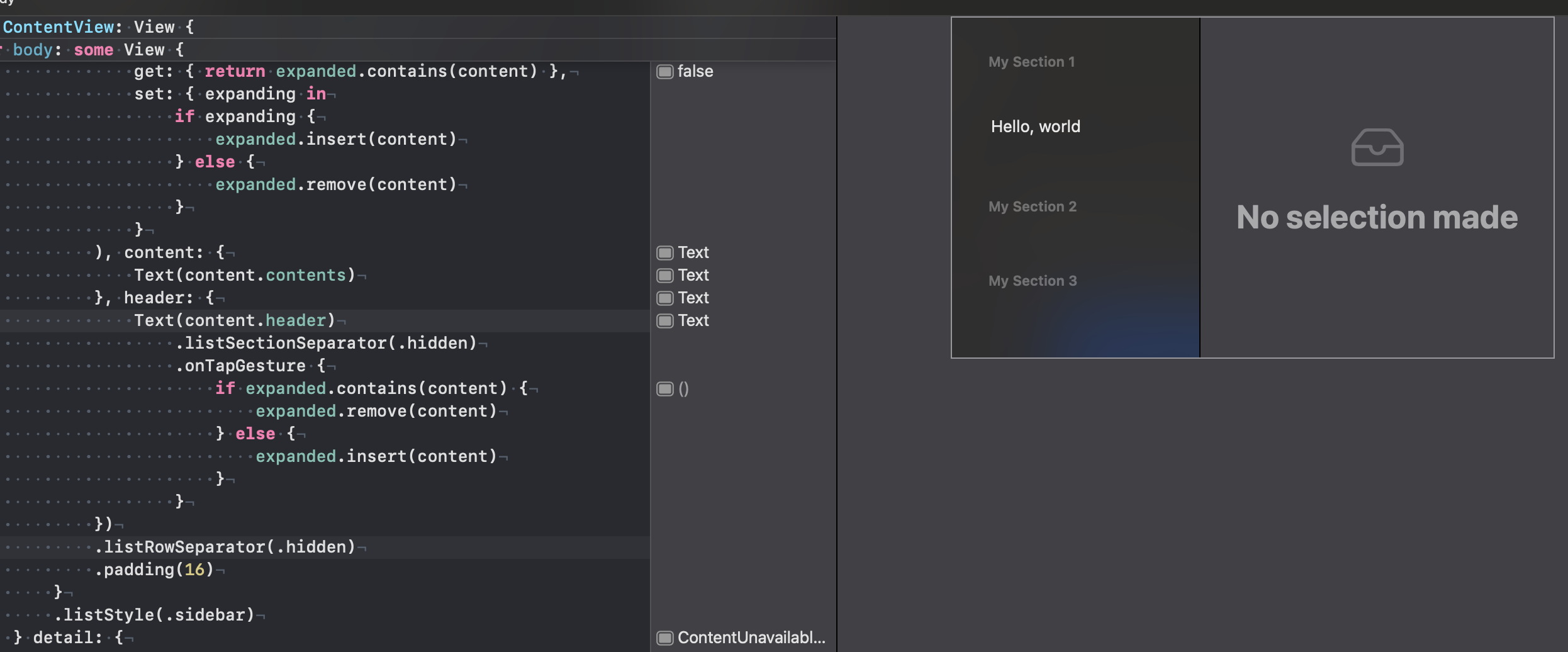
The kicker is that regardless of the .listStyle() used, there seems to be spacing/padding between the sections that cannot be removed. In Apple's infinite wisdom, they added .listRowSpacing(), but decided macOS shouldn't get to use it.
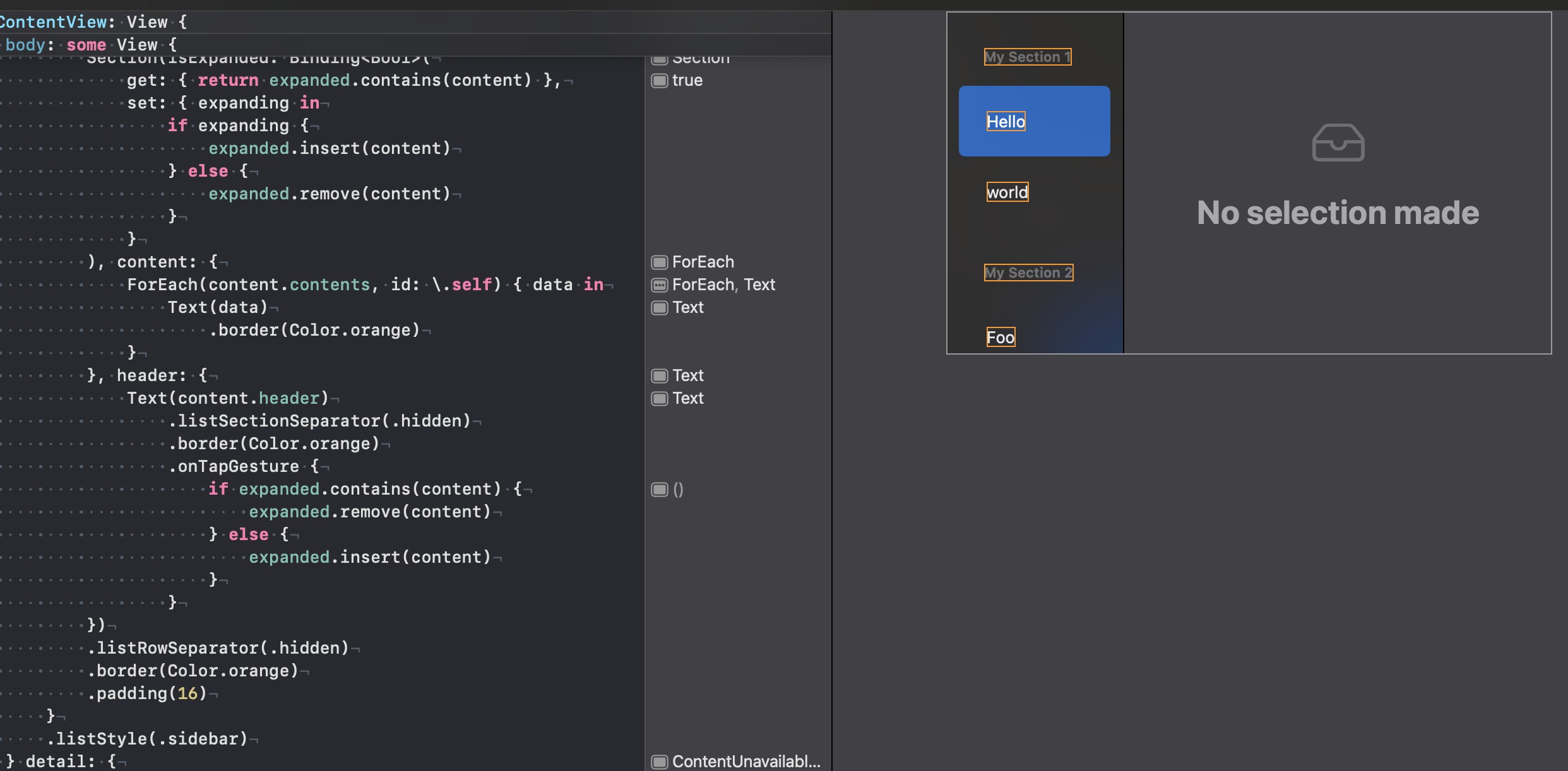
I am still new to all of this, and would really appreciate any advice on how I can style my UI the way I need it to be. I am using SwiftUI, but if there is another method (maybe UIKit or somthing?), I'm open to suggestion.

Here is my playground code used to generate the screenshots:

import SwiftUI
import PlaygroundSupport

struct Content: Hashable, Identifiable {
    var id: Self { self }
    var header: String
    var contents: [String]
}

struct ContentView: View {
    var contents: [Content] = [
        Content(header: "My Section 1", contents: ["Hello", "world"]),
        Content(header: "My Section 2", contents: ["Foo", "bar"]),
        Content(header: "My Section 3", contents: ["Help", "Me"]),
    ]

    @State private var expanded: Set<Content> = []
    @State private var selected: String?

    var body: some View {
        NavigationSplitView {
            List(contents, selection: $selected) { content in
                Section(isExpanded: Binding<Bool>(
                    get: { return expanded.contains(content) },
                    set: { expanding in
                        if expanding {
                            expanded.insert(content)
                        } else {
                            expanded.remove(content)
                        }
                    }
                ), content: {
                    ForEach(content.contents, id: \.self) { data in
                        Text(data)
                            .frame(maxWidth: .infinity, maxHeight: .infinity, alignment: .leading)
                            .border(Color.orange)
                    }
                }, header: {
                    Text(content.header)
                        .frame(maxWidth: .infinity, maxHeight: .infinity, alignment: .leading)
                        .onTapGesture {
                            if expanded.contains(content) {
                                expanded.remove(content)
                            } else {
                                expanded.insert(content)
                            }
                        }
                })
                .listRowInsets(EdgeInsets(
                    top: 0,
                    leading: -2,
                    bottom: 0,
                    trailing: -14
                ))
            }
        } detail: {
            ContentUnavailableView {
                Label("No selection made", systemImage: "tray")
            }
        }
        .border(Color.gray)
    }
}

// Present the view in Playground
PlaygroundPage.current.setLiveView(ContentView())

Edit: 3 hours later... I was able to remove the spacing from the section content's items by using listRowInsets(_ insets:) and removing some of the padding I put in the code. But, I still do not know how to affect the section headers. I've updated the code above, and here's a new screenshot:

41


There's quite a lot of background required to even begin to understand this feature completely. However, the documentation here is to-the-point and definitely useful. I like this quite a lot because it also shows how to use the migration feature, which is cool and pretty much essential if you want to adopt this in an existing project.

Could also be quite eye-opening if you have been using concurrency with the compiler feedback disabled.

(This whole per-diagnostic/feature documentation effort is just great too.)

42


Swift’s concurrency model introduces numerous keywords, some of which are similar in naming and purpose, often causing confusion among developers. This article examines several keywords related to cross-isolation domain passing in Swift concurrency: Sendable, @unchecked Sendable, @Sendable, sending, and nonsending, helping you understand their respective roles and use cases.

43


I'm using Xcode 16.4 (16F6) and whatever version of SwiftUI that comes with it (as an aside, where can I look up the Swift/SwiftUI versions for my version of Xcode?). I want to create an interface that uses a static (always visible) sidebar with buttons, and a collapsable detail view similar to what's in Postman where there is a toolbar that spans the sidebar and detail views when the detail view is visible, but turns into a button when collapsed.

I've found NavigationSplitView, and in combination with a HStack+VStack for the static sidebar, it gets me 95% of the way to what I am looking to do. I am just not sure how can I make the toolbar that spans between the sidebar and the split view having the toolbar where Postman has the "My Workspace" and New/Import buttons.

Here is the code I've got so far:

HStack(alignment: .top, spacing: -2) {
    VStack(alignment: .leading, spacing: 2) {
        Button {
        } label: {
            VStack {
                Image(systemName: "folder")
                    .font(.title2)
                    .padding(3)
                Text("Collections")
            }
            .frame(maxWidth: .infinity, maxHeight: 60)
        }
        .buttonStyle(.plain)
        .cornerRadius(4)

        Button {
        } label: {
            VStack {
                Image(systemName: "folder")
                    .font(.title2)
                    .padding(3)
                Text("History")
            }
            .frame(maxWidth: .infinity, maxHeight: 60)
        }
        .buttonStyle(.plain)
        .cornerRadius(4)
    }
    .font(.caption)
    .padding(3)
    .frame(maxWidth: 80)

    NavigationSplitView {
        ContentUnavailableView {
            Text("Hello, World")
                .font(.body)
        }
    } detail: {
        ContentUnavailableView {
        } description: {
            Text("Select an action on the left to begin.")
        }
    }
}

I don't know what I don't know, so if NavigationSplitView is not the way, I'm open to using different mechanisms.

44


Xcode 26 beta 4: If We're Going Down, We're Going Down Together

  • 🚀 Default Actor Isolation
  • 🎨 SwiftUI for Mac 2025
  • ☎️ Assembler for Swift Developers
  • 🔎 SwiftUI and Godot

and more...

45


Xcode 26 beta 4: If We're Going Down, We're Going Down Together

  • 🚀 Default Actor Isolation
  • 🎨 SwiftUI for Mac 2025
  • ☎️ Assembler for Swift Developers
  • 🔎 SwiftUI and Godot

and more...

46


While Swift’s strict concurrency checking has good intentions, it significantly increases the burden on developers in many single-threaded scenarios. Developers are forced to add unnecessary Sendable, @MainActor, and other declarations to their code just to satisfy the compiler’s requirements. Swift 6.2’s new Default Actor Isolation feature will greatly improve this situation and reduce unnecessary boilerplate code. This article will introduce the Default Actor Isolation feature and point out some situations to be aware of when using it.

47


Blender is Developing an iPad Version

  • 🚦 Core Data Migration Incident Analysis
  • 🌟 Uncertain⟨T⟩
  • 🛠️ Xcode Project Renamer
  • 💡 iOS Backend Selection Cheat Sheet
  • ❓ How to Combine SwiftUI Views

and more...

48


Compared to some open-source frameworks, Core Data and SwiftData, despite having Apple’s official endorsement, often leave developers helpless when exceptions occur due to their “black box” nature, making it difficult to quickly locate problems and find effective solutions. This article documents an app startup timeout incident caused by Core Data model migration, shares the solution, and deeply analyzes the underlying causes.

49


Fatbobman’s Swift Weekly #094 is out!

F1: A Great Movie, An Even Greater Business

  • ✨ Icon Composer: Tackling Challenges
  • ⏳ SwiftUI 2025: What’s Fixed, What’s Not
  • 🪟 Windowing on iPadOS
  • 🔎 Apple Docs MCP

and more...

50


A Dimmer Liquid Glass and the Disappearance of Apple Intelligence

  • 🚀 How to Detect Text Truncation in SwiftUI
  • 📲 Everything You Should Know About Spacer
  • 🔍 Shaft - Swift-based Cross-platform UI Framework

and more...

view more: ‹ prev next ›