Selfhosted
54254 readers
878 users here now
A place to share alternatives to popular online services that can be self-hosted without giving up privacy or locking you into a service you don't control.
Rules:
-
Be civil: we're here to support and learn from one another. Insults won't be tolerated. Flame wars are frowned upon.
-
No spam posting.
-
Posts have to be centered around self-hosting. There are other communities for discussing hardware or home computing. If it's not obvious why your post topic revolves around selfhosting, please include details to make it clear.
-
Don't duplicate the full text of your blog or github here. Just post the link for folks to click.
-
Submission headline should match the article title (don’t cherry-pick information from the title to fit your agenda).
-
No trolling.
-
No low-effort posts. This is subjective and will largely be determined by the community member reports.
Resources:
- selfh.st Newsletter and index of selfhosted software and apps
- awesome-selfhosted software
- awesome-sysadmin resources
- Self-Hosted Podcast from Jupiter Broadcasting
Any issues on the community? Report it using the report flag.
Questions? DM the mods!
founded 2 years ago
MODERATORS
1
2
3
4
5
6
7
8
9
44
I'm proud to share major development updates for XPipe, a connection hub that allows you to access your entire server infrastructure from your local desktop. It can make your life easier when working with any kind of servers by eliminating many of the tedious tasks that come up when interacting with remote systems, either from the terminal or from a graphical interface.
It comes with integrations for SSH, docker and other containers, various hypervisors, cloud providers, and more without requiring setup on your remote systems. You can also keep using your favourite text/code editors, terminals, password managers, shells, command-line tools, and more with it.

It has been half a year since I last posted here, so there are a lot of improvements that were implemented since then:
Netbird support
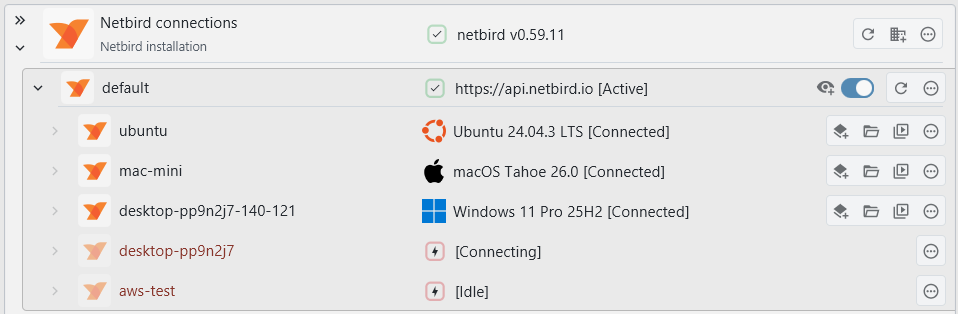
You can now list and connect to devices in your Netbird network. This works via SSH and your locally installed netbird command-line client:
Legacy system support
Up until now, the testing was done on relatively up-to-date machines that were not considered EOL. However, in practice, legacy systems are still used. The handling of older Unix-based systems has been greatly improved, especially when they did not ship with GNU command-line tools.
As long as you can connect to a system via SSH somehow, it should work now regardless of how old the system is. If you're into retrocomputing, feel free to give this a try.


AWS support
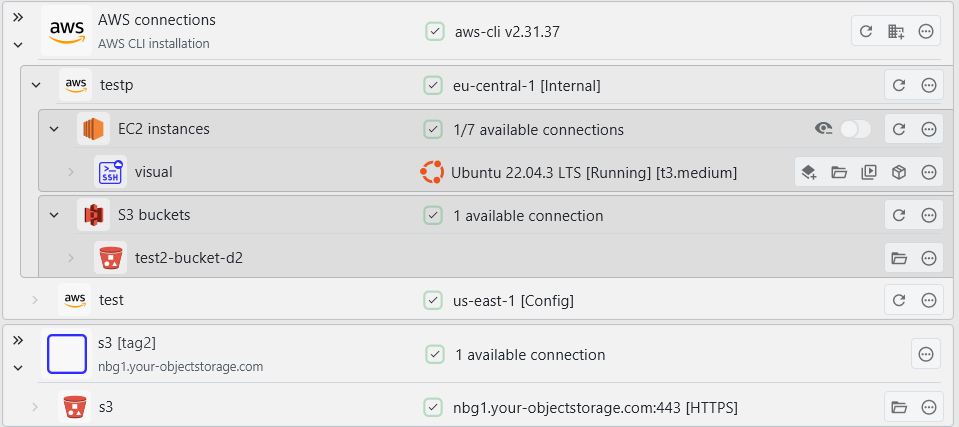
You can now connect to your AWS systems from within XPipe. Currently, EC2 systems and S3 buckets are supported, also including support for SSM. The integration works on top of the AWS CLI. The usage of the AWS CLI allows the integration to work very flexibly on any existing CLI setup if you already use the CLI. You can use any IAM access keys and authentication methods with it.
SSH keygen
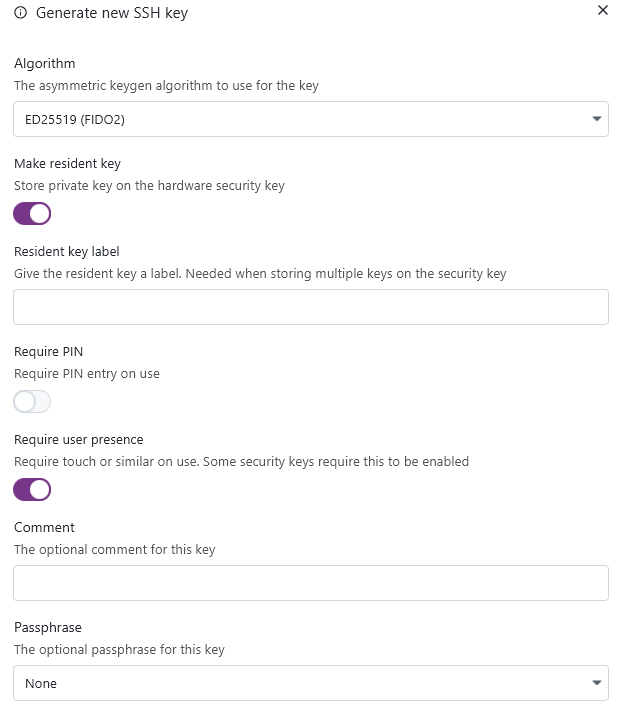
You can now generate new SSH keys from within XPipe. The keys are generated via the installed OpenSSH ssh-keygen CLI tool, so you can be assured that the keys are generated in a cryptographically secure manner. This keygen right now supports RSA, ED25519, and ED25519 + FIDO2:
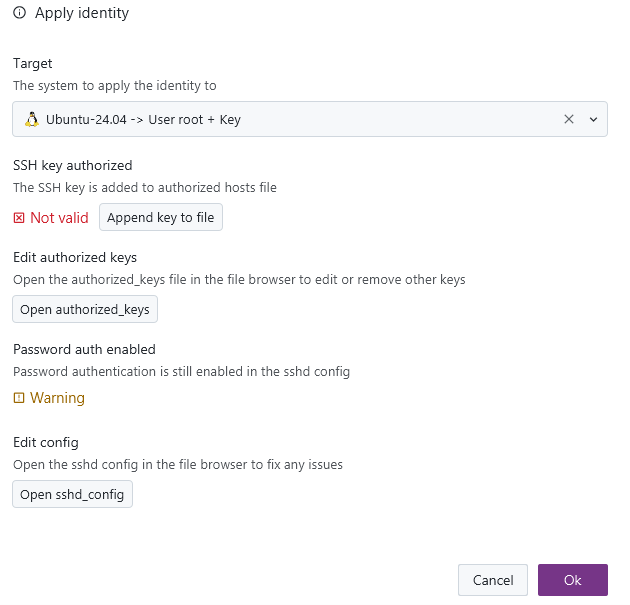
Keys of identities can now also be automatically applied to systems, allowing you to perform a quick key rotation when needed:

The process of changing the authentication configuration of a system is not always one simple step. So the dialog is a comprehensive overview of what is needed to apply a certain identity to a remote system, with various quick-action buttons and notes. This gives you still full manual control of what should be done and an overview of what is required prior to doing so.
Network scan
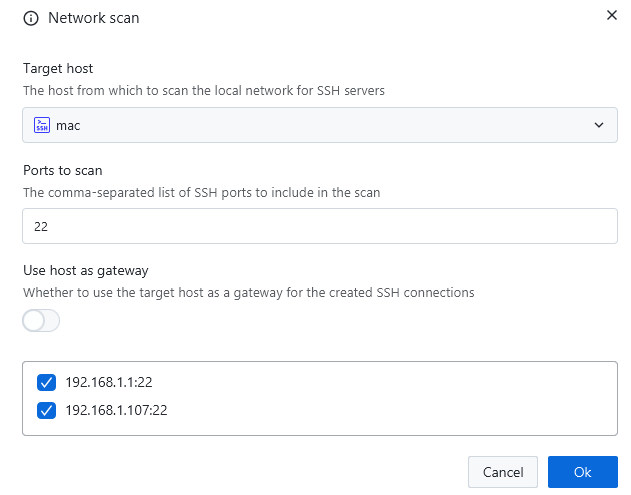
There is now the option to automatically search the local network for any listening SSH/VNC/RDP servers and add them automatically as new connections. This also works for remote systems and their networks:
VNC
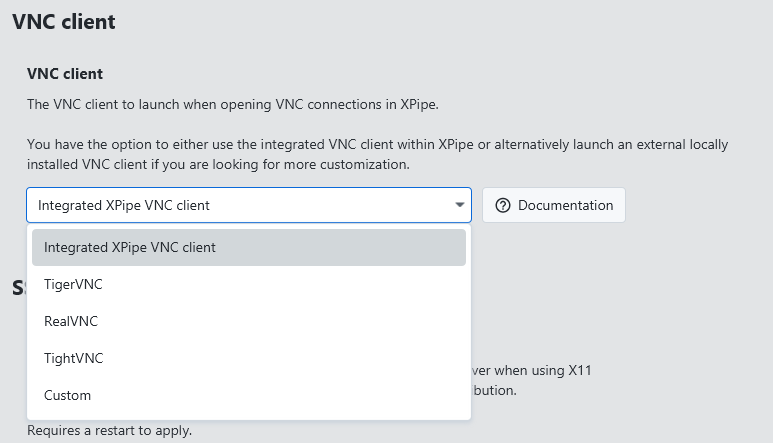
Up until now, the internal VNC implementation of XPipe did a somewhat acceptable job for most connections. However, it is not able to match dedicated VNC clients when it comes to more advanced features and authentication methods. There's simply not the development capacity to maintain all of these additional VNC features. For this reason, there is now support to also use an external VNC client with XPipe, just as with any other tool integrations:
Split terminals
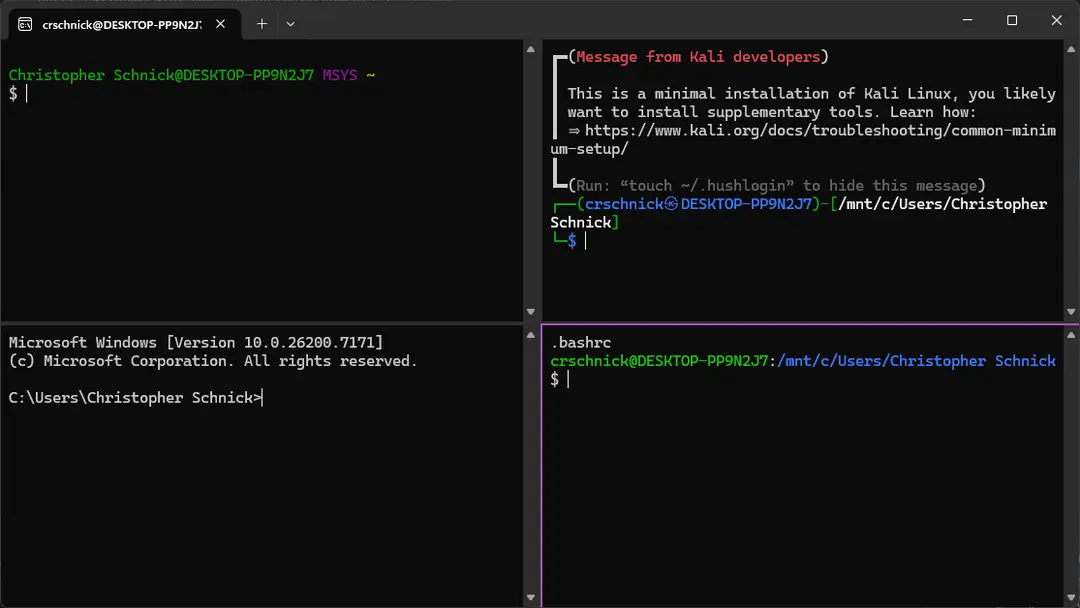
There is now a new batch action to open multiple systems in a split terminal pane instead of individual tabs. This action is only supported for terminals that support this, which currently includes: Windows Terminal, Kitty, and WezTerm. In addition, this is also supported when using any other terminal and a terminal multiplexer like tmux or zellij.

This allows you to also use a feature like broadcast mode of your terminal to type one command into multiple terminal panes at the same time.
Tags
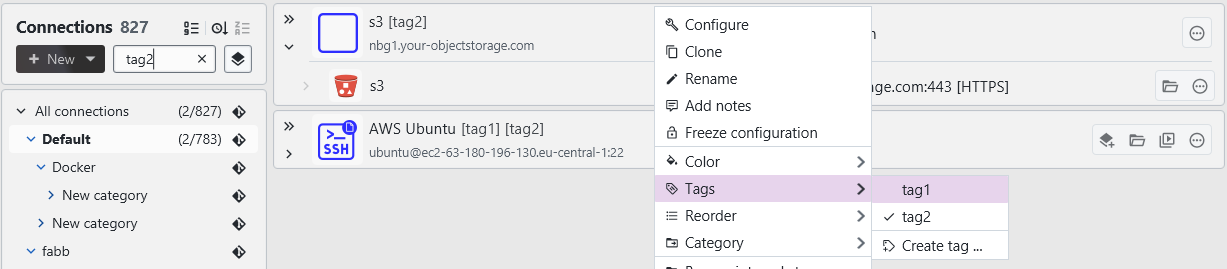
You can now create and add tags to connection entries. This allows you to have a more structured workflow when filtering individual connections.
macOS 26 Tahoe
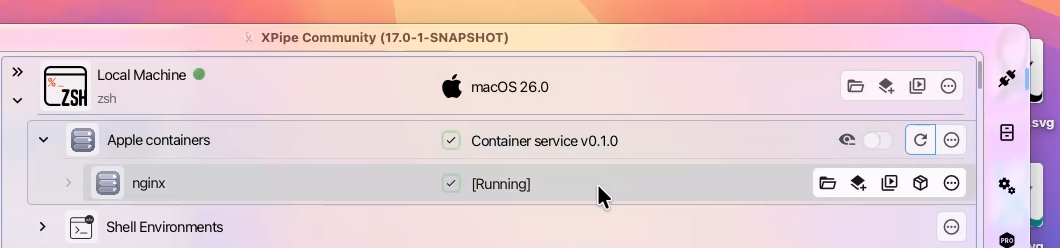
XPipe adopts many of the new features of macOS 26 right away. The application window now uses the new Liquid Glass theming. The application icon has also been reworked with Liquid Glass in mind. There's also support for the new apple containers framework:
Windows ARM
There are now native Windows ARM builds. These releases are also available in winget and scoop.
Other
- Add support for flatpak variants of various editors and terminals
- The nixpkg package now also supports macOS and has been reworked as a flake
- Add support for nushell
- Add support for xonsh
- Several fixes to be able to run the application in the Android Linux Terminal app without issues
- The entire interface has been reworked to better work with screen readers and other accessibility tools
- Various many other small improvements
- Many performance optimizations
- A lot of bug fixes across the board
A note on the open-source model
Since it has come up a few times, in addition to the note in the git repository, I would like to clarify that XPipe is not fully FOSS software. The core that you can find on GitHub is Apache 2.0 licensed, but the distribution you download ships with closed-source extensions. There's also a licensing system in place with limitations on what kind of systems you can connect to in the community edition as I am trying to make a living out of this. I understand that this is a deal-breaker for some, so I wanted to give a heads-up.
Outlook
If this project sounds interesting to you, you can check it out on GitHub, visit the Website, or check out the Docs for more information.
Enjoy!

10
11
259
Reitti v3.1.0: A year of self-hosting my location history (1.1k stars and 46 releases later)
(discuss.tchncs.de)
Hey everyone, I’m Daniel.
On June 5, 2025, I pushed v1.0.0 of Reitti. My goal was personal: I wanted to track my movements so that I could look back a year later and easily bring back memories of where I had been and what I had done. I wanted that "Time Machine" feeling, but I didn't want to hand my entire life's history over to another entity to get it.
Today, exactly 213 days and 46 releases later, I’m releasing v3.1.0.
The journey from a personal hobby to a community project has been wild:
- 1,191 Stars on GitHub.
- 404 Commits to main with 311 PRs merged.
- 250 Issues closed.
- 9 Languages supported.
What is Reitti?
"Reitti" is Finnish for "route" or "path." It’s a personal location tracking and analysis application. It is fully local and private and no data ever leaves your server. You own the database, and you own the memories.
The Year in Review: Major Milestones
To reach that goal of "bringing back memories," we had to build some serious infrastructure this year:
- The Memories Feature: This was the soul of the project this year. We moved beyond just "rows of data" to create beautiful travel logs that combine raw GPS data with images, text notes, and visit summaries.
- Deterministic Visit Detection: I’ve rewritten the processing pipeline multiple times. Handling raw GPS data is a struggle, debugging is a nightmare when one single "bounced" coordinate out of 10,000 can break a visit logic. We moved to a unified, deterministic engine to ensure your logs are accurate and noise-free.
- Advanced Sharing & Federation: We implemented "Magic Links" for external sharing, added sharing your data to other users and added support for cross-instance sharing, allowing you to see live locations on a single map of all your friends and family members.
New in v3.1.0:
- Polygon Boundaries for Places: Move beyond simple circular radiuses; define exact shapes for your significant places.
- OwnTracks Friend Data Support: Seamlessly integrate and view data from your friends directly in your OwnTracks App.
- Docker Secrets Support: Hardening security for your self-hosted setup.
- Dutch Language Support: Now supporting our 9th language!
Full v3.1.0 Release Notes: https://github.com/dedicatedcode/reitti/releases/tag/v3.1.0
A Heartfelt Thank You
This project isn't just me anymore. I want to say a massive thank you to everyone who contributed this year. To the 15 contributors on GitHub who touched the code, and to the countless others who:
- Helped translate Reitti into 9 languages.
- Filled detailed issues and bug reports.
- Suggested features that shaped the direction of the app.
- Supported the project indirectly by sharing it with others.
You are the reason this project stayed healthy for 46 releases and I am looking forward what we can achieve in 2026
What’s Next?
I’m currently focusing on usability, mostly polishing the date selection and adding more configuration options. Long-term, I want to expand the Memories feature, possibly exploring local AI to help turn raw coordinate logs into natural-language travel diaries to make looking back even easier.
I appreciate your feedback and support! Here are a few ways to connect:
- Report Issues: Encountered a bug? Open an issue on GitHub Issues.
- Discuss on Lemmy: Message me on Lemmy.
- Connect on Reddit: Find me here.
- Support My Work: If you find this useful, you can buy me a coffee on Ko-fi.
GitHub: https://github.com/dedicatedcode/reitti
Documentation: https://www.dedicatedcode.com/projects/reitti/
I'll be in the comments to answer your questions.

12
13
14
Hey everyone,
I'm new here! I wanted to share a music search and discovery tool for Lidarr. It plugs into Spotify, TIDAL, Deezer, Last.fm, MusicBrainz, Plex/Tautulli, Jellyfin, and even some AI recommendations.
GitHub: https://github.com/aquantumofdonuts/mixarr/releases/tag/v1.1.1
Website: https://aquantumofdonuts.github.io/mixarr/
What it does:
- Connects to Lidarr and analyzes your existing artists
- Hooks into Spotify, TIDAL, Deezer, Last.fm, MusicBrainz, Plex/Tautulli, and AI services
- Finds related/similar artists, new releases, charts, labels, playlists, etc.
- Gives you a review queue to approve or dismiss discovered artists
- Automatically adds approved artists to Lidarr with the profile you choose
- Has a universal search and discovery interface across all services
- Runs as a web app (Next.js frontend + Express backend) and plays nice with Docker
Why I built it:
I wanted one tool that I could point at my Lidarr library and get a steady stream of relevant artist recommendations.
Basically, make music discovery feel as automated and “infrastructure-y” as the rest of the *arr ecosystem.
Current status:
- Working with Lidarr + Spotify/TIDAL/Deezer/Last.fm/MusicBrainz + Plex/Tautulli
- Has subscriptions for different discovery sources (charts, playlists, related & followed artists, etc.)
- Docker-compose setup available, plus local dev if you prefer
- Early but usable; I’m actively using it myself and iterating

15
16
17
18
19
178
Introducing Hypermind: A fully decentralized, P2P, high-availability solution to a problem that doesn't exist.
(www.reddit.com)
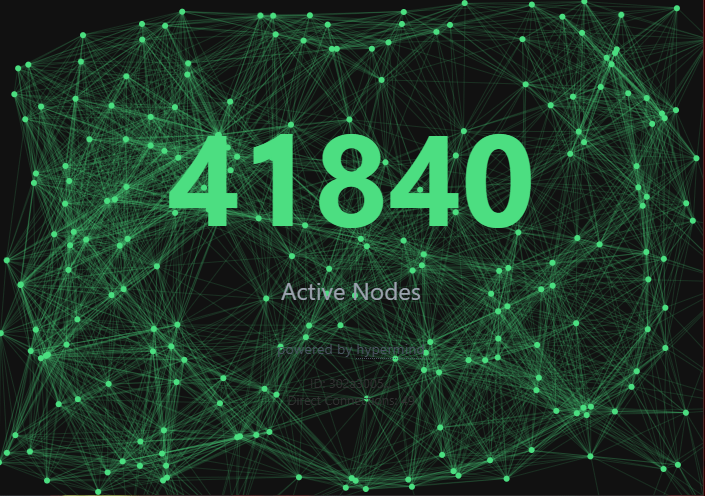
I'm not the creator of this program, but its too fun not to share! The comments from the developer and users joining the swarms on the reddit thread are hilarious.
It's basically a decentralized swarm of docker users. It does nothing except tell you how many other users you are connected to. Some are in the tens of thousands, haha!
20
21
22
23
24
25
view more: next ›