Neovim

2711 readers
1 users here now

founded 2 years ago
MODERATORS
26
27


Hello guys, my question is basically in the title. I would really like to be able to have the parameter names included when I cursor over a function and open the 'hover' window to show basic info about it. Currently it only shows me the expected types, which while still useful I feel is only a piece of the puzzle when working either with a new library, or a codebase you're not familiar with.

As an example I'm learning ncurses these past couple days, and its significantly flow-breaking to have to switch focus away from the editor to either search on the web what a particular function takes as parameters, or open a separate terminal to read the man page for it. I'm still not familiar with the library so I frequently need to look up what a parameter represents in the context of the code, in addition to what type I should give it. Is there any way to do this while still using clangd as my lsp server?

Ive also included a screenshot of one such hover window for the ncurses function mvprintw.

28


I simply want to emulate the effect of -p by default i.e. open all files in tabs when multiple files are supplied. I wrote the following autocommand to make it work.

-- Open files in tabs by default
vim.api.nvim_create_autocmd("VimEnter", {
    callback = function()
        if not vim.opt.diff:get() and #vim.fn.argv() > 1 then
            vim.cmd("tab sball")
            vim.cmd("tabfirst")
        end
    end,
})

But it seems to bork the colorscheme for all but the first tab. It's weird since Running the same commands manually after neovim is loaded works perfectly. I may have something to do with the order in which things are run. Is it possible to run this command as late as possible?

I'm open to alternative approaches that gets the job done.

29


While LLMs deliver at times questionable quality of code, they can be none the less helpful to give feedback, explain syntax or high level concepts. I was wondering how people are integrating them in neovim. How are you using LLMs? Is it worth thinking about a setup?

30


I use Obsidian for Zettelkasten note-taking. Anybody have a system in (Neo)Vim that they use?

31


nvim-dap 0.10.0 released

https://github.com/mfussenegger/nvim-dap/releases/tag/0.10.0

This is a smaller one. Mainly to drop support for nvim-0.9.5 on master.

I was hoping I'd get to wrap up the new breakpoint API and data and method breakpoint support, but that will have to wait for 0.11.0 or later.

@neovim
#neovim

32
33


Hi! I built this small plugin that adds JSX/TSX text-objects and motions using Treesitter: jsx-element.nvim. I was surprised that it (to my knowledge) doesn't exist yet.

From the README:

Use ]t/[t to go to the next/previous JSX/TSX element.

Use it/at to use JSX/TSX elements as text-objects. For example dit for "delete inside tag". This works with self-closing elements:

<Checkbox value="checkedA" />
          ╰───── it ─────╯
╰─────────── at ────────────╯

It also works with paired elements:

<Button variant="text">This is a button</Button>
                       ╰───── it ─────╯
╰───────────────────── at ─────────────────────╯
34
13
submitted 10 months ago* (last edited 10 months ago) by mathias@social.fussenegger.pro to c/neovim@programming.dev


No-Config Python debugging using neovim

https://zignar.net/2025/03/02/no-config-python-debugging-using-neovim/

A follow up post of my earlier toot about no-config debugging that explains a bit more on how it works. (https://social.fussenegger.pro/@mathias/113970677458792689)

@neovim

#neovim

35


(Linked video showcases issue quite clearly)

I am using AstroNvim, but I believe that doesn't matter too much in this instance

I am very much new to html and js and the stuffs - but this tag indenting is catching me very offguard.
When I type a new tag it gets indented all nicely, and when opening a new line with o or O key, it nicely puts an indent if I am already in another tag. But when I then save with :w or ZZ, it reformats the indenting again... I think this might be two formatting agents fighting one another with different goals to format the xml tag indenting?

I installed node with npm, as it kinda seems that that is a requirement for working with html stuffs smoothly... and I installed some Lsp and ... stuffs with TsInstall and LspInstall and such... but I would expect those to not change formatting like this.

Has someone here experienced a similar issue? Is nvim in general maybe not the best for webdev? My friend uses brackets, which seems FOSS, but windows only >;(
Until recently, I mostly used nvim only for editing basic json and GDScript files, sometimes some cpp code even, and that worked great so far.

36
15
Lemmy neovim (lemmy.sdf.org)
submitted 10 months ago* (last edited 10 months ago) by you_are_it@lemmy.sdf.org to c/neovim@programming.dev


So how does this compare to reddit neovim?

Do you recommend some active opensource programming lemmys?

(edit. I'm new to lemmying)

37


I've been using Neovim for about eight years, but I knever knew about :help o_CTRL-V until today. It lets you perform a command over a column.

I had the code below and wanted to remove all trailing colons:

foo:
bar:
baz:
faz:

What I meant to do was to do was (with the cursor on the first line) $<C-v>3jd to visually select all colons and then delete them. But I accidentally did $d<C-v>3j, which, to my surprise, did the same thing.

I did know about :help o_V, which lets you turn a characterwise operation like di{ into a line-wise one by doing dVi{. But it never occurred to me that I could do the same thing with <C-v>.

38


Want to switch between projects fast or too lazy to cd into the project directory? Now you directly do that from neovim.

Details on installation in README.

39


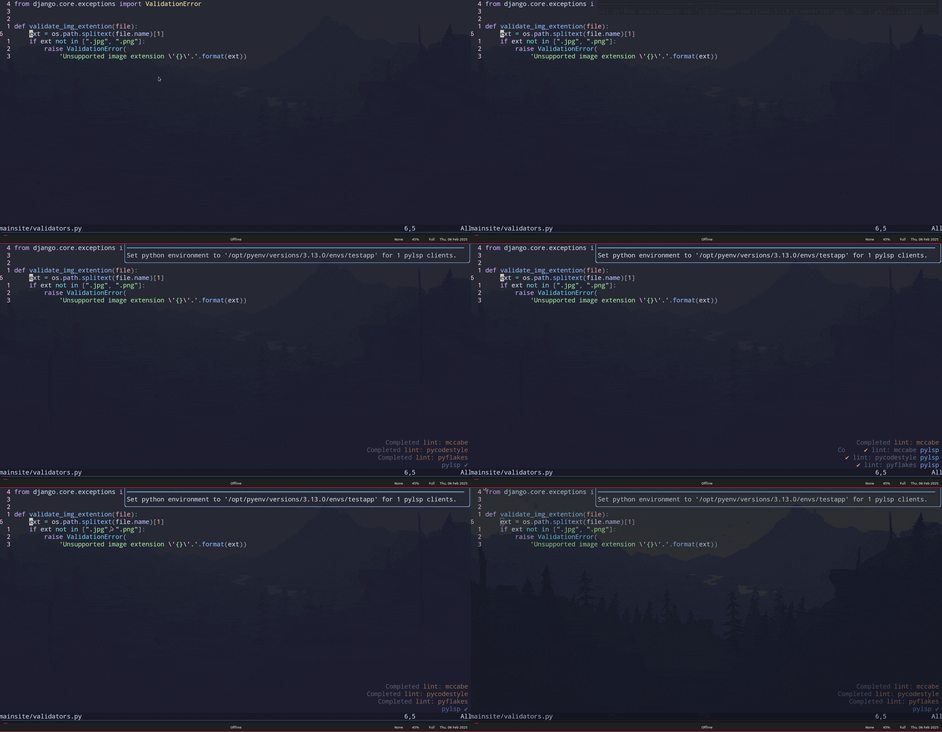
Preview


What

So I really needed my pylsp to use a different pyenv install, and just want to share my basic solution in hopes it'll help someone else.

The basic gist of it is that I use vim.system() to get the version paths through pyenv:

pyenv root
pyenv versions --bare --skip-aliases

and create a telescope picker for selection.

Then I use vim.lsp.client.notify() with the workspace/didChangeConfiguration lsp method to change pylsp's settings (for which options can be found here).

Code

local pickers = require("telescope.pickers")
local finders = require("telescope.finders")
local conf = require("telescope.config").values
local actions = require("telescope.actions")
local action_state = require("telescope.actions.state")

local M = {}

M.get_pyenv_root = function()
    if not vim.fn.executable('pyenv') then
        vim.notify("pyenv executable not in path.", vim.log.levels.WARN)
        return nil
    end

    local root_cmd = vim.system({
        'pyenv',
        'root',
    }):wait()

    if root_cmd.code ~= 0 then
        vim.notify('"pyenv root" command returned non zero exit status.', vim.log.levels.WARN)
        return nil
    end

    local pyenv_root = string.gsub(root_cmd.stdout, '%s+', '')
    local pyenv_versions_path = vim.fs.joinpath(pyenv_root, '/versions')

    if not vim.fn.isdirectory(pyenv_versions_path) then
        vim.notify("Failed to find pyenv versions directory, '" .. pyenv_versions_path .. "'.", vim.log.levels.WARN)
        return nil
    end

    return pyenv_versions_path
end

M.get_pyenv_version_paths = function()
    if not vim.fn.executable('pyenv') then
        vim.notify("pyenv executable not in path.", vim.log.levels.WARN)
        return nil
    end

    local cmd = {
        'pyenv',
        'versions',
        '--bare',
        '--skip-aliases'
    }

    local versions_cmd = vim.system(cmd):wait()
    if versions_cmd.code ~= 0 then
        vim.notify('command "' .. vim.inspect(cmd) .. '" returned non zero exit status.', vim.log.levels.WARN)
        return nil
    end

    local versions = vim.fn.split(versions_cmd.stdout, '\n')
    return versions
end

M.get_pyenv_results = function()
    local pyenv_versions_root = M.get_pyenv_root()
    local results = {}

    if pyenv_versions_root == nil then
        return nil
    end

    local pyenv_versions = M.get_pyenv_version_paths()
    if pyenv_versions == nil then
        return nil
    end

    for _, version_path in ipairs(pyenv_versions) do
        table.insert(results, {
            version_path,
            vim.fs.joinpath(pyenv_versions_root, version_path),
        })
    end

    return results
end

M.set_pylsp_environment = function(python_env)
    local pylsp_clients = vim.lsp.get_clients({ name = "pylsp" })
    if pylsp_clients == nil or next(pylsp_clients) == nil then
        vim.notify("No Pylsp clients found.", vim.log.levels.WARN)
        return
    end

    local clients = 0
    for _, client in ipairs(pylsp_clients) do
        client.notify("workspace/didChangeConfiguration", {
            settings = {
                pylsp = {
                    plugins = {
                        jedi = {
                            environment = python_env
                        }
                    }
                }
            }
        })
        clients = clients + 1
    end
    vim.notify("Set python environment to '" .. python_env .. "' for " .. clients .. " pylsp clients.")
end

M.pyenvs = function(opts)
    opts = opts or {}
    local version_results = M.get_pyenv_results()
    if version_results == nil then
        return
    end

    pickers.new(opts, {
        prompt_title = "pyenvs",
        finder = finders.new_table({
            results = version_results,
            entry_maker = function(entry)
                return {
                    value = entry,
                    display = entry[1],
                    ordinal = entry[1],
                }
            end,
        }),
        attach_mappings = function(prompt_bufnr, _)
            actions.select_default:replace(function()
                actions.close(prompt_bufnr)
                local selection = action_state.get_selected_entry()
                M.set_pylsp_environment(selection.value[2])
            end)
            return true
        end,
        sorter = conf.generic_sorter(opts)
    }):find()
end

return M

And now you can easily open the picker with the M.pyenvs() function.

Also nice way to create the keymap for it is to wait for the LspAttach autocmd (which fires when an LSP is attached to a buffer) to fire and only create the keymap on the buffer that pylsp is attached to like so:

(don't forget to change the '<module_name>')

vim.api.nvim_create_autocmd("LspAttach", {
    callback = function(args)
        local client = vim.lsp.get_client_by_id(args.data.client_id)
        if client and client.name == "pylsp" then
            vim.keymap.set("n", "<leader>le", function()
                local pylsp_picker = require("<module_name>")
                pylsp_picker.pyenvs()
            end, {
                desc = "[e]nvironment (python)",
                buffer = args.buf
            })
        end
    end
})
40


I want to create a WYSIWYG editor for markdown, and I want it to be keyboard-driven with vim editing philosophy.

I want the editor to have rich formatting, rather than the equally spaced cells of characters in the terminal. This would enable rows having different text sizes, usage of non-monospaced fonts, editing RTL languages such as arabic or hebrew, and bypass other terminal limitations.

Embedding neovim would be nice in theory, enabling all compatible vim features. But it seems to come with great difficulties, since I am forgoing the entire rendering philosophy that neovim depends on (equally spaced cells of the terminal).

SO I am thinking it would be better to emulate the vim features I want, starting with basic keybindings and motions, and go from there. But I am worried that I might end up regret this choice? It seems that embedding neovim is too monumental of a task for what I want to do. Am I mistaken?

41


I like smooth scroll. I love Neovim. So I use Neovide. But I really wanted a nice way to manage instances per git repository / project, including server / remote socket management and allowing files to be opened into the correct instance. It detects running instances and opens into or switches to them accordingly.

This is also integrated into Finder and open via a swift wrapper. So one can, for example, use raycast to quick switch projects.

Check it out if that sounds interesting. There is also a longer video guide on the Usage wiki.

42


nvim-dap 0.9.0 released

See https://github.com/mfussenegger/nvim-dap/releases/tag/0.9.0 for the release notes.

@neovim #neovim

43


Released nluarepl 1.0.0

A Lua REPL for #neovim based on the debug adapter protocol.

See https://github.com/mfussenegger/nluarepl for more information and demos

@neovim

44
7
submitted 1 year ago* (last edited 1 year ago) by disrupted@lemmy.world to c/neovim@programming.dev


I need some advice how to handle project-specific plugin configuration for Neovim. My paid software gig involves work for several different client projects which are basically structured like this:

~/work-clientA
  - repoA1
  - repoA2
~/work-clientB
  - repoB1
  - repoB2
~/work-clientC
...

I manage the different environments using direnv.

What I struggle with is overriding/extending the config for Neovim plugins for each environment.

let's say for example clientA uses a self-hosted GitLab instance which requires me to override the lazy.nvim config for some Git-related plugins. How could I achieve this?

I looked into exrc. afaict this would require duplicating any client-specific configuration for each new repository. Instead what I would like is something like ~/work-clientA/init.lua which would then be sourced automatically for each project (repo) inside work-clientA.

45


Honestly... everybody should try out neovim for at least a week. I mean like... fully commit to it.

It's just amazing how fast and light on resource usage it is, compared to vscode.

For reference: I just opened qmk_firmware which has a shit load of clang code and files. Guess what, neovim doesn't even break a sweat, while vscode almost burns my CPU.

46


By default in Neovim, H/M/L jump to the highest, middle, and lowest line in the current visible window. If you have scrolloff set, it can be dificult to tell exactly which lines they correspond to. I made this plugin to visually guide you.

47


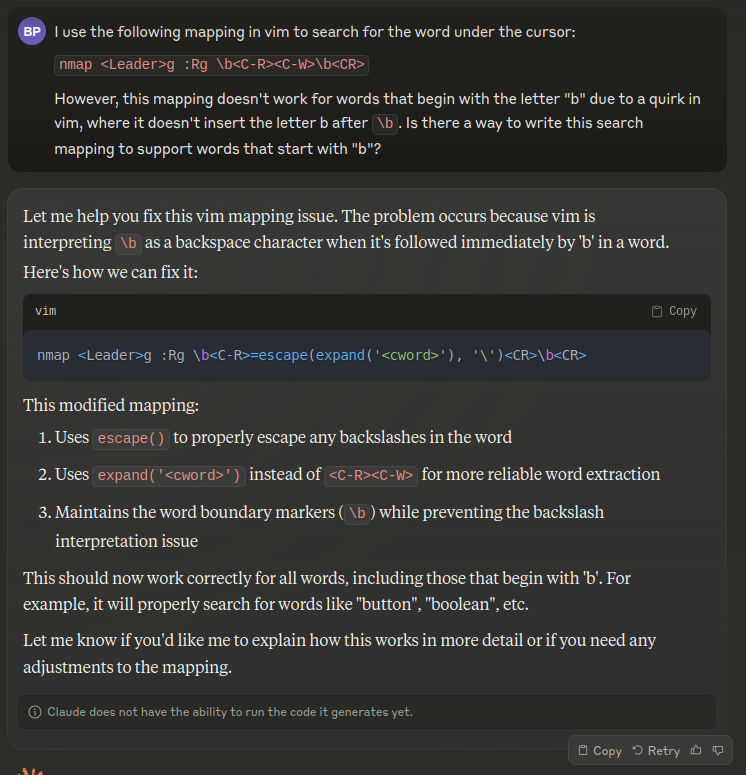
I'm generally skeptical of the hype around LLMs, but I've been manually working around this broken mapping for years. I don't think I could have found a solution easily just by googling.
48


🚀 Introducing Nevica: A modular, Vim-based IDE powered by Nix for maximum flexibility and reproducibility. 🔥

Nevica brings together the simplicity of Vim and the power of Nix, creating a fully customizable and reproducible development environment that works seamlessly across any OS that supports Nix—be it Linux, macOS, or even Windows.

Key Features:

•	Nix Integration: With Nix, your development environment is reproducible and consistent across different machines and operating systems.
•	Modular Design: Keep your setup lightweight by enabling only the languages and tools you need, with each language configured in its own module.
•	LSP Support: Full Language Server Protocol integration for autocompletion, real-time error checking, and code navigation.
•	Debugging & Diagnostics: Integrated tools for debugging and diagnosing issues across supported languages.
•	Customizable Flavours: Pre-configured profiles for various programming stacks, helping you set up quickly with the right tools for your workflow.
•	Code Formatting & Syntax Highlighting: Built-in support for consistent code formatting and syntax highlighting.

Why Choose Nevica?

Nevica is the ideal IDE for developers who need a lightweight yet powerful environment. Thanks to Nix, your setup is reproducible and works consistently on any operating system that supports Nix. Whether you’re on Linux, macOS, or Windows, you get the same reliable experience with Nevica.

💻 Try Nevica on GitHub: https://github.com/matteocavestri/nevica

I’d love to hear your feedback! Let’s improve Nevica together. 💬

49
50
6
submitted 1 year ago* (last edited 1 year ago) by IsoSpandy@lemm.ee to c/neovim@programming.dev


I was recently watching a tsoding stream when he was singing huge praises for the compilation mode in emacs, so I created a plug in to do essentially the same thing in neovim. Feel free to test it and share feedback.

error-jump

view more: ‹ prev next ›