Nix / NixOS

2558 readers
1 users here now

Main links

Videos

founded 2 years ago
MODERATORS
176


I want to install a package, I lookup for the package here https://search.nixos.org/packages? I can find multiple versions. two that sound right, two sound like rubbish and one is a plugin for something. How do I decide which of the two good sounding packages I should choose? What if the package or even both not work? How do I know that it is up to date? How do I know that it will be updated in a timely manner? Can I update it?

177


I've tried just about every type of setup I can find for a nix shell with python.

I don't want to purely use nixpkgs for a lack of some packages and broken packages. I'm trying to use pyside6, but not everything in pyside6 is provided by the package, e.g. tools like uic.

Attempting to use a venv as normal leads to a disconnect between the env and system with libstdc++.so.6 unable to be found. There are a various different flakes I've tried to use like the-nix-way/dev-templates#python and others from forum discussions which add stdenv.cc.cc.lib to no avail.

I think the farthest I've gotten is with poetry/poetry2nix, where auto-patchelf warns about missing libQt6 libraries. Running with nix run fails to 'find all the required dependencies' even when adding qt6.qtbase or qt6.full to the packages. This is that flake, taken from the poetry2nix github with an added devshell:

{
  description = "Python application packaged using poetry2nix";

  inputs = {
    nixpkgs.url = "github:NixOS/nixpkgs/nixos-unstable";
    poetry2nix.url = "github:nix-community/poetry2nix";
  };

  outputs = { self, nixpkgs, poetry2nix }:
    let
      system = "x86_64-linux";  # Adjust for your system
      pkgs = nixpkgs.legacyPackages.${system};
      inherit (poetry2nix.lib.mkPoetry2Nix { inherit pkgs; }) mkPoetryApplication;
    in {
      packages.${system}.default = mkPoetryApplication {
        projectDir = ./.;
      };

      apps.${system}.default = {
        type = "app";
        program = "${self.packages.${system}.default}/bin/app";
      };

      devShells.${system}.default = pkgs.mkShell {
        packages = [ pkgs.poetry ];
        buildInputs = [ pkgs.qt6.qtbase pkgs.qt6.full pkgs.qt6.wrapQtAppsHook ];
      };
    };
}

It seems kind of hopeless to get it working on NixOS. Does anyone have a working setup I could use for inspiration, or any other tips? I love the nix paradigm, but I'm honestly considering distrohopping with all of the trouble.

178
179


And others like him that have been ostracized. His mere presence seems to bring out quite negative emotions in people.

Anti Commercial-AI license

180


cross-posted from: https://awful.systems/post/1746256

Nix project: ban? What ban?

They invited that guy back. I do have to admit, I admire his inability to read a room.

181


I'm a beginner/intermediate in NixOS and my flake rebuild takes about 25 seconds to be finished. Most of the time is evaluating derivation for some reason and it's getting kinda frustrating having to wait when I want to add a package to my config. Has anyone the same problem or is it normal that it takes this long in Nix?

182


I've been trying to achieve a working mail setup on nixos by using simple-nixos-mailserver.

  mailserver = {
    enable = true;
    certificateScheme = "acme-nginx";
    enableManageSieve = true;
    fqdn = "email.teatastic.org";
    domains = ["teatastic.org"];
    mailboxes = {
      Drafts = {
        auto = "subscribe";
        specialUse = "Drafts";
      };
      Junk = {
        auto = "subscribe";
        specialUse = "Junk";
      };
      Sent = {
        auto = "subscribe";
        specialUse = "Sent";
      };
      Trash = {
        auto = "no";
        specialUse = "Trash";
      };
    };

    loginAccounts = {
      "user1@teatastic.org" = {
        hashedPasswordFile = config.sops.secrets.password.path;
        aliases = ["postmaster@teatastic.org"];
      };
    };

    fullTextSearch = {
      enable = false;
      enforced = "body";
      indexAttachments = true;
      memoryLimit = 512;
    };

    enableImap = true;
    enablePop3 = true;
    enableImapSsl = true;
    enablePop3Ssl = true;

    virusScanning = false;
  };
  services.roundcube = {
    enable = true;
    package = pkgs.roundcube.withPlugins (
      plugins: [
        plugins.carddav
        plugins.contextmenu
        plugins.custom_from
        plugins.persistent_login
        plugins.thunderbird_labels
      ]
    );
    plugins = [
      "attachment_reminder" # Roundcube internal plugin
      "carddav"
      "contextmenu"
      "custom_from"
      "managesieve" # Roundcube internal plugin
      "newmail_notifier" # Roundcube internal plugin
      "persistent_login"
      "thunderbird_labels"
      "zipdownload" # Roundcube internal plugin
    ];
    #dicts = with pkgs.aspellDicts; [en];
    hostName = config.mailserver.fqdn;
    maxAttachmentSize = 100;
    extraConfig = ''
      $config['smtp_server'] = "tls://${config.mailserver.fqdn}";
      $config['smtp_user'] = "%u";
      $config['smtp_pass'] = "%p";
    '';
  };

  security.acme = {
    acceptTerms = true;
    defaults.email = "user1@teatastic.org";
  };
    firewall = {
      enable = true;
      allowedTCPPorts = [
        25 587 143 993 110 995 # Email
        80 # Nginx
      ];
    };

I'm logging in through roundcube, which works as expected. However, when I get to the point of composing an email to somebody, it just starts a "Sending message..." loop without actually sending anything.

I've forwarded the aforementioned ports on my router, yet it fails.

183


https://github.com/NixNeovim/NixNeovim

I'm getting back into my setup after dualbooting and not touching it for a while. Flakes, home-manager, all that jazz. I was in the middle of messing around with my neovim config, bouncing between nixvim and nixneovim. Can't really remember why I was landing on nixneovim, but I think it had to do with having more 1-to-1 vim options through nix and more available plugins.

Part of this post is just to see what everyone's using, but I also can't copy to the system clipboard for the life of me! No ctrl-shift-v or anything. Oddly enough, ctrl-click-drag will copy a cut-off box of text. In nixneovim there's an option for clipboard, but that's just a string like 'unnamed' or 'unnamedplus', straight from the vim options. Nixvim has the option abstracted in a way that has the register and a provider for the functionality like wl-copy. I don't remember it not working with nixneovim before. That was months ago, though. Hoping someone would have an insight as I've been too deep in the weeds.

Edit: sooooo I just needed xclip in home.packages. I had tried installing it in a nix shell, but maybe that wasn't the right way to test. Doesn't seem to work with wl-clipboard, but I think neovim looks for xclip by default and nixneovim doesn't seem to have a way to give a different provider.

But still, how's everyone doing their neovim shenanigans?

184
1
submitted 2 years ago* (last edited 2 years ago) by LGUG2Z@lemmy.world to c/nix@programming.dev


I updated my NixOS on WSL starter template for NixOS 24.05 and created a fresh walkthrough video.

WSL is how I first got started with NixOS (and now I use it to manage more servers and machines than I can keep track of!) and I'm a big proponent of being able to quickly spin up a simple flake with a relatively flat structure where people can play around with settings to come up with something they feel comfortable applying to a bare metal machine at a later point in time.

185


I recently tried switching from Arch to NixOS and the experience I had can best be described as apalling. I have not had a new user experience this bad since my first dip into Ubuntu dependency hell back in 2016. I'd like to preface this by saying I've been a Linux user in one form or another for almost half my life at this point, and in that time this may well be the most I've struggled to get things to work.

Apparently they have this thing called home-manager which looks pretty cool. I'd like to give that a shot. Apparently I have to enable a new Nix channel before I can install it. I'm guessing that's the equivalent of a PPA? Well, alright. nix-channel --add ..., nix-channel --update (oh, so it waits until now to tell me I typo'd the URL. Alright), and now to run the installation command and... couldn't find home-manager? Huh?? I just installed it. I google the error message and apparently you have to reboot after adding a new nix-channel and doing nix-channel --update before it will actually take effect, and the home-manager guide didn't tell me that. Ah well, at least it works now.

I didn't want to wait for KDE and its 6 morbillion dependencies to download, so I opted for Weston. It wasn't a thing in configuration.nix (programs.weston.enable=true; threw an error and there was no page for it on the NixOS wiki), but it was available in nix-env (side note: why does nix-env -i take upwards of 30 seconds just to locate a package?), so I installed it, tried to run it, and promptly got an inscrutable "Permission denied" error with one Google result that had gone unresolved. Oh well, that's alright, I guess that's not supported just yet -- I'll install Sway instead. Great, now I have a GUI and all I need is a browser. nix-env -i firefox gave me the firefox-beta binary which displayed the crash reporter before even opening a browser window. Okay, note to self: always use configuration.nix. One programs.firefox.enable=true; and one nixos-rebuild switch later, I'm off to the races. Browser is up and running. Success! Now I'd like to install a Rust development environment so I can get back to work. According to NixOS wiki, I can copy paste this incantation into a shell.nix file and have rustup in there. Cool. After resolving a few minor hangups regarding compiler version, manually telling rustc where the linker is, and telling nix-shell that I also need cmake (which was thankfully pretty easy), I'm met with a "missing pkg-config file for openssl" error that I have absolutely no idea how to begin to resolve.

I'm trying to stick with it, I really am -- I love the idea that I can just copy my entire configuration to a brand new install by copying one file and the contents of my home directory and have it be effectively the same machine -- but I'm really struggling here. Surely people wouldn't rave about NixOS as much as they do if it was really this bad? What am I doing wrong?

Also unrelated but am I correct in assuming that I cannot install KDE without also installing the X server?

186


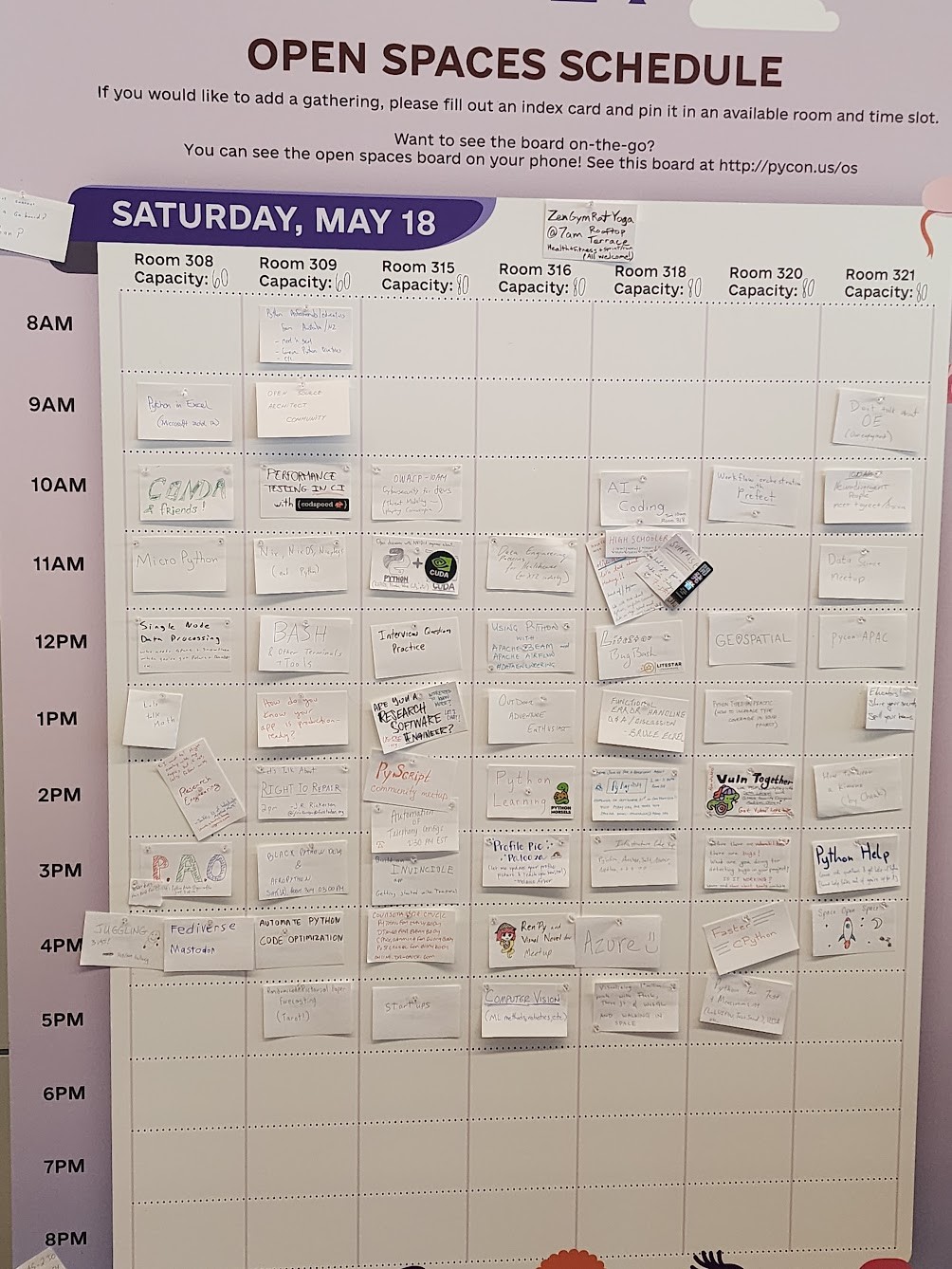
Open spaces for 11am (as of 10:30am) for #PyConUS

Room 308: @micropython
Room 309: @nix
Room 315: #Python and #Cuda
Room 316: Data Engineering Patterns for Healthcare
Room 318: High Schoolers
Room 320: Learning @rust
Room 321: Data Science Meetup

#PyCon #PyConUS2024 #PyConUSOpenSpaces

187


Power on my dell laptop is getting wonky so I'm pulling the thinkpad x201 out of retirement. Hadn't booted it since 2019! For some reason the wifi wasn't working so connected it to wired ethernet.

Updated the channel to 23.11 and did nixos-rebuild switch. Had to fix a few things where packages no longer exist or options have changed. Rebooted and wifi is working now!

What other OS could you upgrade like that?

188


cross-posted from: https://programming.dev/post/14020506

The product of a chat with @QuazarOmega@lemy.lol

189


You can change the color theme of your whole desktop with a single line of code.

Currently supported adapters:

  • Adwaita (GTK3, GTK4)
  • Alacritty
  • dunst
  • Firefox (hijacking the default theme with userchrome.css)
  • GTK2
  • Kvantum
  • Rofi
  • swaylock
  • Wezterm

repo: https://gitlab.com/vfosnar/nix-colors-adapters / https://github.com/vfosnar/nix-colors-adapters

190


I'm very, very new to nix and nixOS both - I come from imperative workflows and very very rarely anything determinative, so this is all brand new to me.

As an example of the kind of thing I don't understand how to do, let's take an example repo I've been bouncing off: https://github.com/GideonWolfe/Chameleon

On a "normal" system, I can get pip and python ready, and then make install and I'm off to the races.

With NixOS, I've got as far as adding python3 and gnumake to my configuration.nix packages. (I have also discovered that putting python in my system packages was the wrong move, so some advice on how better to go about this would be cool too.)

I can't for the life of me wrap my head around what I'm supposed to do, and so many people online are using flakes but I'm on stable 23.11 (and quite daunted by flakes) so I'd prefer if this was from that POV.

Can anyone speak to any of these points? I've tried reading the docs but it's very confusing for some reason.

191
0
submitted 2 years ago* (last edited 2 years ago) by starman@programming.dev to c/nix@programming.dev
 
 
192
0
submitted 2 years ago* (last edited 2 years ago) by recursive_recursion@programming.dev to c/nix@programming.dev


I just saw the news of the soft fork announcement over on the IceShrimp instance and thought I should share here


Background Context for Anyone Out of the Loop

(newest to oldest news - top to bottom):


As mentioned (by u/steventrouble in the previous post here):

193


So Ive been using nixos with gnome for almost a year now and things have been pretty smooth, it's just amazing, I never looked back since I started using it. So to make things more interesting and learn stuff I am trying to install hyprland, Ive no idea what window manager, compositor etc are, I have few questions Will installing hyprland delete gnome? Is hyprland not a desktop environment but something else? If yes, then how does it differ from one and what are its pros/cons? Would you suggest a clean installation to reduce bloating, or install on an existing system?

194


I'm trying to switch my home server over to nix and currently I'm struggling a bit with k3s. In a "regular" distro I would just create a registries.yaml in /etc/rancher and the rest happens on its own - that's not really how nix is supposed to work, though.

So how would I do that? There seems to be no way to create a registry using the command line (so the ConfigFlags option won't work), so pointing to the config file directly seems to be the way to go.

But how do I do that in a "nixy" way? Can I somehow say "this string here is actually a config file that's supposed to be in that dir"?

195
196
197


It took me some time to work out how to get my ssh agent set up in Niri so I though I would share what I did. I'm using NixOS and Home Manager. I put this in my Home Manager config:

services.gnome-keyring = {
  enable = true;
  components = [ "pkcs11" "secrets" "ssh" ];
};
home.sessionVariables.SSH_AUTH_SOCK = "$XDG_RUNTIME_DIR/keyring/ssh";

I'm using GDM according to NixOS' default configuration which I think runs gnome-keyring (I thought I saw it in the process list before I set up the user unit), and I think that configuration is automatically unlocking gnome-keyring when I log in via PAM integration. But apparently I need to run gnome-keyring again in my window manager session. Home Manager's services.gnome-keyring adds a systemd user unit that does that.

198


I have always been exposed to windows active directory with server controlled logins, server based "home" directories, etc. With the nature of NixOS it seems like it might be easy to deploy something similar by just setting up the configuration.nix as some sort of symlink to one stored on a central server. The only issue would possibly be how to not create home directories on the local machine and instead store them on server. You might be able to make a central passwd file that gets read, but i am not sure just how secure that would be. Thoughts?

199
0
submitted 2 years ago* (last edited 2 years ago) by demesisx@infosec.pub to c/nix@programming.dev


How easy would it be to flakify the Lemmy repo to add a fourth build option for those of us in the Nix world?

I had the (perhaps foolishly ambitious) idea of creating a rolling fork of Lemmy with the intent of modifying the codebase for use in an open source pub sub implementation of retail inventory. But I have to get standard Lemmy working first...and I like to use Nix for everything I do in the dev world (where feasible).

So, I forked the repo and was immediately brought into dev environment hell.

They only offer a choice between:

A.) Docker B.) Ansible C.) Building from scratch.

Two hours of fighting with the scratch build instructions and I eventually had to admit defeat due to some vague dependencies (and general malaise). Though I have completely flakified my Purescript and Haskell dev environments, I have found Rust to be a lot more challenging even on simple projects.

Anyway, I decided to come here to ask: **How easy would it be to flakify the Lemmy repo to add a fourth build option for those of us in the Nix world? **

Can I reference the build instructions from nixpkgs to get close to my intended goal? I need all of the help I can get. Be as pedantic or defeatist as you will. I currently have no skin in this game and merely want to help the Lemmy devs welcome people that are more nixy like myself (if nothing else).


edit: here's a naive attempt. I haven't tested anything other than it being a valid flake. Here's the link to my rolling flakification fork.

{
  inputs = {
    nixpkgs.url = "github:nixos/nixpkgs/nixos-unstable";
    flake-parts.url = "github:hercules-ci/flake-parts";
    systems.url = "github:nix-systems/default";

    # Dev tools
    treefmt-nix.url = "github:numtide/treefmt-nix";
  };

  outputs = inputs:
    inputs.flake-parts.lib.mkFlake { inherit inputs; } {
      systems = import inputs.systems;
      imports = [
        inputs.treefmt-nix.flakeModule
      ];
      perSystem = { config, self', pkgs, lib, system, ... }:
        let
          cargoToml = builtins.fromTOML (builtins.readFile ./Cargo.toml);
          nonRustDeps = [
            pkgs.libiconv
            # Derived from Documentation on Dev installation for Linux
            pkgs.cacert
            pkgs.postgresql
            pkgs.openssl
            pkgs.pkg-config
            pkgs.libpqxx
          ];
          rust-toolchain = pkgs.symlinkJoin {
            name = "rust-toolchain";
            paths = [ pkgs.rustc pkgs.cargo pkgs.cargo-watch pkgs.rust-analyzer pkgs.rustPlatform.rustcSrc pkgs.cacert pkgs.postgresql pkgs.openssl pkgs.pkg-config pkgs.libpqxx ];
          };
        in
        {
          # Rust package
          packages.default = pkgs.rustPlatform.buildRustPackage {
            inherit (cargoToml.package) name version;
            src = ./.;
            cargoLock.lockFile = ./Cargo.lock;
          };

          # Rust dev environment
          devShells.default = pkgs.mkShell {
            inputsFrom = [
              config.treefmt.build.devShell
            ];
            shellHook = ''
              # For rust-analyzer 'hover' tooltips to work.
              export RUST_SRC_PATH=${pkgs.rustPlatform.rustLibSrc}
              export CARGO_PROFILE_DEV_BUILD_OVERRIDE_DEBUG=true

              echo
              echo "๐ŸŽ๐ŸŽ Run 'just <recipe>' to get started"
              just
            '';
            buildInputs = nonRustDeps;
            nativeBuildInputs = with pkgs; [
              just
              rust-toolchain
            ];
            RUST_BACKTRACE = 1;
          };

          # Add your auto-formatters here.
          # cf. https://numtide.github.io/treefmt/
          treefmt.config = {
            projectRootFile = "flake.nix";
            programs = {
              nixpkgs-fmt.enable = true;
              rustfmt.enable = true;
            };
          };
        };
    };
}

and here's the lemmy-ui flake (which, judging by past forays into tsc with nix last summer, should be a lot easier to create and work with than the Rust library):

{
  inputs = {
    nixpkgs.url = "github:NixOS/nixpkgs/nixpkgs-unstable";
    systems.url = "github:nix-systems/default";
  };

  outputs = {
    systems,
    nixpkgs,
    ...
  } @ inputs: let
    eachSystem = f:
      nixpkgs.lib.genAttrs (import systems) (
        system:
          f nixpkgs.legacyPackages.${system}
      );
  in {
    devShells = eachSystem (pkgs: {
      default = pkgs.mkShell {
        buildInputs = [
          pkgs.nodejs
          # You can set the major version of Node.js to a specific one instead
          # of the default version
          # pkgs.nodejs-19_x

          # You can choose pnpm, yarn, or none (npm).
          pkgs.nodePackages.pnpm
          # pkgs.yarn

          pkgs.nodePackages.typescript
          pkgs.nodePackages.typescript-language-server
        ];
      };
    });
  };
}
200
1
submitted 2 years ago* (last edited 2 years ago) by shortwavesurfer@monero.town to c/nix@programming.dev


So i followed the instructions to install virtualbox and added myself to the vboxusers group, but i cant run VMs as a standard user. The GUI message says "VirtualBox kernel driver is not accessible, permission problem" the VM log says "ERROR [COM]: aRC=E ACCESSDENIED (0x80070005) aText={The console is not powered up}"

Someone on mastodon mentioned /dev/vboxdrv and that file is "crw-rw---- root vboxusers". There is also a file /dev/vboxdrvu which is "crw-rw-rw- root root" but changing that to root vboxusers with chown didnt work.

I can run VMs as root just fine. Any thoughts?

Edit: new to NixOS and really enjoying it so far

Edit 2: SOLVED: I had "virtualbox" as a package under "envoronment.systemPackages = with pkgs; [" and wasnt supposed too.

view more: โ€น prev next โ€บ