Debian operating system

3161 readers
1 users here now

Debian is a free operating system (OS) for your computer. An operating system is the set of basic programs and utilities that make your computer run. Debian provides more than a pure OS: it comes with over 59000 packages, precompiled software bundled up in a nice format for easy installation on your machine.

founded 6 years ago
MODERATORS
76


I have been struggling with this for over a month and still keep running into a brick wall. I am building a new firewall which has six network interfaces, and want to rename them to a known order (wan[0-1], and eth[0-3]). Since Bullseye has stopped honoring udev rules, I have created link files under /etc/systemd/network/ for each interface based on their MAC address. The two WAN interfaces seem to be working reliably but they're not actually plugged into anything yet (this may be an important but untested distinction).

What I've found is that I might get the interfaces renamed correctly when logging in from the keyboard, and this continues to work for multiple reboots. However if I SSH into the machine (which of course is my standard method of working on my servers) it seems to destroy systemd's ability to rename the interface on the next boot. I have played around with the order of the link file numbers to ensure the renumbering doesn't have the devices trying to step on each other, but to no avail. Fixing this problem seems to come down to three different solutions...

  • I can simply touch the eth*.link files and I'm back up afte a reboot.
  • Sometimes I have to get more drastic, actually opening and saving each of the files (without making any changes). WHY these two methods give me different results, I cannot say.
  • When nothing else works, I simply rename one or more of the eth*.link files, giving them a different numerical order. So far it doesn't seem to matter which of the files I rename, but systemd sees that something has changed and re-reads them.

Another piece of information I ran across is that systemd does the interface renaming very early in the boot process, even before the filesystems are mounted, and that you need to run update-initramfs -u to create a new initrd.img file for grub. OK, sounds reasonable... however I would expect the boot behavior to be identical every time I reboot the machine, and not randomly stop working after I sign in remotely. I've also found that generating a new initrd.img does no good unless I also touch or change the link files first, so perhaps this is a false lead.

This behavior just completely baffles me. Renaming interfaces based on MAC addresses should be an extremely simple task, and yet systemd is completely failing unless I change the link files every time I remote connect? Surely someone must have found a reliable way to change multiple interface names in the years since Bullseye was released?

Sorry, I know this is a rant against systemd and this whole "predictable" naming scheme, but all of this stuff worked just fine for the last 24 years that I've been running linux servers, it's not something that should require any effort at all to set up. What do I need to change so that systemd does what it is configured to do, and why is something as simple as a remote connection enough to completely break it when I do get it to work? Please help save my sanity!

(I realize essential details are missing, but this post is already way too long -- ask what you need and I shall provide!)

tl;dr -- Systemd fails to rename network interfaces on the next cycle if I SSH in and type 'reboot'

77
0
submitted 2 years ago* (last edited 2 years ago) by TCB13@lemmy.world to c/debian@lemmy.ml


Debian 12.1 (6.1.0-11-amd64) running LXD/LXC and on an unprivileged container setting security.idmap.isolated=true seems to fail to update the owner/group of the container's files.

Here is an example:

# lxc launch images:debian/12 debian
(...)

# lxc config get debian volatile.idmap.base
296608

# lxc stop debian
Error: The instance is already stopped

# lxc config set debian security.idmap.isolated true

# lxc config get debian security.idmap.isolated
true

# lxc start debian

Now if I list the files on the container volume I'll get they're all owned by the host root user:

# ls -la /mnt/NVME1/lxd/containers/debian/rootfs/
total 24
drwxr-xr-x 1 root   root  154 Sep  5 06:28 .
d--x------ 1 296608 root   78 Sep  5 15:59 ..
lrwxrwxrwx 1 root   root    7 Sep  5 06:25 bin -> usr/bin
drwxr-xr-x 1 root   root    0 Jul 14 17:00 boot
drwxr-xr-x 1 root   root    0 Sep  5 06:28 dev
drwxr-xr-x 1 root   root 1570 Sep  5 06:28 etc

I tried multiple versions of LXD/LXC. This happens with both 5.0.2 from apt as well with 4.0 and 5.17 (latest) from snap.

Interestingly enough I have another Debian 10 (4.19.0-25-amd64) running and older LXD 4 from snap and on that one things work as expected:

# ls -la /mnt/NVME1/lxd/containers/debian/rootfs/
total 0
drwxr-xr-x 1 1065536 1065536  138 Oct 29  2020 .
d--x------ 1 1065536 root      78 Oct 14  2020 ..
drwxr-xr-x 1 1065536 1065536 1328 Jul 24 19:07 bin
drwxr-xr-x 1 1065536 1065536    0 Sep 19  2020 boot
drwxr-xr-x 1 1065536 1065536    0 Oct 14  2020 dev
drwxr-xr-x 1 1065536 1065536 1716 Jul 24 19:08 etc

As you can see on this systems all the files are owned by 1065536:1065536.


Update:

I tried to probe around the maps with lxc config show debian in both machines and I saw this:

Machine running Debian 10:

security.idmap.isolated: "true"
(...)
volatile.idmap.base: "1065536"
volatile.idmap.current: '[{"Isuid":true,"Isgid":false,"Hostid":1065536,"Nsid":0,"Maprange":65536},{"Isuid":false,"Isgid":true,"Hostid":1065536,"Nsid":0,"Maprange":65536}]'
volatile.idmap.next: '[{"Isuid":true,"Isgid":false,"Hostid":1065536,"Nsid":0,"Maprange":65536},{"Isuid":false,"Isgid":true,"Hostid":1065536,"Nsid":0,"Maprange":65536}]'
volatile.last_state.idmap: '[{"Isuid":true,"Isgid":false,"Hostid":1065536,"Nsid":0,"Maprange":65536},{"Isuid":false,"Isgid":true,"Hostid":1065536,"Nsid":0,"Maprange":65536}]'

Machine running Debian 12:

security.idmap.isolated: "true"
(...)
volatile.idmap.base: "231072"
volatile.idmap.current: '[{"Isuid":true,"Isgid":false,"Hostid":231072,"Nsid":0,"Maprange":65536},{"Isuid":false,"Isgid":true,"Hostid":231072,"Nsid":0,"Maprange":65536}]'
volatile.idmap.next: '[{"Isuid":true,"Isgid":false,"Hostid":231072,"Nsid":0,"Maprange":65536},{"Isuid":false,"Isgid":true,"Hostid":231072,"Nsid":0,"Maprange":65536}]'
volatile.last_state.idmap: '[]'

Why didn't it populate volatile.last_state.idmap: '[]'?

How can I fix it? Thank you.

78


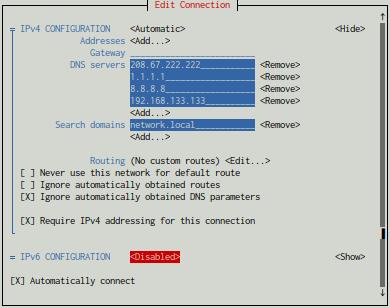
Hi everyone, so I'm having this weird issue. No matter the DNS and IP settings I use in NetworkManager, it will always generate the same resolv.conf.

resolv.conf

# Generated by NetworkManager
nameserver ::1

IPv6 is disabled by the way.

79
1
submitted 2 years ago* (last edited 2 years ago) by frippa@lemmy.ml to c/debian@lemmy.ml


Debian turns 30 today!

80
81


With contributions in that room and various 'Jitsi Meet' events from Kochi.

These annual 'DebConfs' and several 'MiniDebConfs' in a year, are a unique selling point of Debian and springs from the spirit, philosophy of GNU/Linux. Opening these events around the world to Debian users and getting them involved is the idea behind them.

Debian also lives from the discussion of controversial topics. For this, I think, Jitsi Meet lends itself.

82


😃

83
1
submitted 2 years ago* (last edited 2 years ago) by Shdwdrgn@mander.xyz to c/debian@lemmy.ml


I've been running systems up to Buster and have always had the 'quiet' option in the grub settings to show the regular service startup messages (the colored ones showing [ok] and such but not all the dmesg stuff). I just upgraded a server to bullseye and there are zero messages being displayed now except an immediate message about not being able to use IRQ 0. Worse, google can't seem to find any information on this. If I remove the quiet option from grub then I see those service messages again, along with all the other stuff I don't need.

What is broken and how do I fix this issue? I assumed it would be safe to upgrade by now but this seems like a pretty big problem if I ever need to troubleshoot a system.

[Edit] In case anyone else finds this post searching for the same issue… Apparently the trick is that now you MUST install plymouth, even on systems that do not have a desktop environment. For whatever reason plymouth has taken over the job of displaying the text startup messages now. Keep your same grub boot parameters (quiet by itself, without the splash option) and you will get the old format of startup messages showing once again. It’s been working fine the old way for 20+ years but hey let’s change something just for the sake of confusing everyone.

[Edit 2] Thanks to marvin below, I now have a final solution that no longer requires plymouth to be installed. Edit /etc/default/grub and add systemd.show_status=true to GRUB_CMDLINE_LINUX_DEFAULT. In my case to full line is:

GRUB_CMDLINE_LINUX_DEFAULT="quiet systemd.show_status=true"

Don't forget to run update-grub after you save your changes.

84
0
submitted 2 years ago* (last edited 2 years ago) by waspentalive@lemmy.one to c/debian@lemmy.ml


[Solved by going to X11]

I am working with my Debian 12 system and suddenly the whole screen goes blank and comes right back. I am not sure what triggers it, it seems to happen when I am exiting a program, I think when It comes back any program I had running is gone now. This is very intermittent and does not happen very often.

Here as a start have a neofetch:

OS: Debian GNU/Linux 12 (bookworm) x86_64

Host: VivoBook_ASUSLaptop S5402ZA_S5402ZA 1.0

Kernel: 6.1.0-11-amd64

Uptime: 12 hours, 2 mins

Packages: 2361 (dpkg)

Shell: bash 5.2.15

Resolution: 2880x1800

DE: Plasma 5.27.5

WM: kwin

WM Theme: plastik

Theme: [Plasma], Breeze [GTK2/3]

Icons: [Plasma], breeze-dark [GTK2/3]

Terminal: konsole

Terminal Font: Hack 19

CPU: 12th Gen Intel i7-12700H (20) @ 4.600GHz

GPU: Intel Alder Lake-P Memory: 3406MiB / 11577MiB

I did journalctl -b - there is a crazy amount of detail in there.

If there is anything specific I can do, please let me know - I am more than a noob, but a lot of the time I only know just enough to be dangerous.

Thanks!

85


Running Bookworm, Plasma DE if that's relevant.

Background: I'm learning here. Decent amount of coding and embedded hardware experience but I'm usually missing one or two key concepts with this stuff.

Getting a box running, and wrestling with NVIDIA drivers. I successfully installed the driver (I think), but now lightdm isn't working. From what I read it appears there's a common issue around a race condition where lightdm tries to fire up before the drivers ready, so I need to add the nvidia driver to initramfs.

Can anyone give me some pointers? Specifically while I get the above:

  1. I'm not sure what modules need to be added and if they're named something specific for debian vs other distros
  2. The correct file to modify
  3. The correct format/syntax that needs to be added

I've found lots of examples, just none specific to debian, and screwing around at this level I don't want to bork something enough I need to do a bare install.

Thanks for any help!

86
87
88


Hi, if you're trying to build lemmy from scratch, on debian (not ubuntu), and you're following this guide: https://join-lemmy.org/docs/en/administration/from_scratch.html

There are a few corrections I would like to point you.

Install those two things before following the guide:

apt install sudo

Of course, 'sudo' is not installed by default on Debian, so I guess it would be a good idea to install it.

sudo apt install build-essential

This will install the 'cc' compiler needed by Rust.

sudo apt install protobuf-c-compiler protobuf-compiler

This is needed to compile opentelemetry-proto.

89


Do i simply install on top of a Debian server OS? Which .iso do I download/install?

I think even XFCE is rather bloated and have Debian XFCE on 2 other drives already, so will test out Debian stable nonfree with xfwm standalone. I have the names of the top 5 packages to add and will worry about the rest later. I am in no hurry to get this perfect yet. But, I would like to install the fundamentals tomorrow.